
Disclosure: This page may contain affiliate links. Prices were checked on the date shown and may change.
An introduction to Crickets Audio Strata, based on information from the maker and distributors: what it does, how to use it and who it may suit. It is not scored.
Strata Standard by Crickets Audio transforms how you visualize your mix.
— Crickets Audio official site
What is Strata?
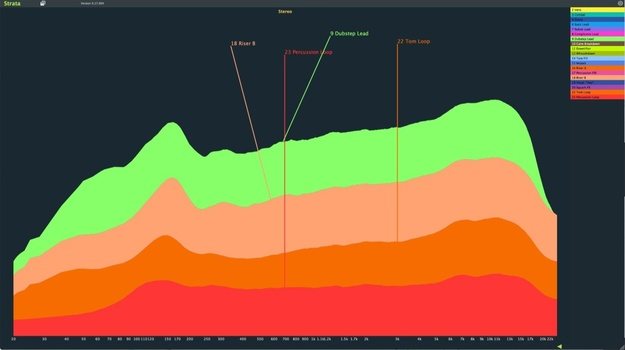
Strata is a spectral analysis plug-in for mixing from Crickets Audio. It layers the frequency content of multiple tracks like geological strata in a single window.
A typical spectrum analyzer shows only the master or a single channel. Strata overlays every monitored track at once, so you can see which instruments occupy the same frequency range.
It consists of two plug-ins. Strata Track goes at the end of the chain on each track you want to monitor and passes audio through unchanged. Strata Vision is the dashboard that collects data from all Track instances into one graph.
It also offers DAW track-color matching, high-contrast palettes and a Low CPU mode that reduces processing load.
Key features
All tracks in one view
Frequency content from each track is layered together, which may help find low-end buildup or instruments clashing in similar ranges.
Track and Vision pair
Place Track at the end of each channel and Vision wherever you like. no complex routing is needed, according to the product description.
DAW track-color matching
Plug-in colors can match your DAW's track colors, making it easier to tell which track is which layer.
High-contrast palettes
You can switch to palettes with clearer color differences for better legibility.
Low CPU mode
One click pauses processing across all instances, useful when you need CPU headroom while tracking.
Resizable interface
The window can be resized, so it can be shown large on a secondary monitor.
Specifications
| Item | Details |
|---|---|
| Type | Multi-track spectral analysis |
| Components | Strata Track / Strata Vision |
| Plug-in formats | VST3 / AU / AAX |
| OS | macOS, Windows |
What is included and system requirements
- Strata Track (placed on each monitored track)
- Strata Vision (display plug-in)
- Formats: VST3, AU, AAX (macOS / Windows)
How to use it
- Download the installer after purchase and install the plug-ins.
- Rescan plug-ins in your DAW.
- Insert Strata Track at the end of the chain on each track you want to monitor.
- Place Strata Vision on the master or another location.
- Play the project and confirm each track's layer appears.
- Switch palettes or match DAW track colors as needed.
- When you find a clashing range, adjust it with EQ or similar tools.
- Use Low CPU mode when load is a concern, such as during tracking.
Where it may come in handy
Finding low-end buildup
You may be able to view kick, bass and synth overlap to see where the mud is.
Making room for vocals
It could be used to check whether other instruments intrude into the vocal range.
Checking when ears are tired
In long mix sessions it may help back up what you hear with what you see.
Learning mixing
Seeing which instruments use which ranges may help in learning how to approach EQ.
Who it may suit
- People who want to find frequency clashes in a mix
- People with many tracks who struggle to locate mud
- People who want to compare spectra across multiple tracks
Good to know before you buy
- You need one Strata Track per monitored track.
- Strata Track is described as passing audio through unchanged.
Price
$75 (Plugin Boutique, checked 2026-10-27). Prices can vary by region and promotion, so check the official page before buying.
See Strata on the product page
More of the same kind
Other introduction articles of the same kind.
- Slate Digital Infinity Horizon
- Solid State Logic SSL Fusion HF Compressor
- United Plugins BassRift
- IK Multimedia Mic Room
- Klevgrand DAW LP
- Boz Digital Labs ProVocative
See the full list in Product database: Effects.
Sources: pluginboutique.com (checked 2026-10-27)










Comments