
Disclosure: This page may contain affiliate links. Prices were checked on the date shown and may change.
An introduction to Solid State Logic SSL Native Drumstrip, based on information from the maker and distributors: what it does, how to use it and who it may suit. It is not scored.
Plug in, switch on and experiment. Drumstrip handles the hard part; putting the right selection of fantastic sounding processing tools in your hands in an instant.
— Solid State Logic official site
What is SSL Native Drumstrip?
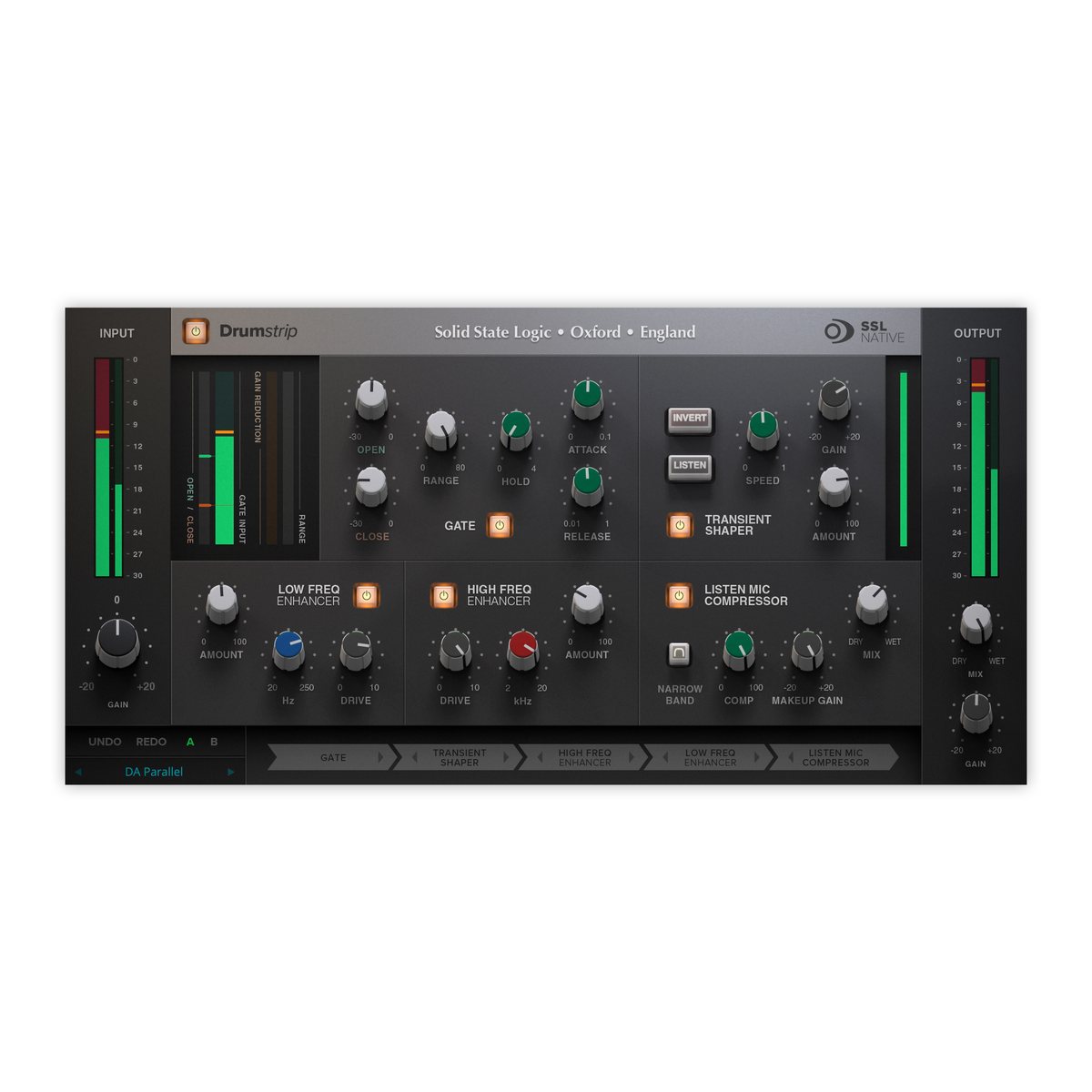
SSL Native Drumstrip is a channel-strip-style plug-in for drums and percussion from Solid State Logic (SSL). It gathers common drum-processing tools into one window so that a few control moves can shape a drum track.
It contains five processors: a transient shaper, a drum-oriented gate, a high-frequency enhancer, a low-frequency enhancer and SSL's Listen Mic Compressor. SSL says it can help add presence and clarity, reduce spill between tracks, adjust attack and sustain, and parallel-compress room mics.
The processing order can be rearranged. SSL explains that different types of drums call for different orders. Input and output level metering includes additional RMS meters.
It supports AU, VST2, VST3 and AAX Native on macOS, and VST2, VST3 and AAX Native on Windows, and is a universal binary with Apple M1 support. A free iLok account is needed for authorization.
Key features
Transient shaper
Attack and sustain amounts can be adjusted. Transient Invert flips the attack behavior, and Audition lets you isolate and monitor the shaper's effect. It may help when you want sharper onsets or shorter tails.
Drum gate
A range control plus separate open and close thresholds are available. It gives you a way to reduce bleed from other instruments on toms or snares.
High-frequency enhancer
A processor for adding brightness to the top end of drums, particularly cymbals and snares. It may help restore openness to recordings with a subdued top end.
Low-frequency enhancer
A processor for adjusting low-end weight and tightness. SSL lists uses such as tightening booming toms and helping kicks stand out.
Listen Mic Compressor
The compressor known from the SSL console's Listen Mic. Its band-limited compression can be switched to full-range compression with the added bypass function. It may suit parallel compression of room mics.
Reorderable processing chain
The five processors can be reordered, so you can try different orders for kicks, snares, toms or buses. Everything stays in one window instead of a row of plug-ins.
Specifications
| Item | Details |
|---|---|
| Type | Drum channel strip (transient shaper, gate, HF/LF enhancers, compressor) |
| Formats (Mac) | AU, VST2, VST3, AAX Native |
| Formats (Windows) | VST2, VST3, AAX Native |
| OS (Mac) | macOS 11 Big Sur to macOS 13 Ventura (64-bit, M1 supported) |
| OS (Windows) | Windows 10 to Windows 11 (64-bit) |
| Requirements | CPU of 2.4 GHz or higher, 4 GB RAM minimum (8 GB recommended) |
| Authorization | iLok account (free) |
What is included and system requirements
- Transient shaper (with Transient Invert and Audition)
- Drum gate (range, separate open and close thresholds)
- High-frequency enhancer
- Low-frequency enhancer
- SSL Listen Mic Compressor (with a bypass for full-range operation)
- Input and output meters with RMS
- Reorderable processing chain
- Universal binary with Apple M1 support
How to use it
- Prepare a free iLok account.
- After purchase, download and run the installer and assign the license to your iLok.
- Open your DAW and load Drumstrip as an insert on a kick, snare or other drum track.
- Decide the processing order for the source first, such as whether the gate or compressor comes first.
- Adjust the gate range and thresholds to quiet the spill that bothers you.
- Set attack and sustain with the transient shaper, using Audition to hear just its effect.
- Add the high and low enhancers and the compressor a little at a time.
Where it may come in handy
Quick home-recorded drum prep
For programmed drums or tracks you have already recorded, having the tools in one plug-in may cut the effort of setting up each track.
Parallel compression of room mics
You could switch the Listen Mic Compressor to full range and blend heavily compressed room mics under the original. SSL itself lists parallel compression of room mics.
Reducing tom spill
If other instruments leak into a tom track, the drum gate could quiet them while the low enhancer tidies the weight.
Who it may suit
- People who want to process drums in as few steps as possible
- Those who want to try an SSL-style compressor on drums
- Users who prefer transient shaping and gating in a single window
- Home recordists dealing with drum spill and attack shaping
Good to know before you buy
- A free iLok account is required for authorization.
- The OS versions listed on the official page are macOS 11 to 13 and Windows 10 to 11; check the official site for support of newer systems.
- It is designed for drums, so other uses are a matter of experimenting.
- SSL also offers a subscription covering its plug-ins.
How it differs from similar products
We do not pick a winner; the official figures are placed side by side.
Safari Audio Camel Strip V2
Drumstrip is built for drums, with a transient shaper, gate, high and low enhancers and a compressor. Camel Strip V2 is a general channel strip with preamp, 3-band EQ, compressor, gate and transient shaper.
Price
$99 (Solid State Logic official site, checked 2026-10-27). Prices can vary by region and promotion, so check the official page before buying.
See SSL Native Drumstrip on the product page
More of the same kind
We have introduced 51 channel strips. Here are some of the others.
- Harrison FasTrack
- Waves Renaissance Channel
- Waves SSL EV2 Channel
- McDSP 6050 Ultimate Channel Strip
- Waves CLA MixHub
- Waves SSL E-Channel
We have introduced 33 other products from Solid State Logic.
- Solid State Logic SSL Native Vocalstrip 2
- Solid State Logic SSL Native Channel Strip 2
- Solid State Logic SSL Guitarstrip
- Solid State Logic Solid State Logic SSL 4K B
- Solid State Logic SSL 4K G
See the full list in Product database: Effects.
Sources: solidstatelogic.com pluginboutique.com (checked 2026-10-27)










Comments