
Disclosure: This page may contain affiliate links. Prices were checked on the date shown and may change.
An introduction to Safari Audio Safari Audio The Herd V2, based on information from the maker and distributors: what it does, how to use it and who it may suit. It is not scored.
The Herd V2 is three compressors in one box – and you can run them together.
— Safari Audio official site
What is Safari Audio The Herd V2?
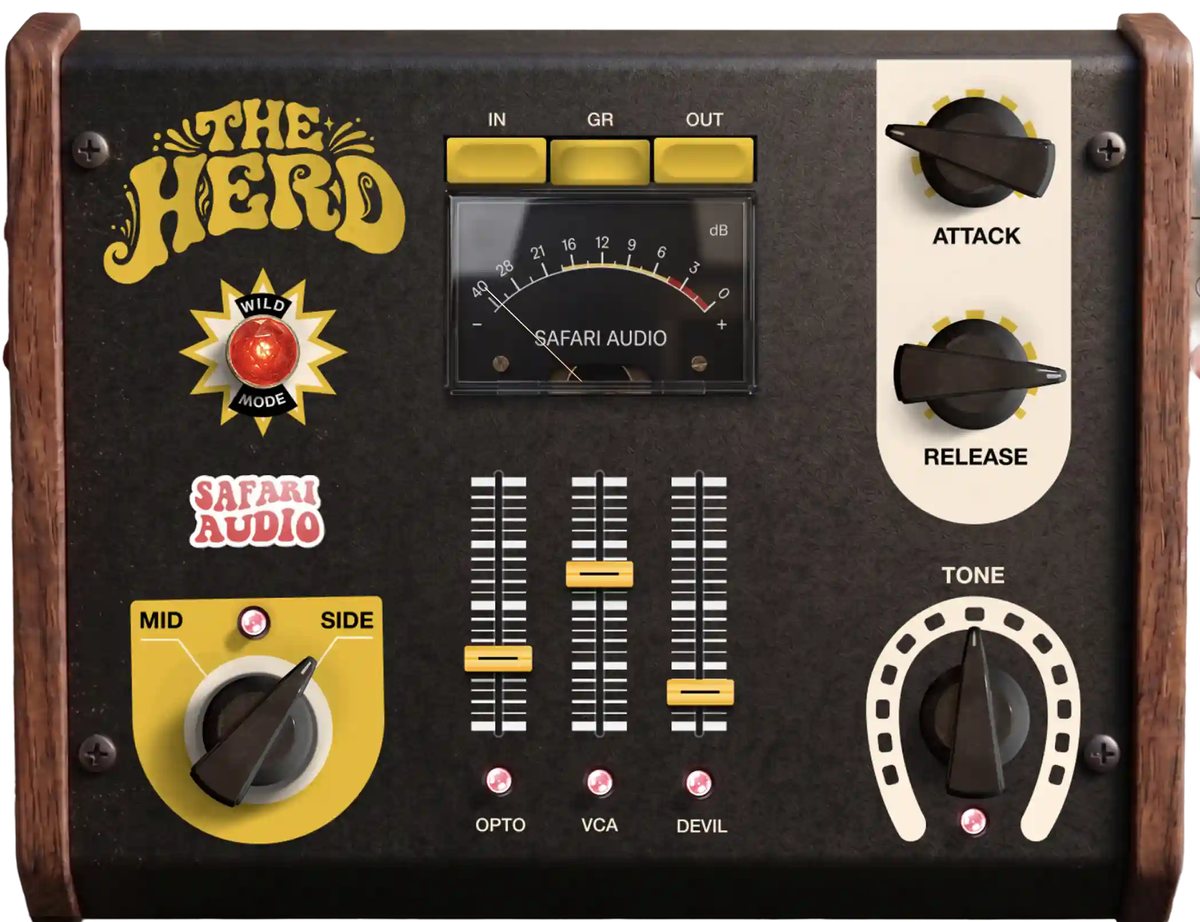
The Herd V2 is a compressor plug-in from Safari Audio (Safari Pedals). Its main feature is three compressors of different character, Opto, VCA and Devil, in one plug-in, which can be run together.
Each has its own on/off LED, so you can stack a smooth optical squeeze under a snappy VCA grab and then add the wilder Devil. Attack and Release are shared across the three, so they move together.
A Blend control is provided for parallel compression, where the compressed signal is mixed with the dry one, so you can get the energy of heavy compression while keeping the original transients. It also has input Tone, Mid/Side processing and gain-reduction metering.
V2 adds improved algorithms, an extended tone control, Smart Gain and Link Gain, A/B compare, a short-term LUFS readout, a new oversampling algorithm and a redesigned interface with a new preset system.
Key features
Three compressors that can run together
Opto, VCA and Devil can each be switched on or off, used singly or in combination, so you can stack compression characteristics that one unit cannot give.
Blend for parallel compression
Adjust how much of the compressed signal is mixed back with the dry one, so you can crush hard for impact while keeping transients.
Mid/Side processing
Compress the center and the sides by different amounts, which helps when shaping the stereo image of the mix.
Extended tone control
The tone control shapes the character going in has been extended, so you can adjust the direction before the signal reaches the compressors.
Smart Gain and Link Gain
These help with level matching, so that a volume difference before and after compression does not bias your judgment.
Metering, A/B and LUFS
It offers gain-reduction metering with IN/GR/OUT switching, A/B compare and a short-term LUFS readout, so you can see how hard it is working.
New preset system
The preset browser now supports folders, tags, favorites and search.
Specifications
| Item | Details |
|---|---|
| Type | Compressor (Opto / VCA / Devil) |
| Main functions | Parallel blend, Mid/Side, tone, Smart Gain, A/B, short-term LUFS, oversampling |
| Formats | macOS: VST3, AU, AAX / Windows 64-bit: VST3, AAX |
| Operating systems | Mac OS X 10.15 or later / Windows 8 or later |
| CPU | 2 GHz Intel dual-core or AMD equivalent |
| Memory | 8 GB minimum (16 GB recommended) |
| License | Perpetual license, works offline on up to 4 machines (per the maker) |
What is included and system requirements
- Three compressors: Opto, VCA and Devil
- Formats: macOS (VST3, AU, AAX), Windows (VST3, AAX)
- Operating systems: Mac OS X 10.15 or later / Windows 8 or later
- V2 updates are free (per the maker), and upgrade credit is offered to V1 owners
How to use it
- Download it from your Safari Audio account.
- Run the installer (on Windows you place the formats you want into their folders yourself).
- Restart your DAW and check that it appears in the plug-in list.
- Open the plug-in and enter the serial number to authorize.
- Turn on whichever of Opto, VCA and Devil you want to use.
- Set Attack, Release and Tone.
- Use Blend to decide how much dry signal to mix back, and watch the gain reduction on the meter.
- Match the level with Smart Gain and use A/B to compare before and after.
Where it may come in handy
Adding energy to drums
Mixing a heavily squashed signal under the dry one may add energy to drums while keeping the attack.
Steadying vocals
A light touch of the optical compressor with Blend adjusted may help settle the level of a vocal.
Presence for bass
Stacking the VCA and Devil may add thickness or grit to a bass.
Mix bus
Mid/Side processing may help bring a sense of cohesion to the whole mix.
Who it may suit
- People who want to use parallel compression easily
- People who want to layer the characters of several compressors
- People who want to add energy to drums, vocals or bass
- People who like to watch the meters while compressing
Good to know before you buy
- The maker states that Safari Pedals are software plug-ins and not hardware pedals.
- Serial authorization is required, and it can be used on up to four machines.
- The maker’s site may show a separate sale price; the price given here is the regular price.
Price
$79 (Plugin Boutique, checked 2026-10-27). Prices can vary by region and promotion, so check the official page before buying.
See Safari Audio The Herd V2 on the product page
More of the same kind
We have introduced 85 compressors. Here are some of the others.
- Slate Digital SD-3A
- McDSP SPC2000
- Pulsar Audio Pulsar 1178
- McDSP SPC2000 Serial/Parallel Compressor Native v7
- Waves Linear Phase Multiband Compressor
- Universal Audio Empirical Labs EL8 Distressor Compressor
We have introduced 9 other products from Safari Audio.
- Safari Audio Camel Strip V2
- Safari Audio Time Machine V2
- Safari Audio Flamingo Verb V2
- Safari Audio Gorilla Drive V2
- Safari Audio Cobra Fuzz V2
For a side-by-side comparison scored on the same criteria, see our comparison of compressors.
See the full list in Product database: Effects.
Sources: safariaudio.com pluginboutique.com (checked 2026-10-27)










Comments