
Disclosure: This page may contain affiliate links. Prices were checked on the date shown and may change.
An introduction to Rob Papen UniMagic, based on information from the maker and distributors: what it does, how to use it and who it may suit. It is not scored.
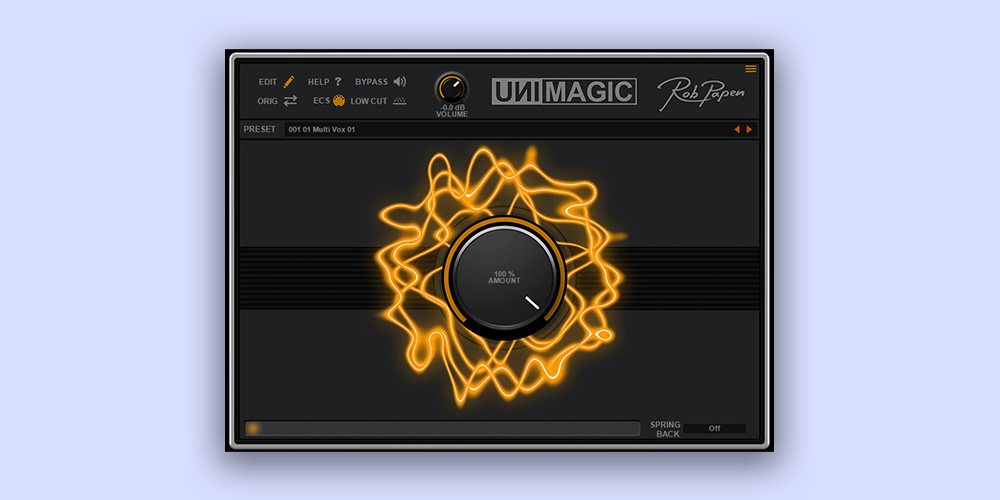
UniMagic’s controls are minimal, to say the least. However, the sound produced is very high quality and extremely useful to thicken up your vocals or instruments.
— Rob Papen official site
What is UniMagic?
UniMagic is an effect plugin from the Dutch developer Rob Papen. It is meant to be inserted on vocal or instrument tracks to add thickness and width, and its defining trait is a deliberately small set of controls. The official page explains that sound shaping is left mainly to the presets.
What kind of effect it is has intentionally not been spelled out in detail. On the Plugin Boutique page, the Rob Papen team suggests not worrying about what is inside and simply trying it on a vocal or instrument track. The idea is that a plugin does not need many features for its presets to give usable effect sounds.
The Amount control sets how much of the effect is applied, and a ribbon-style slider (Ribbon) adjusts a predefined range of parameters inside each preset type. The ribbon also has a spring-back feature that returns it to its home position in time with the tempo, with selectable time divisions.
There are 50 presets. The interface animates in response to the audio and the effect, and the GUI can be set to 100%, 125%, 150% or 200%. MIDI control is available, so the ribbon movement can be assigned to a controller. The official page lists the price as $25.
Key features
50 presets define the sound
With few controls on the plugin itself, the sound direction comes from switching presets. Loading it on a vocal or instrument and auditioning them in turn may suit the way it is built, and it can be approachable if detailed parameter tweaking is not your thing.
Amount sets how much effect is applied
The Amount knob sets how much of the effect is added. It makes it easy to pull back when it is too much, and may help when you want to judge the blend with the original sound by ear.
Ribbon slider for fine adjustment
The ribbon moves a predefined range of parameters within the chosen preset type in one gesture. Because several values are tied to a single movement, it may be handy when you want to change the sound in a live-feeling way.
Spring-back in time with the tempo
After you move the ribbon, the time it takes to return home can be set by a musical time division. Because the sound returns in step with the tempo, it can be tried at phrase endings where you want the effect to move.
Animated response to audio and FX
The display animates with the input audio and the effect, so you can also check by eye how strongly the plugin is working.
MIDI control
MIDI control is available, so a hardware controller can move the ribbon and similar controls. It may suit people who want to change the sound while playing.
Four GUI sizes
Sizes of 100%, 125%, 150% and 200% are provided, so you can pick a size that is readable on high-resolution or smaller screens.
Specifications
| Item | Details |
|---|---|
| Type | Effect (thickening FX for vocals and instruments) |
| Presets | 50 |
| GUI sizes | 100% / 125% / 150% / 200% |
| MIDI | MIDI control supported |
| Windows | 64-bit VST3, AAX and VST (Windows 7 or later; AAX needs Pro Tools 12 or later) |
| Mac | 64-bit AU, VST3, AAX and VST (macOS 10.13 or later; M1/M2/M3 ARM compatible) |
| License | Serial-number activation (online or offline); installable on 2 computers |
| Price | $25 (official page) |
What is included and system requirements
- Plugin (Windows: VST3, AAX, VST / Mac: AU, VST3, AAX, VST)
- 50 presets
- Serial-number license (installable on 2 computers)
How to use it
- Create an account on the Rob Papen site and log in.
- In the account area, open My Products, choose Register New, and enter the purchased product and its serial number.
- On the download page, choose the installer format that matches your DAW.
- Run the installer and follow the on-screen steps.
- Open your DAW, scan for the plugin, and insert UniMagic on a vocal or instrument track.
- Step through the presets and pick one that matches the direction you want.
- Set the amount with the Amount control and fine-tune with the Ribbon slider.
- If needed, set the time division for the ribbon spring-back.
Where it may come in handy
Adding thickness to a vocal
Loading it on a vocal and auditioning presets may reveal a direction that gives the voice more body or width. Keeping the Amount low and blending it in is another option.
Adding movement to synths or guitars
On a part that feels static, moving the ribbon slowly may add motion to the tone.
Moving the effect through an arrangement
The tempo-synced spring-back may be useful at phrase endings where you want the sound to move.
Playing the effect live
Because the ribbon can be driven by MIDI, recording while operating a controller may be worth trying.
Who it may suit
- People who would rather pick a preset than tweak many settings
- Those who want another way to add thickness or movement to vocals and instruments
- Users who want to try a low-cost effect with few controls
- People who would like to move an effect from a MIDI controller
Good to know before you buy
- The license uses a serial number and can be installed on 2 computers.
- The official page does not describe in detail what kind of effect it is, so checking a demo or video before buying may be reassuring.
- On Windows, AAX requires Pro Tools 12 or later.
How it differs from similar products
We do not pick a winner; the official figures are placed side by side.
Rob Papen LowSane
UniMagic centers on 50 presets with an Amount control and a Ribbon slider. LowSane, another effect from the same maker, has distortion, band-pass/notch, lo-fi, high-pass/low-pass and noise-gate modules driven by the Disrupt Sphere. The number of controls differs.
Price
$25 (Rob Papen official site, checked 2026-10-27). Prices can vary by region and promotion, so check the official page before buying.
See UniMagic on the product page
More of the same kind
Other introduction articles of the same kind.
- Crickets Audio Strata
- United Plugins QuickBass
- LANDR LANDR FX Electric
- Boz Digital Labs Pan Knob
- Boz Digital Labs Mongoose 2
- BLEASS BLEASS Spectral Resonator
We have introduced 17 other products from Rob Papen.
- Rob Papen LowSane
- Rob Papen MasterMagic
- Rob Papen RG Rhythm Guitar
- Rob Papen RAW-Kick 2
- Rob Papen RP-VERB 2
See the full list in Product database: Effects.
Sources: robpapen.com pluginboutique.com (checked 2026-10-27)










Comments