
Disclosure: This page may contain affiliate links. Prices were checked on the date shown and may change.
An introduction to Slate Digital Custom Opto, based on information from the maker and distributors: what it does, how to use it and who it may suit. It is not scored.
We took a legendary Opto comp and cranked it to 11. Custom timing, ratio, and four bold tone modes let you shape, slam, and style your mix in seconds.
— Slate Digital official site
What is Custom Opto?
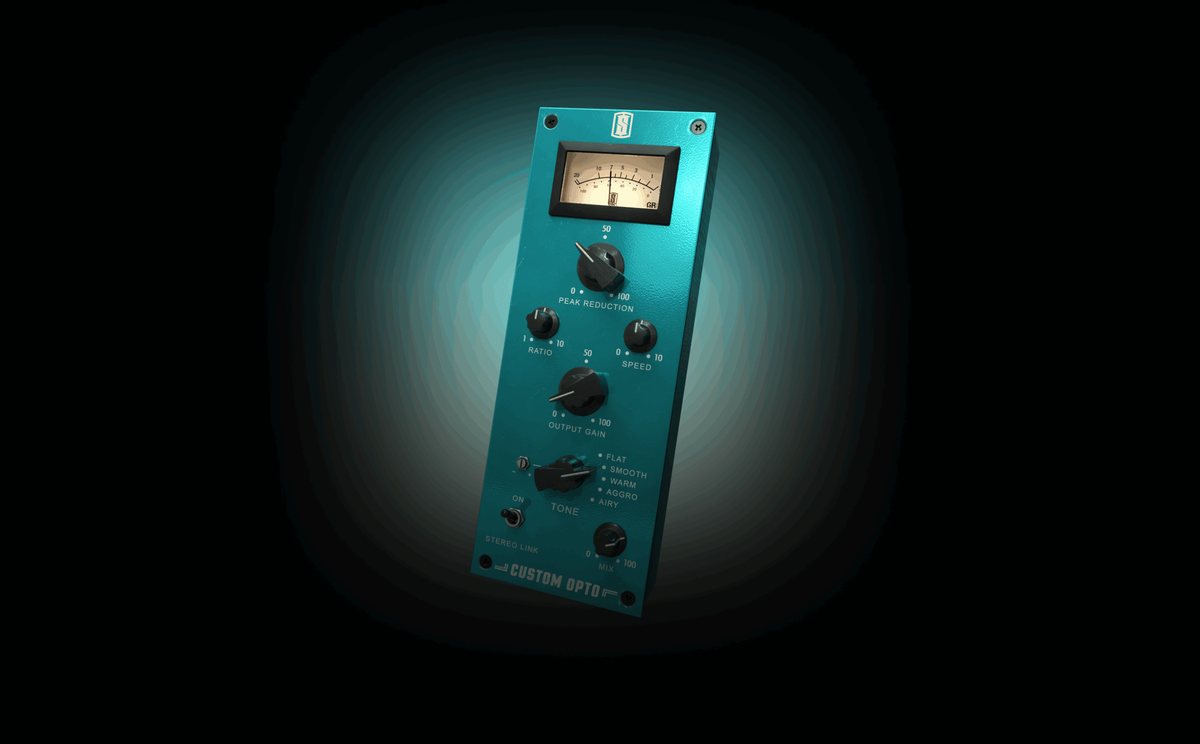
Custom Opto is an opto-style compressor plug-in from Slate Digital, based on a classic opto compressor but with adjustable timing and ratio.
The company says it keeps the smoothness of a classic opto while Speed and Ratio let you set how fast it reacts and how much it compresses.
The Tone knob has four modes: Airy, Smooth, Aggro and Warm, offering directions such as opening the top end, taming harsh frequencies, adding snap, or adding fatness.
It also works as a Virtual Mix Rack (VMR) module, chained with EQs and saturators. The company says it is versatile for vocals, drums, instruments and mix-bus duties.
Key features
Speed control
Sets how quickly the circuit responds, adding adjustment range the classic opto design does not have.
Ratio control
Sets the amount of compression, from light to heavier use.
Four tone modes
Airy opens the top end, Smooth tames harsh frequencies, Aggro adds snap and punch, and Warm adds vintage fatness, according to the official text. You could switch between them by source.
From vocals to mix bus
The official text says it suits vocals, drums, instruments and mix-bus use.
VMR integration
Works as a VMR module that can be chained with others.
Quick operation
A small number of controls is meant to help you shape a mix in a short time.
Specifications
| Item | Details |
|---|---|
| Type | Opto-style compressor |
| Main controls | Speed, Ratio, Tone (Airy / Smooth / Aggro / Warm) |
| Formats (macOS) | AU, VST, VST3, AAX (64-bit host) |
| Formats (Windows) | VST, VST3, AAX (64-bit host) |
| OS | macOS 14 or later / Windows 11 |
| Hardware | Intel or Apple Silicon, 4GB RAM |
| Licensing | iLok account required |
What is included and system requirements
- Custom Opto plug-in
- A module usable in Virtual Mix Rack
- Also available via subscription plans
How to use it
- Buy from Slate Digital or Plugin Boutique and add the license to iLok.
- Install and load it in your DAW.
- Insert it standalone or as a VMR module.
- Set Ratio.
- Adjust Speed for response time.
- Switch Tone among Airy, Smooth, Aggro and Warm.
- Bypass and compare at matched level.
- Save settings you like.
Where it may come in handy
Vocal glue
Switching Tone modes could help you hear how the top and mids of a voice change.
Adding punch to drums
You could try Aggro to check how punch develops.
Tidying bass and instruments
Smooth or Warm might help tame harsh frequencies or add body.
Bus finishing
A light touch on the bus could help you check the overall tendency of a mix.
Who it may suit
- People who want to try an opto-style compressor
- Those who prefer quick decisions with few controls
- Virtual Mix Rack users
- Anyone who likes switching tonal directions and comparing
Good to know before you buy
- An iLok account is required.
- The official site notes that older operating systems are not actively tested.
- It is available as a perpetual license or via subscription plans.
How it differs from similar products
We do not pick a winner; the official figures are placed side by side.
FG-Dynamics
FG-Dynamics, also from Slate Digital, combines a solid-state style compressor with a gate/expander and automatic makeup gain. Custom Opto is opto-style, adjusted with Speed, Ratio and four Tone modes.
Price
$99 (Slate Digital official site, checked 2026-10-27). Prices can vary by region and promotion, so check the official page before buying.
See Custom Opto on the product page
More of the same kind
We have introduced 85 compressors. Here are some of the others.
- Waves Linear Phase Multiband Compressor
- Kuassa EFEKTOR CP3603 Compressor
- PSP Audioware PSP Audioware oldTimerME
- Universal Audio Capitol Mastering Compressor
- Minimal Audio Fuse Compressor
- McDSP CompressorBank Native v7
We have introduced 21 other products from Slate Digital.
- Slate Digital The Monster
- Slate Digital FG-Stress
- Slate Digital SD-3A
- Slate Digital Virtual Buss Compressors
- Slate Digital Stellar Echo SD-201
For a side-by-side comparison scored on the same criteria, see our comparison of compressors.
See the full list in Product database: Effects.
Sources: slatedigital.com pluginboutique.com (checked 2026-10-27)










Comments