
Disclosure: This page may contain affiliate links. Prices were checked on the date shown and may change.
An introduction to AIR Music Technology Xpand!2, based on information from the maker and distributors: what it does, how to use it and who it may suit. It is not scored.
Xpand!2 is a multitimbral workstation offering four active sound slots, or parts, per patch.
— AIR Music Technology official site
What is Xpand!2?
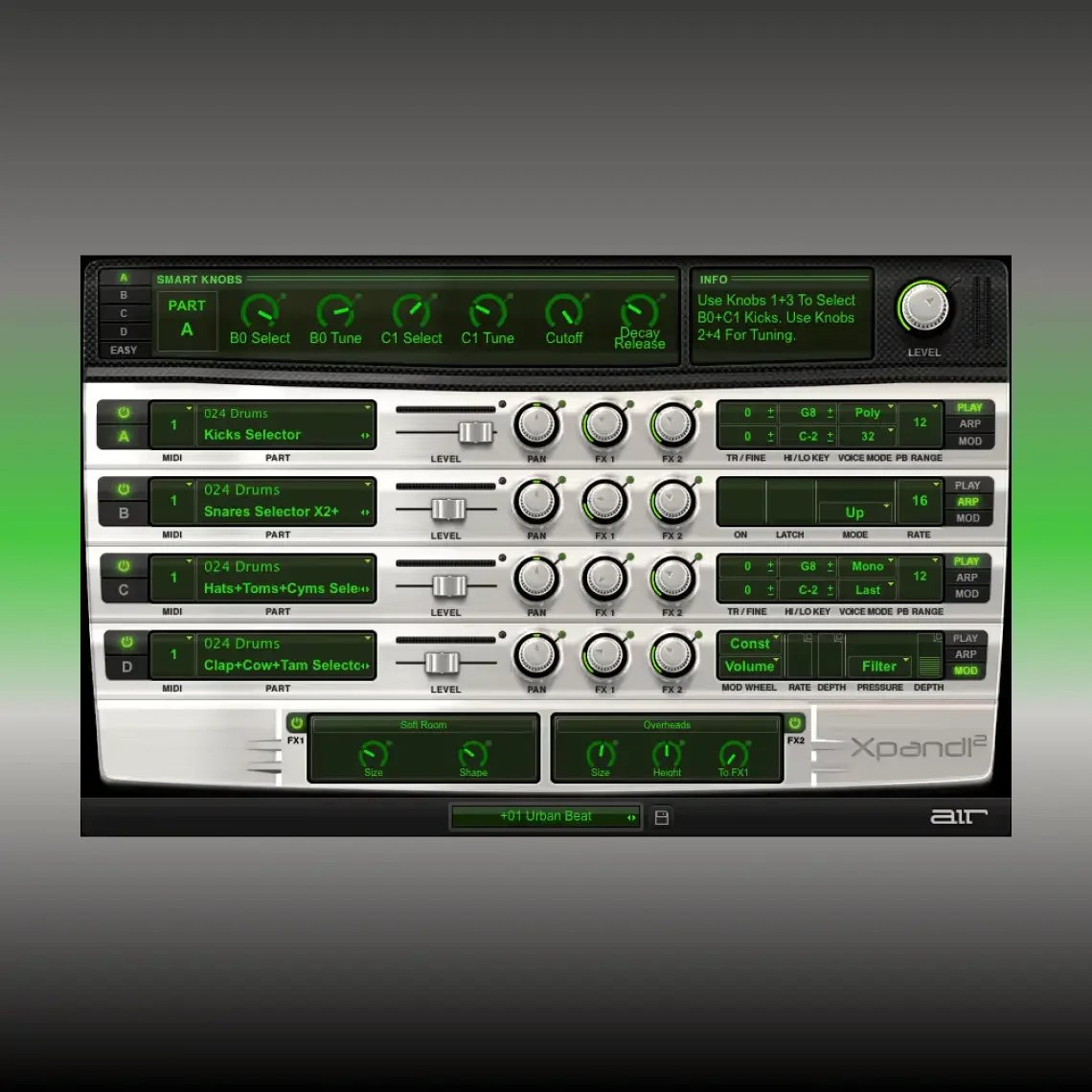
Xpand!2 is a multitimbral workstation instrument from AIR Music Technology. A patch has four parts, each with its own MIDI channel, note range (zone), mix, arpeggiation, modulation and effects settings.
It descends from Xpand!, created as part of the Creative Collection that comes with Avid Pro Tools. With Pro Tools 8 it received new controls, improved features and about 1 GB of extra sounds, along with the new name Xpand!2. It is now also offered on its own.
Several sound-generation methods are used, including wavetables, FM synthesis and sample playback. The factory content is thousands of ready-made patches, and parts are sorted into 29 categories to make browsing easier.
Each part's voice mode can be polyphonic or monophonic, with up to 64 voices for polyphonic parts. Monophonic parts offer first, last, highest or lowest note priority.
Key features
Four-part multitimbral operation
A patch holds four parts, each with its own MIDI channel and zone, so layers and splits can be built in one instrument.
29 part categories
Parts are organised into 29 categories, from pads and leads to piano, organ, strings, drums and loops, giving a starting point for browsing.
Smart knobs and Easy mode
Six smart knobs change function with the selected part. In Easy mode they control all four parts at once for quick edits.
Per-part arpeggiator
Rate includes dotted and triplet values, and Latch keeps it going when you release the keys. Some parts such as Action Pads and Loops activate it automatically.
Two effects, fifty types
Two independent effect processors offer fifty effects from reverbs to Chaos Delay, and FX1 can feed FX2 in a cascade.
Per-part modulation
Pitch bend and aftertouch assignments are independent for each part. Modulation can be tempo-synced or free-running.
Multiple sound engines
Subtractive, FM, tonewheel and sample playback engines are included, covering many sound types in a single instrument.
Specifications
| Item | Details |
|---|---|
| Maker | AIR Music Technology |
| Type | Multitimbral workstation instrument |
| Parts | 4 per patch |
| Voices | Up to 64 per part |
| Categories | 29 |
| Effects | Two independent processors, 50 types |
| Presets and parts | 2500+ (per Plugin Boutique) |
| Formats | VST2, VST3, AU |
| Operating systems | Windows 10 / 11, macOS 14 Sonoma to macOS 26 |
| System | 4 GB RAM (8 GB recommended), dual-core 2.5 GHz CPU (per Plugin Boutique) |
What is included and system requirements
- Xpand!2 (the instrument)
- Thousands of factory patches (2500+ presets and parts, per Plugin Boutique)
- VST2 / VST3 / AU (Windows 10 and 11, macOS 14 to 26)
How to use it
- After purchase, download and install from your account.
- Load it into your DAW as an instrument.
- Pick a patch close to the sound you have in mind.
- Select the part, among the four, that you want to change.
- Adjust the main sound elements of that part with the smart knobs.
- Switch to Easy mode to adjust the whole patch together.
- Set the arpeggiator rate and mode.
- Add space or modulation with the two effects and save the patch.
Where it may come in handy
Demos and sketches
Because many sound categories are gathered in one place, it may help when you want to settle on sounds quickly while sketching a track.
Layers and splits
Assigning MIDI channels and zones to the four parts may suit building layers or splits within one track.
Arpeggiated material
Per-part arpeggiators may be tried for rhythmic material.
Adding pads and effects
It may be worth considering when you want pads, ambience or FX sounds.
Who it may suit
- People who want many kinds of sounds from one instrument
- People who want to build layers with a multitimbral instrument
- People who want the Xpand!2 sound outside Pro Tools
- People who prefer to browse ready-made sounds rather than design from scratch
Good to know before you buy
- System requirements are those listed by Plugin Boutique. Check the latest official information before buying.
- A sale is running on the official site. Check the price at the time of purchase.
- An AIR account is needed to download.
Price
Please check the official page for the price.
See Xpand!2 on the product page
More of the same kind
Other introduction articles of the same kind.
- Waves Clavinet
- Audio Modeling SWAM Double Bass v3
- Audio Modeling SWAM Clarinets v3
- Audio Modeling SWAM Cello v3
- GForce Software Oberheim SEM
- Audio Modeling SWAM Flutes
We have introduced 21 other products from AIR Music Technology.
- AIR Music Technology Transfuser 2
- AIR Music Technology TimewARP 2600
- AIR Music Technology Mellotron
- AIR Music Technology Fabric Vintage CS
- AIR Music Technology Hype
See the full list in Product database: Instruments.
Sources: airmusictech.com pluginboutique.com (checked 2026-10-27)










Comments