
Disclosure: This page may contain affiliate links. Prices were checked on the date shown and may change.
An introduction to D16 Group Antresol, based on information from the maker and distributors: what it does, how to use it and who it may suit. It is not scored.
You get a wide range of parameters far beyond those you could find in common flanger-type effects.
— D16 Group official site
What is Antresol?
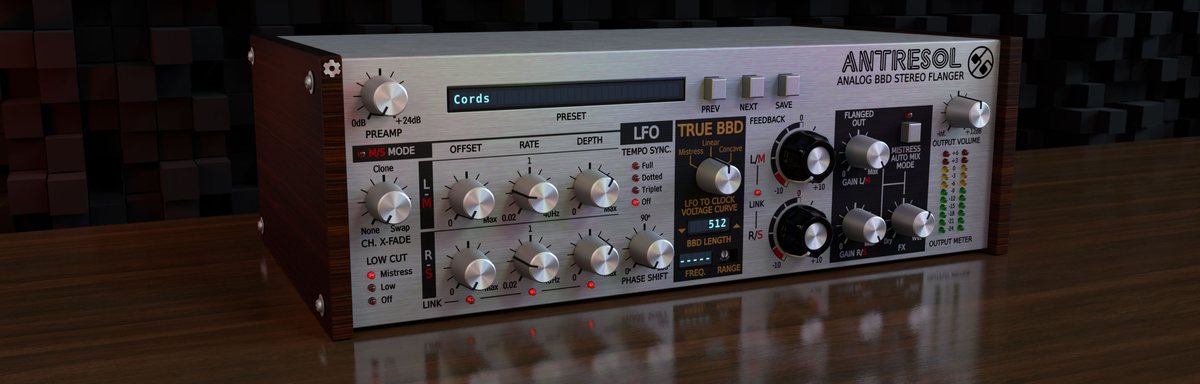
Antresol is a flanger plugin from D16 Group, described on the maker's page as a recreation of a stompbox that appeared in the mid-1970s. It belongs to the company's SilverLine collection.
At its core is an emulation of an analog BBD (bucket brigade device) delay line. The maker says it used a quasi-analog signal representation to get behavior closer to the physical circuit.
Beyond the knobs of the original unit, it exposes items such as on-board trimpot-style settings that normally require opening the hardware. It also offers an adjustable LFO with phase and tempo sync, and independent left/right (or mid/side) control.
It is presented as usable on guitar, synth lines and other instruments. The user manual is available in English, French and German.
Key features
BBD delay line emulation
It models an impulse-driven solid-state analog delay line. The maker says details such as clock linearity and the number of memory cells can be adjusted.
Access to internal items
Items that would be trimpots on the PCB appear as on-screen knobs. It could help when you want to push the original sound in your own direction.
Mistress mode
The maker says Mistress mode makes the whole unit work like the classic flanger. You can check the original behavior first and then explore the extended controls.
LFO and tempo sync
The LFO has adjustable phase and rate, and the rate can sync to the host tempo. Three LFO-to-BBD-clock curves are available.
Stereo processing modes
You can choose L/R or M/S processing and control the main parameters for each channel independently. It may help when you want to refine the stereo image.
Low aliasing
The maker describes an output designed to keep aliasing very low, with 64-bit internal processing.
Preset browser and GUI
There is a tag-based preset browser, two GUI sizes and HiDPI support. MIDI Learn lets you assign controller knobs.
Specifications
| Item | Details |
|---|---|
| Type | Flanger (SilverLine collection) |
| Plugin formats | Windows: VST2 / VST3 / AAX; Mac: VST2 / VST3 / AU / AAX |
| Windows | Windows 7 or newer (maker's page) |
| Mac | Mac OS X 10.13 to macOS 26 (maker's page), Intel / Apple Silicon, 64-bit only |
| Sample rate | 44.1 kHz or higher |
| Internal processing | 64-bit |
| Manuals | English, French, German |
What is included and system requirements
- The plugin
- Tagged presets
- A demo version is available (maker's page)
- Installers for Windows and Mac
- User manual (English, French, German)
How to use it
- Insert Antresol on a DAW track.
- Choose a preset with a similar feel in the preset browser.
- Use Mistress mode to check behavior close to the original flanger.
- Sync the LFO rate to the tempo to follow the song.
- Switch to L/R or M/S mode to vary how each side moves.
- Adjust Feedback to set the strength of the resonances.
- Use the extended controls to refine BBD details as needed.
- Assign knobs to a controller with MIDI Learn.
Where it may come in handy
Flanger on guitar
It could add a stompbox-style flanger texture to a recorded guitar track.
Synth melodies
A tempo-synced LFO may add slow movement to a synth melody.
Building stereo movement
L/R or M/S modes could let each side move differently to create width.
Drum loops
It could add periodic motion when applied to a drum loop.
Who it may suit
- People who want a stompbox-style flanger inside a DAW
- People who want to tweak details beyond the original hardware
- People who want tempo-synced modulation
Good to know before you buy
- System requirements may differ between the maker's page and retailer pages. Try the demo before buying.
- The maker notes that CPU usage varies with settings and sample rate.
How it differs from similar products
We do not pick a winner; the official figures are placed side by side.
D16 Group Godfazer
Antresol focuses on a single effect, the flanger. According to the maker, Godfazer has 22 effect types in its Ensemble section and 40 filter types in each of two Multi Filters.
Price
Please check the official page for the price.
See Antresol on the product page
More of the same kind
We have introduced 46 modulation effects. Here are some of the others.
- Waves Space Rider
- Kuassa Efektor PH3605 Phaser
- Universal Audio Studio D Chorus
- Antelope Audio V12 Chorus
- Kuassa EFEKTOR Omnivibe
- MeldaProduction MChorusMB
We have introduced 14 other products from D16 Group.
- D16 Group Godfazer
- D16 Group Syntorus 2
- D16 Group Fazortan 2
- D16 Group Redoptor 2
- D16 Group Sigmund 2
See the full list in Product database: Effects.
Sources: d16.pl pluginboutique.com (checked 2026-10-27)










Comments