
Disclosure: This page may contain affiliate links. Prices were checked on the date shown and may change.
An introduction to MeldaProduction MeldaProduction MFlangerMB, based on information from the maker and distributors: what it does, how to use it and who it may suit. It is not scored.
Flangers are tools with a specific character and are indispensable for guitars, and a wide range of other instruments.
— MeldaProduction official site
What is MeldaProduction MFlangerMB?
MFlangerMB is MeldaProduction's multiband flanger. A flanger mixes the original signal with a slightly delayed copy and sweeps that delay, which moves a comb-like pattern of peaks and notches across the spectrum. This plugin lets you split the signal into up to six bands and shape each one separately.
According to the official page, it offers up to 16x upsampling, sinc interpolation, and analog-style saturation, so attention has also gone into the audio processing itself. Further options include a jet effect (an additional tremolo) and tempo synchronization with the host.
Oscillator (LFO) shapes can be built from presets, free-drawn waveforms made with MeldaProduction's Envelope System (MES), a step sequencer, and algorithmic post-processing. That may help when you want a movement that is not a plain sine-wave sweep.
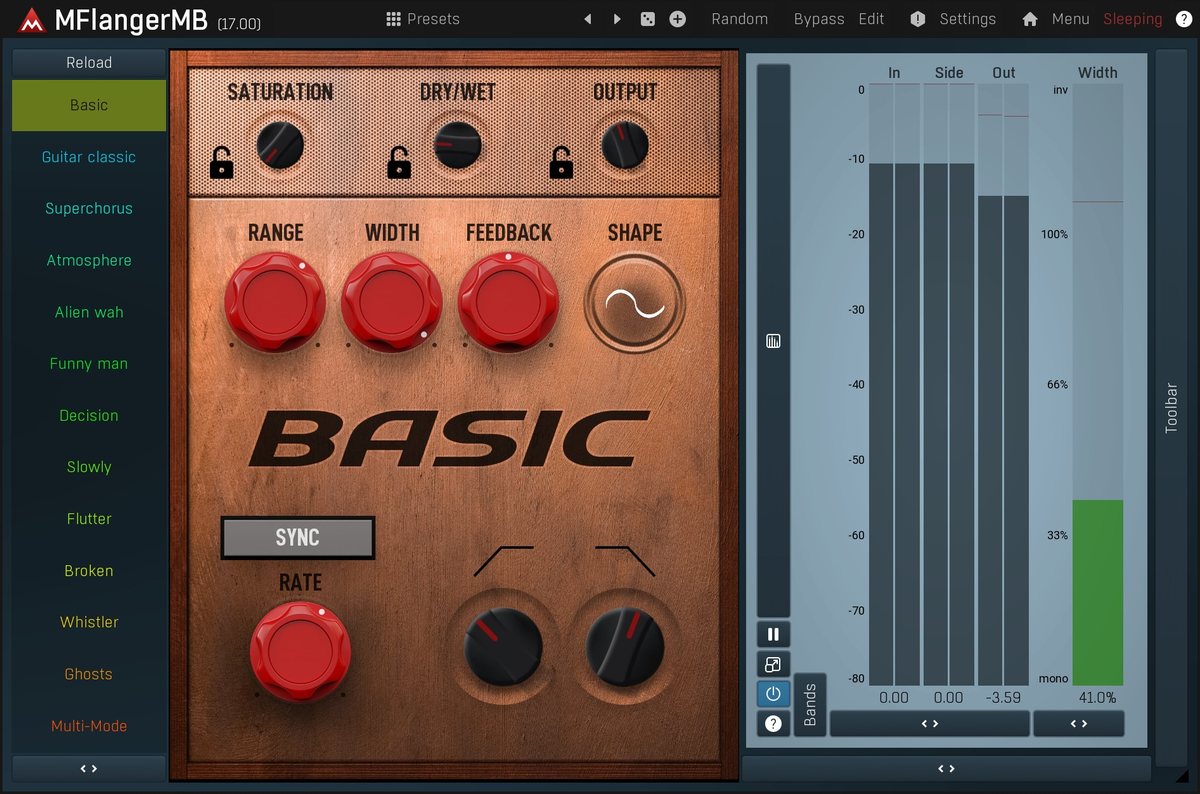
There are two interfaces: a basic screen where you pick from several modes and use a few knobs, and an advanced screen with access to every feature. You can set the sound on the basic screen first and move to the advanced one when you need to.
Key features
Multiband processing in up to six bands
The input can be split into up to six bands, each with its own settings. For example, you could leave the low end nearly untouched and apply deeper flanging only to the mids and highs.
Three crossover types
Bands can be split with analog, linear-phase, or hybrid crossovers. Because each handles phase differently, you can compare them to suit the material and your CPU budget.
Adjustable oscillator shape
LFO shapes can come from presets, MES-drawn curves, or the step sequencer. Because you design the motion itself, both steady rhythmic sweeps and irregular movement are possible.
Four global modulators
Each instance can hold up to four modulators acting as an LFO, level follower, MIDI- or audio-triggered ADSR, or pitch detector, and they can even modulate each other.
Tube-style saturation and jet
Built-in saturation adds a vintage-leaning texture, and the jet (an additional tremolo) is an option when you want a second kind of movement on top of the flange.
Randomization and MIDI learn
One button generates entirely new settings, or, with Ctrl held, only slightly alters the current ones. Any parameter can be mapped to a MIDI controller.
Surround and high-quality processing
Up to eight channels of surround are supported, and upsampling from 1x to 16x lets you tune how aliasing is handled.
Specifications
| Item | Details |
|---|---|
| Bands | 1 to 6 (three crossover types: analog, linear-phase, hybrid) |
| Modulators | Up to 4 (each can act as an LFO, envelope follower, ADSR envelope, pitch detector, or a combination) |
| Upsampling | 1x to 16x |
| Channels | Up to 8-channel surround processing |
| Formats | VST, VST3, AAX (Windows) / VST, VST3, AU, AAX (macOS) |
| System | Windows 8/10/11 (64-bit, SSE2 CPU) / macOS 10.14 or later (Intel and Apple Silicon) |
What is included and system requirements
- The plugin itself (VST, VST3, AAX; AU also on macOS)
- Windows 8/10/11 (64-bit) or macOS 10.14 or later
- MeldaProduction common preset management (A-H comparison slots and more)
How to use it
- Insert the plugin on a DAW track.
- Start from a preset or mode on the basic screen that is close to the sound you have in mind.
- Set the mix (dry/wet balance) to decide how much of the effect blends with the original.
- To split the sound into bands, set the crossover frequencies and adjust the effect amount per band.
- Choose whether the rate follows the host tempo or runs at a free speed in Hz.
- Assign a modulator to a parameter to add movement over time.
- If you hear aliasing in the high end, raise the upsampling factor and compare.
- Save settings you like as a preset.
Where it may come in handy
Guitar and bass movement
You might use it on guitar or bass to create a jet-like sweep. Keeping the lows in a separate band could add motion while leaving the core of a bass intact.
Keyboard and pad width
On synth pads or electric piano, a slow sweep may add movement to a static sound.
Drums and sound effects
On drum loops or cymbals, the moving peaks and notches could give a filter-like effect.
Subtle motion on a full mix
A small amount on the master track is another option for adding slight motion to the whole mix.
Who it may suit
- People who use flanging on guitar or synths and want to define the shape of the sweep
- People who want different effect amounts per band
- People who enjoy building their own modulation
- People who want to try a demo before buying
Good to know before you buy
- The official site offers a free trial (Try for free).
- With many advanced features, starting on the basic screen may suit first-time users.
- Higher upsampling can increase CPU load.
- MeldaProduction plugins share a common interface, so experience with another of their products carries over.
How it differs from similar products
We do not pick a winner; the official figures are placed side by side.
MeldaProduction MPhaserMB
Both are six-band multiband designs with the same modulation system. The official pages state that MFlangerMB offers up to 16x upsampling and a jet function, while MPhaserMB can use up to 100 filters.
Price
Please check the official page for the price.
See MeldaProduction MFlangerMB on the product page
More of the same kind
We have introduced 46 modulation effects. Here are some of the others.
- Blue Cat Audio Blue Cat's PolyVibe
- Arturia Flanger BL-20
- Kuassa EFEKTOR FL3606 Flanger
- D16 Group Fazortan 2
- D16 Group Godfazer
- AudioThing AudioThing Phase Motion 2
We have introduced 32 other products from MeldaProduction.
- MeldaProduction MeldaProduction MPhaserMB
- MeldaProduction MChorusMB
- MeldaProduction MBitFunMB
- MeldaProduction MPolySaturator
- MeldaProduction MeldaProduction MRingModulatorMB
See the full list in Product database: Effects.
Sources: meldaproduction.com pluginboutique.com (checked 2026-10-27)










Comments