
Disclosure: This page may contain affiliate links. Prices were checked on the date shown and may change.
An introduction to GForce Software Oberheim OB-E, based on information from the maker and distributors: what it does, how to use it and who it may suit. It is not scored.
GForce Oberheim OB-E® was the first software instrument ever to receive Tom Oberheim’s personal endorsement, and v2 was refined under his guidance.
— GForce Software official site
What is Oberheim OB-E?
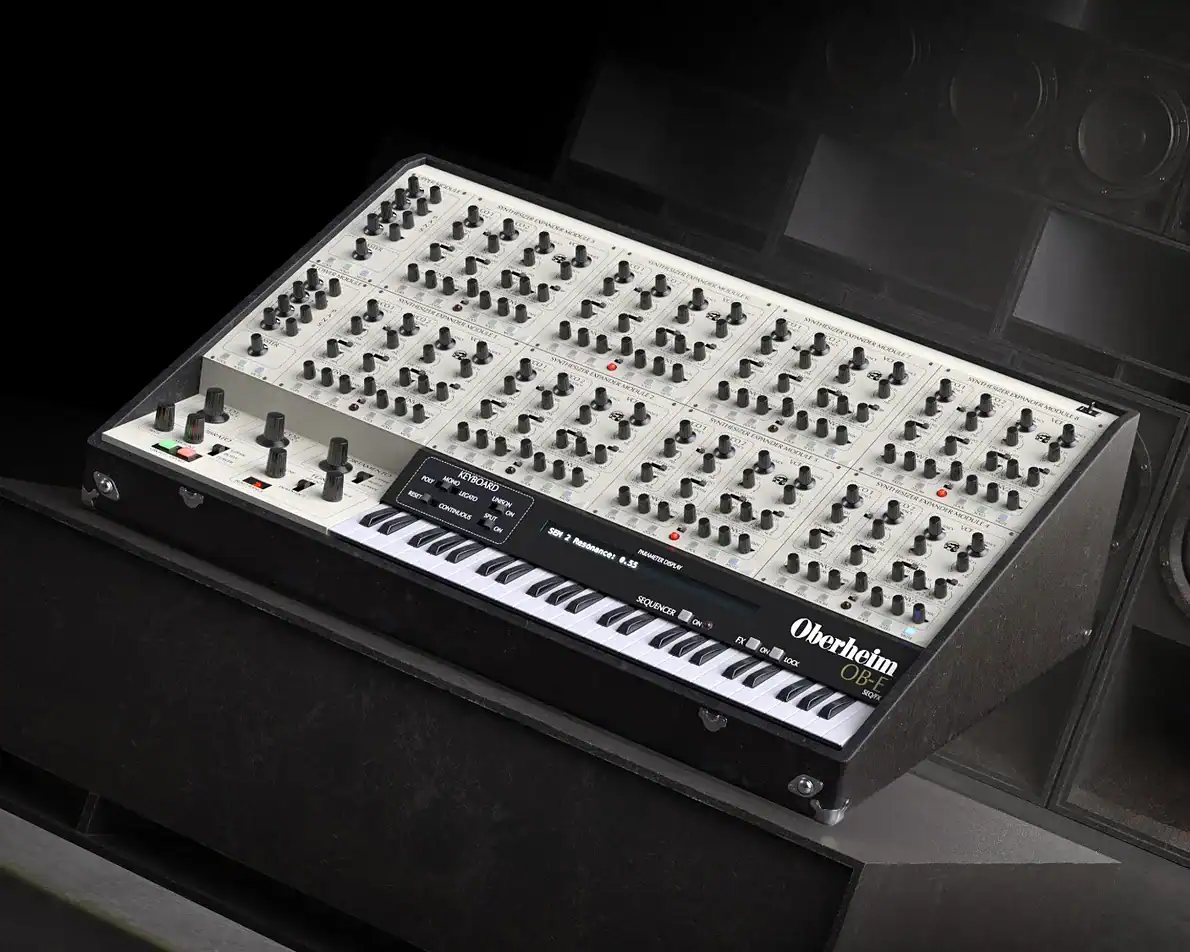
Oberheim OB-E is a software instrument from GForce Software that recreates the Oberheim 8-Voice, a polyphonic synthesizer from the 1970s. The 8-Voice is built from eight monophonic Synthesizer Expander Modules (SEMs) triggered by one keyboard, and OB-E reproduces that eight-module layout on screen.
According to the maker, OB-E was the first software instrument to receive Tom Oberheim’s personal endorsement. After release, Tom Oberheim and Marcus Ryle, an Oberheim engineer in the 1980s, offered to collaborate, and v2 added a Vintage control and a refined Detune parameter under their guidance.
Each SEM has two VCOs (pulse and sawtooth), two ADS envelope generators, an LFO and a multi-mode filter, and OB-E adds a third VCO to every SEM that can also act as an audio-rate LFO. The maker also stresses that the eight modules are slightly different from one another.
The instrument also includes an 8-step sequencer modelled on the original MS-1 as a starting point, a stereo delay, a reverb, a Drum Mode that assigns each SEM to its own key, and more than 700 tagged and categorised factory patches. It runs on both Windows and macOS, including Apple Silicon.
Key features
Eight-SEM architecture
Eight independent SEMs are triggered from one keyboard. Mono, Mono Legato, Poly, Unison and Split modes are available, so the keys can be divided into lower and upper sections playing different sounds.
Vintage control and refined Detune
The Vintage control added in v2 dials in the musical inaccuracies of the original instrument, and the maker says Detune was refined with Tom Oberheim’s input. It may be the place to go when a sound feels too clean.
Third VCO and Group mode
Each SEM has a third VCO that doubles as an audio-rate LFO. In Group mode a single knob move is mirrored across all eight modules, and each SEM can also be copied, pasted and saved individually.
8-step sequencer
The 8-step sequencer takes the original MS-1 as a starting point. It can trigger monophonically or step through each SEM in turn, and a Zoom view helps with detailed editing.
Drum Mode
Drum Mode assigns each SEM to a dedicated key so the instrument can behave like an analog-style drum machine. Ten drum kit presets are included.
Stereo delay and reverb
A routable stereo delay and the Matrix Reverb added in v2 are built in. They can be sent to the upper module, the lower module or both.
700+ patches and MPE
More than 700 tagged factory patches can be browsed with the arrow keys. Velocity, aftertouch, polyphonic aftertouch and MPE are supported.
Specifications
| Item | Details |
|---|---|
| Formats (Mac) | Standalone / AudioUnit / AAX / VST2 / VST3 |
| Formats (Windows) | Standalone / AAX / VST / VST3 |
| Mac requirements | Intel or Apple Silicon, macOS 10.15 or later, 8GB RAM |
| Windows requirements | Intel i5 / Ryzen 5 equivalent or better, Windows 7 or later, 8GB RAM |
| Patches | 700+ (100+ added in v2) |
| Trial | 14 days |
What is included and system requirements
- Oberheim OB-E (standalone and plug-in)
- 700+ factory patches and 10 drum kit presets
- An Oberheim OB-EZ license
- Mac: AudioUnit / AAX / VST2 / VST3; Windows: AAX / VST / VST3
How to use it
- Download and run the GForce installer to install OB-E.
- Purchase it, or start the 14-day trial version.
- Load it as an instrument in your DAW and connect a MIDI keyboard.
- Step through patches with the arrow keys in the patch browser.
- Choose a keyboard mode (Poly, Unison and so on) and adjust the sound’s looseness with the Vintage knob.
- Zoom into an SEM and try its filter and envelopes one module at a time.
- Add the sequencer, delay and reverb, then save your patch.
Where it may come in handy
Pads and chord layers
Because it is a polyphonic eight-module design, it may suit pads, brass-like stacks and thick chords.
Sequenced movement
The 8-step sequencer may let you build looping phrases without playing every note.
Drum parts
Drum Mode may let you sketch simple kick and percussion parts using only the synth.
Split patches
Split mode may let you place bass and chords on different parts of the keyboard inside a single patch.
Who it may suit
- Synth fans interested in the Oberheim 8-Voice layout
- Players looking for polyphonic pads and chord sounds
- Producers who want sequencing and drum sketching in one instrument
- Players using MPE-capable controllers
Good to know before you buy
- The maker states it is a one-time purchase with no subscription.
- The trial version runs for 14 days.
- Both the Mac and Windows requirements list 8GB of RAM.
- An Oberheim OB-EZ license is included with OB-E.
How it differs from similar products
We do not pick a winner; the official figures are placed side by side.
GForce Oberheim SEM
OB-E uses eight SEMs for eight-voice polyphony and ships with 700+ patches and 10 drum kits. Oberheim SEM is a single monophonic module with 400+ patches, and its presets can be exported to and imported from OB-E.
Price
$169.99 (GForce Software official site, checked 2026-10-27). Prices can vary by region and promotion, so check the official page before buying.
See Oberheim OB-E on the product page
More of the same kind
We have introduced 178 synthesizers. Here are some of the others.
- KV331 Audio SynthMaster One
- Cherry Audio CA2600
- Sound Particles MiniDust
- Rob Papen Rob Papen RAW-2
- AIR Music Technology Hype
- Future Audio Workshop Circle²
We have introduced 12 other products from GForce Software.
- GForce Software impOSCar3
- GForce Software MAP
- GForce Software Oddity3
- GForce Software AXXESS
- GForce Software Oberheim OB-1
For a side-by-side comparison scored on the same criteria, see our comparison of synthesizers.
See the full list in Product database: Instruments.
Sources: gforcesoftware.com pluginboutique.com (checked 2026-10-27)










Comments