
Disclosure: This page may contain affiliate links. Prices were checked on the date shown and may change.
An introduction to Sugar Bytes Obscurium, based on information from the maker and distributors: what it does, how to use it and who it may suit. It is not scored.
Obscurium is a synthesis tool for sound and pitch. It feeds on your input of scales & chords to produce futuristic soundscapes and vivid harmonics.
— Sugar Bytes official site
What is Obscurium?
Obscurium is a generative synthesizer from Sugar Bytes of Germany that makes sound and pitch together. The maker says it takes the scales and chords you enter and produces futuristic soundscapes and vivid harmonies.
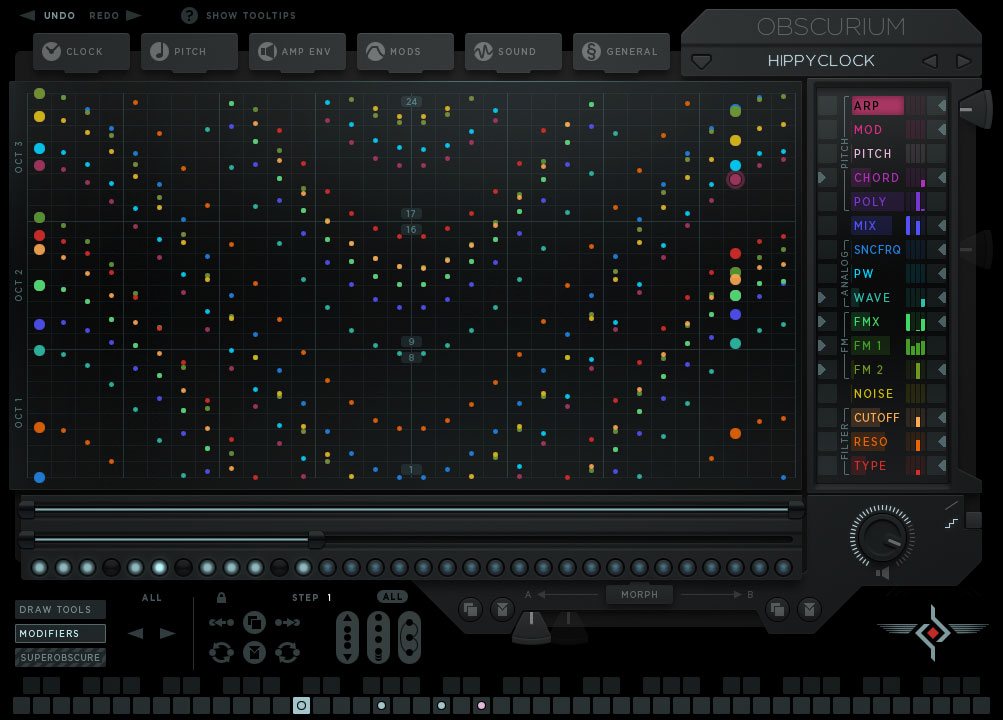
Inside, it can build circuits as complex as a modular system, yet the interface stays clear. There are two sound generators: an analog-style oscillator with unison, and an FM oscillator with a flexible ratio. The sequencer mixes and modulates them.
A key feature is that it can host your VST2 instruments and play and control them from within Obscurium. It sends trigger, pitch and 11 automation lanes, so older instruments can be put to new use.
The sequencer has draw tools, modifiers and a Super Obscure mode that draws sequences automatically. It comes with 400 presets (pads, drums, atmospheres and more) and a demo is available. The maker also says it suits film, advertising and game sound design.
Key features
Two sound generators
One is an analog-style oscillator with unison, the other an FM oscillator with a flexible ratio. Both can be routed through the effects and mixed by the sequencer, so the range is wider than it looks.
Generative harmonies
Enter scales and chords and melodies and harmonies are assembled from them. You can also play it with ordinary MIDI input, so it works for idea generation as well as fixed phrases.
VST interface
You can host your own VST2 instruments and sequence them from Obscurium. Setup works by picking a preset, using a random assignment, or using the Learn function, according to the maker.
Super Obscure mode and modifiers
Super Obscure mode draws sequences automatically in many ways. The modifiers paint all parameters at once, so each step can have a different sound.
Shift and morph
Parameters and their motion lanes can be rotated. You can also morph between two sequencer states, which lets you vary part of a sequence as it repeats.
Obscure Clock
The clock tab sets master speed, swing and direction. Two mini sequencers for clock and direction combine with the main sequencer for complex rhythms.
MIDI out and 400 presets
MIDI output lets you send notes to other gear. The 400 presets include pads, drums and atmospheres, and you can follow the modulation to understand their character.
Specifications
| Item | Details |
|---|---|
| Type | Generative synthesizer (one-time purchase) |
| Sound engine | 8 voices; saw, pulse, supersaw and FM synthesis |
| VST function | Hosts VST2 instruments; trigger, pitch and 11 automation lanes |
| Presets | 400 (pads, drums, atmospheres and more) |
| macOS | macOS 10.13 or later |
| Mac formats | Audio Unit, VST2, VST3, AAX, Standalone |
| Windows | Windows 7 or later |
| Windows formats | VST2, VST3, AAX, Standalone |
| Bit depth | 64-bit only; Apple Silicon supported |
| Version | 1.1.4 (official listing) |
What is included and system requirements
- Obscurium itself (one-time purchase)
- 400 presets
- Manual (English)
- Formats: Mac = AU, VST2, VST3, AAX, Standalone; Windows = VST2, VST3, AAX, Standalone
- Free demo (Mac and Windows)
How to use it
- Buy from Plugin Boutique or the official site and register the license.
- Install it and open Obscurium in your DAW.
- Play through presets first to see how the sequences move.
- Enter a scale and chords and check how the harmony is assembled.
- Set speed, swing and direction on the clock tab.
- From the VST section, load one of your own VST2 instruments and play it.
- Use modifiers and Super Obscure mode to vary the sound per step.
- Send movements you like to other instruments with MIDI out or record them in your DAW.
Where it may come in handy
Finding ideas
You could choose chords and play them while looking for the seed of a track in the phrases that appear.
Film, advertising and game sound
The maker names these as uses. It may help when making pad or atmosphere material.
Reviving old instruments
You could host an old VST2 instrument and drive it with new sequences.
Automatic playing in live sets and jams
Once scales and chords are set, the sequence runs by itself, so it may serve as a base for sessions where sound continues hands-free. MIDI out also lets you drive other gear at the same time.
Who it may suit
- People who want phrases built automatically from scales and chords
- Those who want new movement for their VST2 instruments
- Sound designers looking for material for video or games
Good to know before you buy
- The host function supports VST2 instruments.
- It is 64-bit only and will not run on 32-bit systems.
- The Mac version needs macOS 10.13 or later, and the Windows version Windows 7 or later.
- Both the official site and Plugin Boutique list a regular price of $99, and a demo lets you try it before buying.
- The official review section carries comments from music magazines, but no judgement of sound quality is made here. Trying the demo is the quickest way to see whether it fits your use.
Price
$99 (Sugar Bytes official site, checked 2026-10-27). Prices can vary by region and promotion, so check the official page before buying.
See Obscurium on the product page
More of the same kind
We have introduced 178 synthesizers. Here are some of the others.
- AIR Music Technology Hype
- Dawesome Tracktion Dawesome Abyss II
- Arturia Matrix-12 V
- MOK Miniraze
- KV331 Audio SynthMaster 3
- Tracktion Atmosia
We have introduced 10 other products from Sugar Bytes.
For a side-by-side comparison scored on the same criteria, see our comparison of synthesizers.
See the full list in Product database: Instruments.
Sources: sugar-bytes.de pluginboutique.com (checked 2026-10-27)










Comments