
Disclosure: This page may contain affiliate links. Prices were checked on the date shown and may change.
An introduction to UJAM Symphonic Elements STRIIIINGS, based on information from the maker and distributors: what it does, how to use it and who it may suit. It is not scored.
Symphonic Elements STRIIIINGS gives you access to the emotive power of several world-class string sections, featuring exclusive recordings from Hans Zimmer's personal multi-million-dollar library.
— UJAM official site
What is Symphonic Elements STRIIIINGS?
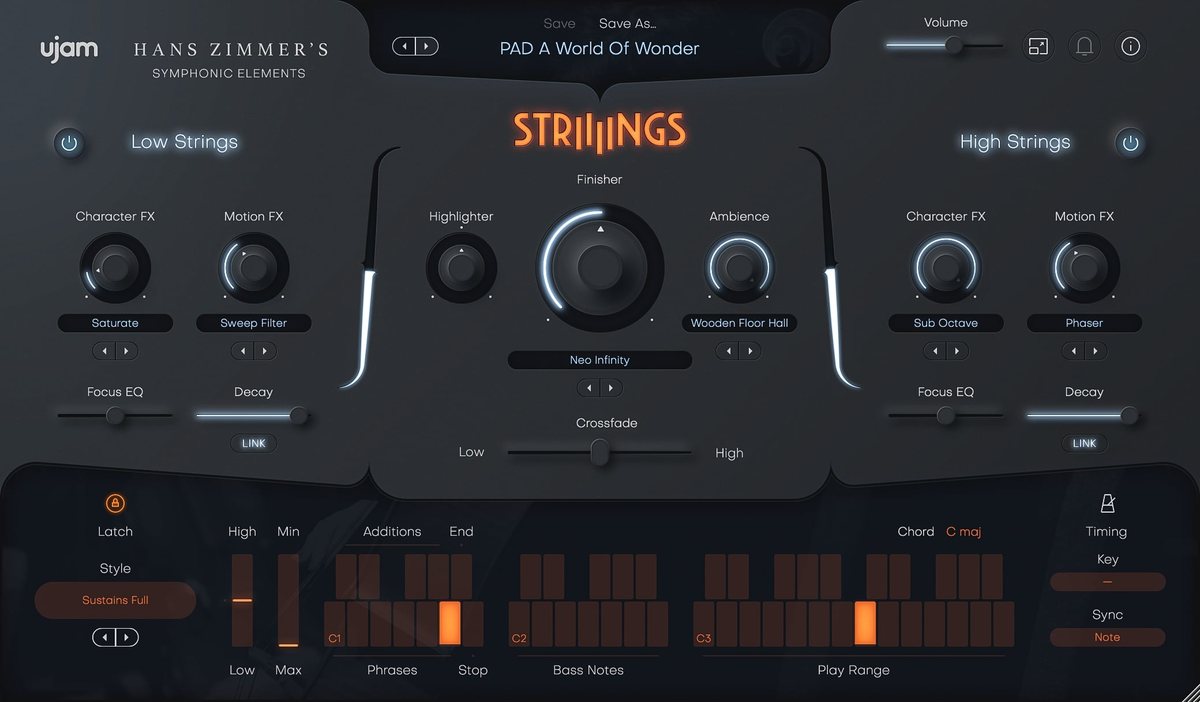
Symphonic Elements STRIIIINGS is a string-section instrument plugin from UJAM. UJAM says it features recordings from the personal library of film composer Hans Zimmer, provided for this product.
UJAM instruments play pre-arranged phrases (styles) and chords automatically when you play keys. STRIIIINGS includes 60 styles and more than 200 sound-designer presets, and is described as letting you try cinematic string sounds without orchestration knowledge.
The sound is divided into two layers: Low Strings (basses and celli) and High Strings (violins and violas). Each can be adjusted independently or blended with a Crossfade control.
For finishing, it includes a Finisher and ambience effects. The regular price is 249 dollars, the same at Plugin Boutique. The same series includes DRUMS, BRAAASS, PERRCS and CHOOIR.
From UJAM's description, its instruments let you try ideas quickly in the middle of composing, because phrases that suit the song play as soon as you press keys. STRIIIINGS follows this idea and emphasizes that no playing skill is required. With NKS support, users of Native Instruments keyboards may be able to browse it from their hardware.
Key features
Low and High String sections
Low (basses and celli) and High (violins and violas) sections are adjusted separately and balanced with a Crossfade. Each section has its own sound design engine.
60 styles
Choose from pre-arranged string phrases, from slow swells to rhythmic motifs, and find the one that matches the track.
Character and Motion FX
Each section has Character, which changes the texture, and Motion FX, which adds movement, so strings can be stretched or made rhythmic.
Finisher and ambience FX
Reverb-type ambience and experimental Finisher presets are built in, which suits sound design beyond ordinary string use.
200+ presets
More than 200 sound-designer presets give you ready-to-use starting points.
Royalty-free phrases
According to UJAM's FAQ, the MIDI phrases and included sounds are royalty-free for commercial productions. NKS is supported.
Specifications
| Item | Details |
|---|---|
| Series | Symphonic Elements |
| Content | Low Strings / High Strings |
| Styles | 60 |
| Presets | 200+ |
| Formats | VST 2, VST 3, AAX, AU 2 (64-bit only) |
| Standards | NKS supported |
| Operating systems | Windows 10–11, macOS Mojave (10.14) to Tahoe (26) |
| Minimum requirements | 4 GB RAM, 4.7 GB disk space, 1280×768 display, internet for download and authorization |
| Note | An SSD is recommended if you move the sample (.blob) files to an external drive |
What is included and system requirements
- STRIIIINGS (VST 2, VST 3, AAX, AU 2)
- 60 styles
- 200+ presets
- Finisher and ambience FX
- Requirements: Windows 10–11, macOS Mojave to Tahoe, 4 GB RAM, 4.7 GB disk space
- Installation and authorization through the UJAM App or an installer
How to use it
- Create a UJAM account and install and authorize the product in the UJAM App.
- Create an instrument track in your DAW and load STRIIIINGS.
- Pick a style from the list that is close to your track.
- Play chords on a MIDI keyboard to hear how the style responds.
- Balance Low and High Strings with the Crossfade.
- Add texture and movement with Character and Motion FX.
- Finish with the Finisher and ambience FX.
- Use an SSD if you place the sample data on an external drive.
Where it may come in handy
Film and game style background music
Laying sustained string chords may support the emotion of a scene.
Lifts in pop songs
Adding strings before and after a chorus may add thickness.
Adding strings to beats
Choosing a rhythmic style could be layered over hip hop and other beats.
Drafting an arrangement
Before writing a full orchestral arrangement, you could quickly check how strings would sound in the track.
Who it may suit
- Producers who want strings in their music without orchestration knowledge
- Creators of film and game background music
- Beatmakers who want string layers for sections
- Anyone looking for quick-to-use string material
Good to know before you buy
- The MIDI phrases and included sounds are described as royalty-free in the official FAQ.
- If you buy from a reseller, enter the serial code under Partner Checkout in your UJAM account; the product then appears in the UJAM App for installation and authorization.
- Officially listed compatible DAWs include Ableton Live, Logic Pro, Pro Tools, FL Studio, Cubase, Studio One, Bitwig, Reaper and Reason.
- The sample content is large and needs 4.7 GB of disk space.
- Internet access is required for authorization.
- Officially supported systems are Windows 10–11 and macOS Mojave to Tahoe.
- The regular price is 249 dollars; sale prices vary.
How it differs from similar products
We do not pick a winner; the official figures are placed side by side.
UJAM Symphonic Elements Bundle
STRIIIINGS is 249 dollars regular as a single product. The Symphonic Elements Bundle, which collects the series, is listed at 699 dollars regular on UJAM's page. If you also want drums, brass or choir, the bundle is an option.
Price
$249 (UJAM official site, checked 2026-10-27). Prices can vary by region and promotion, so check the official page before buying.
See Symphonic Elements STRIIIINGS on the product page
More of the same kind
We have introduced 3 orchestral instruments. Here are some of the others.
We have introduced 32 other products from UJAM.
For a side-by-side comparison scored on the same criteria, see our comparison of orchestral instruments.
See the full list in Product database: Instruments.
Sources: ujam.com pluginboutique.com (checked 2026-10-27)










Comments