
Disclosure: This page may contain affiliate links. Prices were checked on the date shown and may change.
An introduction to Aberrant DSP Digitalis, based on information from the maker and distributors: what it does, how to use it and who it may suit. It is not scored.
What is Digitalis?
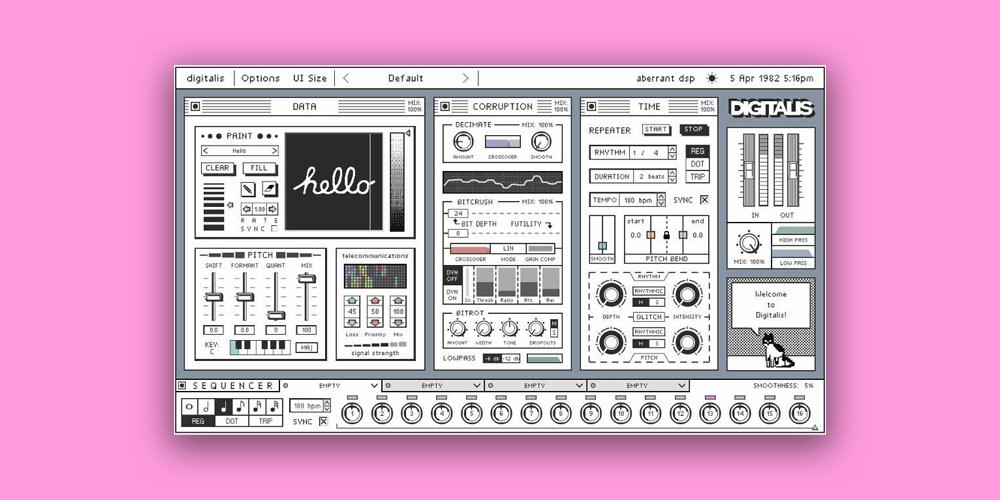
Digitalis is a glitch and digital-degradation multi-effect from Aberrant DSP. It is built around the idea of using "digital failures" such as bad converters, damaged CDs and weak connections as sound design (per the manufacturer).
Formats are VST3 and AAX on Windows 10 or later, and AU, VST3 and AAX on macOS 10.13 or later (Intel and Apple Silicon), all 64-bit. A demo with limits is available on the manufacturer's site (per the manufacturer).
Key features
Data manipulation: filter, pitch and telecom
A "PaintBox" filters audio with patterns you draw, and there are pitch shifting, formant shifting, pitch quantization and a section that imitates lossy telecommunication audio (per the manufacturer).
Corruption: decimate, bitcrush and bitrot
Decimate gives downsampling effects, a dynamic bitcrusher has several modes, and bitrot imitates data loss on old digital media (per the manufacturer).
Repeater and sequencer
A repeater (retrigger and beat repeat) works tempo-synced or free, and a 16-step sequencer with four effect slots adds rhythmic changes (per the manufacturer).
98 presets
98 factory presets are included, and the order of the effect windows can be changed to change the signal flow (per the manufacturer).
After you buy: installation and activation
This is the general flow for products bought at Plugin Boutique. Activation differs by product (serial number, a manufacturer account, iLok and so on), so check the instructions in your library after purchase.
- Log in to your Plugin Boutique account and find the product in “Library”.
- Download the installer (you can switch between the Windows and Mac versions). Depending on the product, you also get a serial number, an unlock code or a key file.
- Product-specific steps are under “…” → “Installation Instructions” next to the product in your library, and also near the bottom of the product page.
Price
Please check the official page for the price.
See Digitalis on the product page
More of the same kind
Other introduction articles of the same kind.
- Leapwing Audio Joe Chiccarelli
- W. A. Production SphereQuad
- Universal Audio Manley VOXBOX Channel Strip
- Lese Fletcher
- Sound Particles Brightness Panner 2
- Karanyi Sounds Playmod
See the full list in Product database: Effects.
Sources: aberrantdsp.com pluginboutique.com help.pluginboutique.com support.pluginboutique.com (checked 2026-11-15)










Comments