
Disclosure: This page may contain affiliate links. Prices were checked on the date shown and may change.
An introduction to Audient ORIA Mini, based on information from the maker and distributors: what it does, how to use it and who it may suit. It is not scored.
Your calibrated sound is always on, always consistent, and always ready to go.
— Audient official site
What is ORIA Mini?
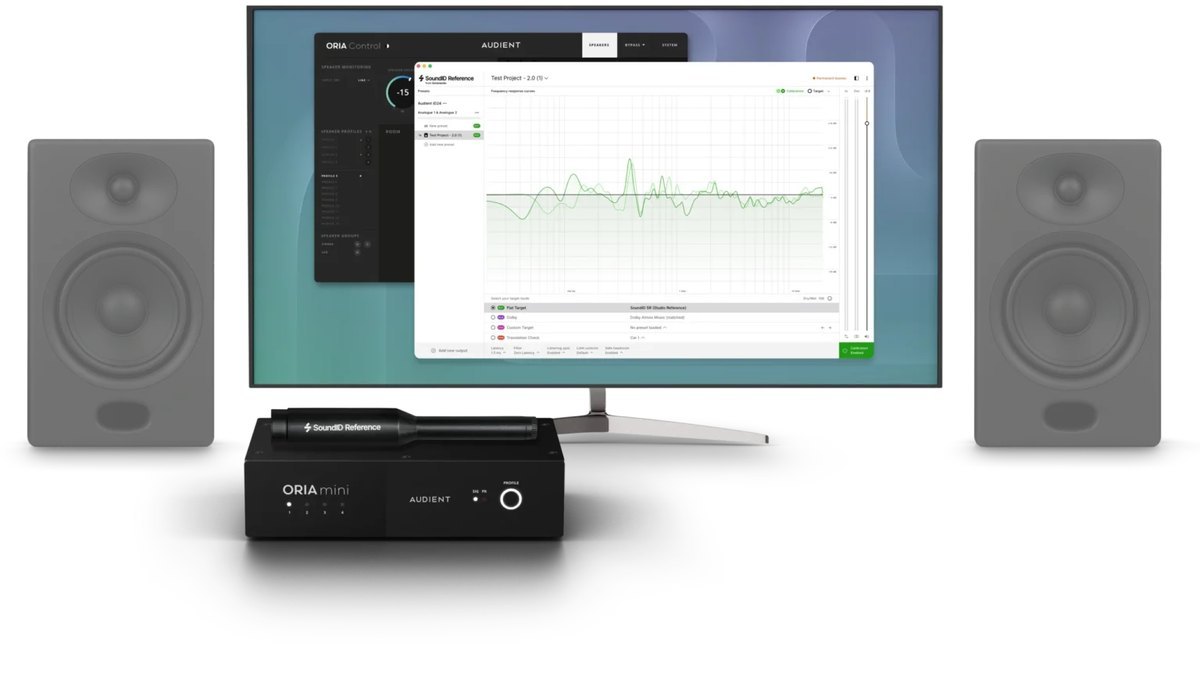
ORIA Mini is a compact hardware room-correction unit from Audient, placed between an audio interface and speakers.
It loads Sonarworks SoundID Reference calibration profiles onto its own processor, so correction runs without the Sonarworks software on the computer.
Up to four profiles can be stored and switched on the unit, which may help A/B checks with target curves such as phone or car playback.
It connects over bus-powered USB 3.0 and works with Windows and macOS. A 3-year warranty applies.
Audient positions ORIA Mini as a dedicated hardware solution built with Sonarworks. It targets the problem of mixes not translating because room reflections and resonances change what you hear, and it sits between the audio interface and the speakers.
As described, you measure the room with SoundID Reference, create profiles, transfer up to four to the unit, and the correction then runs on the unit alone. The maker says it takes under 20 minutes from measuring to mixing. A note also says it can be bought without a SoundID Reference license for those who already own one.
The page stresses that no plugin is needed on the DAW master bus because the correction is always on. Target curves that simulate car stereos, phones or hi-fi systems can be imported for comparison. The unit is compact and portable, and supports up to 2.1 speaker setups.
Key features
Profiles stored on the unit
Up to four profiles are stored on the unit, which may help when switching between room correction and target curves.
Manual DSP control
EQ, delay, trim and bass management can be set per output channel, intended for use with tools such as Smaart or REW.
Low latency, no CPU load
Correction runs on the unit; the maker claims ultra-low latency and no CPU load, which may suit monitoring while recording.
Remote control
It can be controlled remotely from a Stream Deck and iOS.
Monitoring I/O
It has a stereo speaker output (TRS), a subwoofer output (TRS), a stereo TRS input and an S/PDIF digital input.
Measurement with other tools too
Besides SoundID Reference, rooms can be measured with tools such as Smaart or Room EQ Wizard, and EQ, delay, trim and bass management set manually per output.
Delay and trim per speaker
Delay can be aligned so every speaker's sound reaches the listening position at the same time, and levels can be set individually.
Bass management with a subwoofer
Adjusts the crossover between main speakers and subwoofer, aimed at a well-integrated low end.
32-bit AD/DA converters
Designed to minimise conversion loss; the specification lists 127 dB dynamic range (A-weighted) on the line output.
USB for power and control only
Connected by USB-C and bus-powered; the maker notes no audio streams over USB, which carries power and control data only.
Specifications
| Item | Details |
|---|---|
| I/O | 2.0 speaker systems |
| Converters | 32-bit AD/DA |
| Dynamic range | 127 dB |
| Sample rate | 24-bit / 96 kHz |
| Connection | USB 3.0, bus-powered |
| Warranty | 3 years |
| Analogue inputs | 2 channels (stereo TRS) |
| Analogue outputs | 3 channels (speaker L/R plus subwoofer) |
| Digital inputs | 2 channels (stereo S/PDIF, 44.1-96 kHz) |
| System sample rate | 96 kHz (sample rate conversion on digital inputs) |
| Line output max level | +18 dBu |
| Line output THD+N (-1 dBFS) | -113 dB / 0.0002% |
| Line in to line out dynamic range | 122.5 dB (A-weighted) |
| USB | USB-C, 0.9 A at 5 V (USB 3.0 port or better), 1 m cable included |
| Included measurement mic (MREF) | Electret condenser (MEMS), omnidirectional, 20 Hz-20 kHz, sensitivity -40 dBV/Pa, max 125 dB SPL, +48 V phantom power, 3-pin XLR, 54 g |
What is included and system requirements
- ORIA Mini unit
- SoundID Reference software
- SoundID measurement microphone
- OS: Windows / macOS
- USB-C cable (1 m)
- The included measurement mic is the MREF (3-pin XLR, +48 V phantom power)
- Bundled software is available through the ARC registration page
How to use it
- Connect ORIA Mini between the audio interface output and the speakers.
- Connect to the computer over USB 3.0; it is bus-powered.
- Install SoundID Reference and measure the room with the supplied mic.
- Write the resulting profile to ORIA Mini.
- Add target-curve profiles if desired.
- Switch profiles on the unit or remotely to compare.
- Measure the room with SoundID Reference or your preferred software.
- Create a calibration profile.
- Transfer up to four profiles to ORIA Mini.
- Connect it between the interface and speakers and switch profiles to compare.
- The target curve and the frequency range the correction applies to can be adjusted in real time.
Where it may come in handy
Correcting a home studio room
It may suit checking mixes after the room's influence is reduced.
Translation checks
It could be used to compare with curves modelled on phone or car playback.
Playback outside the DAW
Because correction runs on the unit, it may also work when no software is open.
Checking phone and car playback
Switching target curves may help check how a mix might sound in other environments from your desk.
Correction outside the DAW
It may suit people who want the correction active for video and music playback without a master bus plugin.
Small room with a subwoofer
With a 2.1 setup, delay and bass management may be worth adjusting.
Who it may suit
- People wanting room correction for their studio
- People checking mixes on several target curves
- People who do not want to add CPU load
Good to know before you buy
- No price is shown on the page; it points to a dealer locator.
- The 24-bit / 96 kHz spec appears next to a 32-bit converter claim; both are as written by the maker.
- USB carries power and control only, so the interface outputs must be connected to ORIA Mini's inputs.
- Speaker outputs are TRS; check the inputs on your speakers.
- A user guide (English and Chinese) is on the downloads page.
- A 3-year warranty applies.
Price
Please check the official page for the price.
See ORIA Mini on the product page
More of the same kind
Other introduction articles of the same kind.
- ZOOM H5studio
- ZOOM V3
- DeeJei.Tokyo MotTune
- Manley Massive Passive EQ
- Behringer HA400
- TASCAM Portacapture X8
We have introduced 2 other products from Audient.
Sources: audient.com (checked 2026-10-27)









Comments