
Disclosure: This page may contain affiliate links. Prices were checked on the date shown and may change.
An introduction to AudioThing Dub Filter, based on information from the maker and distributors: what it does, how to use it and who it may suit. It is not scored.
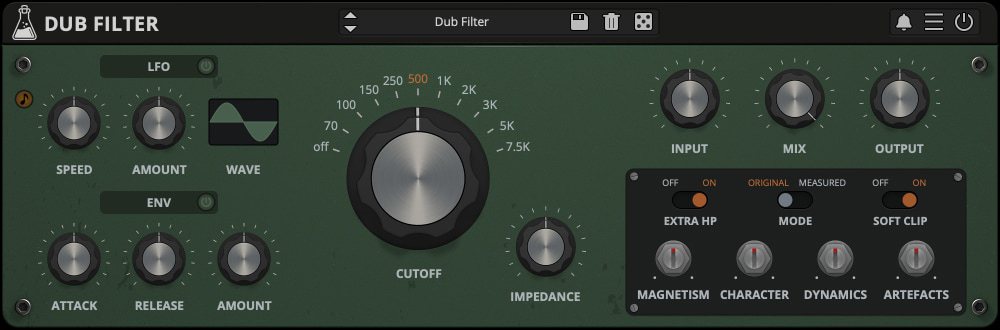
Dub Filter is a filter plugin modeled after King Tubby’s iconic Big Knob, a passive high-pass filter with eleven frequency steps from 70Hz to 7.5KHz.
— AudioThing official site
What is Dub Filter?
Dub Filter is a high-pass filter plugin from AudioThing. It models the Altec 9069B high-pass filter, known as King Tubby's "Big Knob", which was used by the Jamaican dub pioneer.
The original was a passive, inductor-based filter from the 1960s. According to the official description, the hardware had 10 positions with 18 dB/oct attenuation, while the plugin offers eleven frequency steps from 70 Hz to 7.5 kHz.
It does not stop at copying the hardware. Besides Impedance (resonance), it adds four behavior controls: Magnetism, Character, Dynamics and Artefacts, which let you shape the non-linear behavior of the modeled inductance to different depths.
Two modulation sources, an LFO and an envelope follower, are built in. They may be useful for rhythmic pulsing or for filter movement that follows the input, not only in dub mixing.
Key features
Stepped high-pass with 11 positions
The frequency knob moves in steps rather than continuously, across eleven positions from 70 Hz to 7.5 kHz. This is close to how the hardware is operated, and lets you decide how much low end to remove one step at a time.
Impedance (resonance)
This control corresponds to the filter's resonance. It is the part to adjust when you want to emphasize the area around the cutoff and give the high-pass more character.
Magnetism / Character / Dynamics
Magnetism adjusts the non-linear model of the circuit's inductance and affects the slope and intensity of the generated harmonics. Character sets the amount of harmonic content, and Dynamics changes how smoothly the frequency changes; at extreme settings the official description says it can behave like an envelope filter.
LFO modulation
An LFO with multiple waveforms moves the filter periodically. It may suit cases where you want a pulsing movement that matches the tempo.
Envelope follower
This follows the level of the input and moves the filter accordingly. It may help add a more organic movement that responds to playing dynamics.
Presets and randomizer
The preset system includes a randomizer, which is handy for finding a starting point. Brightness and contrast of the interface can be adjusted, and the window is resizable.
Specifications
| Item | Details |
|---|---|
| Type | Stepped high-pass filter (model of the Altec 9069B) |
| Frequency | 70 Hz to 7.5 kHz (11 steps) |
| Modulation | LFO (multiple waveforms), envelope follower |
| Formats | VST2 / VST3 / AU / AAX / CLAP (64-bit); AUv3 and standalone on iOS |
| OS | Windows 7 to 11, macOS 10.13 to macOS 15 (Universal 2), Linux (Ubuntu 20.04 or newer) |
| Recommended | 2 GHz CPU, 4 GB RAM |
What is included and system requirements
- Formats: VST2 / VST3 / AU / AAX / CLAP (Windows, macOS, Linux)
- AUv3 and standalone versions for iPhone and iPad on the App Store
- Demo available (3 seconds of silence every 45 seconds, saving disabled)
- Manual (PDF) available
How to use it
- Create an AudioThing account and redeem the serial number on the Redeem page after purchase.
- Download the installer and the activation license file (.atl).
- Run the installer and choose the plugin formats you want.
- Restart your DAW and rescan plugins if needed.
- Open the plugin on a track and activate it either Online (log in with your account) or Offline (load the license file).
- Start by choosing a Frequency step and listen to how much low end is removed.
- Add resonance with Impedance, and change the behavior with Magnetism, Character and Dynamics if needed.
- Add movement with the LFO or the envelope follower.
Where it may come in handy
Dub-style mixes
It may be used to remove low end from drums or guitars in steps and open up space for echoes and reverbs, in line with how the original hardware was used in dub.
Breakdown effects
By moving the frequency step with the LFO or automation, you may be able to pull the low end away as the arrangement changes.
Sound design
Combining the envelope follower with Dynamics may let you find filter sounds that react to the input.
Who it may suit
- People who care about the character of a high-pass in dub and reggae-style mixes
- People looking for filter behavior that a standard EQ does not offer
- People who like adding movement with LFOs and envelopes
Good to know before you buy
- Activation is required (online or offline).
- The demo has 3 seconds of silence every 45 seconds and cannot save.
- It is a high-pass filter only, not a low-pass or band-pass plugin.
How it differs from similar products
We do not pick a winner; the official figures are placed side by side.
AudioThing Things – Motor
Dub Filter is a stepped high-pass filter with an LFO and an envelope follower. AudioThing's Things – Motor is a tremolo / vibrato / panner that switches between two signals via sidechain, with an LFO offering 10 waveforms.
Price
$59 (Plugin Boutique, checked 2026-10-27). Prices can vary by region and promotion, so check the official page before buying.
See Dub Filter on the product page
More of the same kind
We have introduced 34 filters. Here are some of the others.
- TAL Software TAL-Filter-2
- BLEASS BLEASS Peaks
- Rob Papen FilterField
- McDSP McDSP FilterBank Native v7
- Solid State Logic Native X-Phase
- MeldaProduction MFilter
We have introduced 34 other products from AudioThing.
- AudioThing Things – Crusher
- AudioThing Things – Bubbles
- AudioThing Wires
- AudioThing Megaphone
- AudioThing Echo Cube
See the full list in Product database: Effects.
Sources: audiothing.net pluginboutique.com (checked 2026-10-27)










Comments