
Disclosure: This page may contain affiliate links. Prices were checked on the date shown and may change.
An introduction to MeldaProduction MFilter, based on information from the maker and distributors: what it does, how to use it and who it may suit. It is not scored.
Whenever you need to add some movement to an otherwise static sound, a filter is one of the first processors to try.
— MeldaProduction official site
What is MFilter?
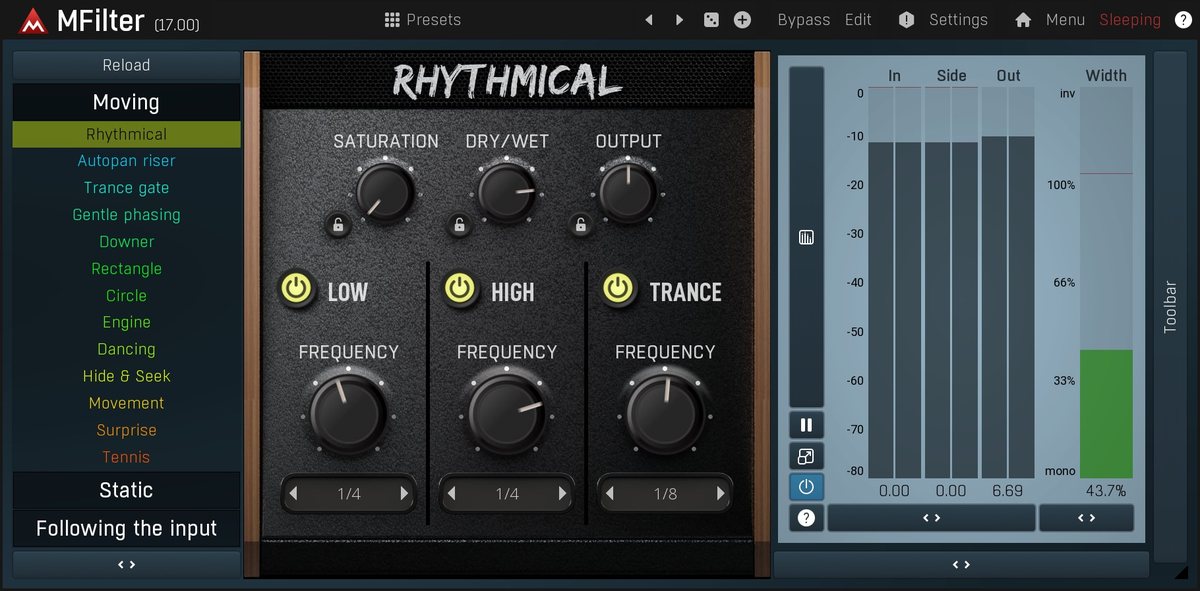
MFilter is a filter plugin from MeldaProduction. When a static sound needs movement, a filter is a common processor to reach for. The company describes it as capable of more than you would expect from a filter.
It is based on the company's equalizer MEqualizer, with four global modulators added. It can produce effects such as wah-wah and sweeps, and the page says it goes much further than standard effects. The display shows the result of your processing directly, and an analyzer, sonogram and spectrum areas are built in.
Each band offers seven filter types: peak, low shelf, high shelf, low pass, high pass, band pass and notch. You can switch between a simple interface and an advanced one that exposes every function. Harmonics control and tube-style saturation are built in.
The four modulators work as LFOs, followers, MIDI- or audio-triggered envelopes, pitch detectors or combinations, and can modulate other modulators. The official regular price is 55 USD, a free trial is offered, and it supports Windows and macOS.
Key features
Built on MEqualizer
It is the company's equalizer with four global modulators added. You keep the clear EQ-style display and can add change over time.
Seven filter types
Peak, low shelf, high shelf, low pass, high pass, band pass and notch are available per band, and all settings can be adjusted from the graph.
Four global modulators
They can act as LFOs, followers, MIDI- or audio-triggered envelopes or pitch detectors. This may help when you want wah or sweep effects.
Two interface modes
The simple interface offers preset modes and a few knobs for quick results, while the advanced interface exposes all features.
Clear visual feedback
A built-in analyzer, sonogram and spectrum areas let you adjust while watching the frequency response.
Randomization and workflow tools
It includes one-button randomization, 1x to 16x upsampling, MIDI learn, tube-style saturation and up to 8-channel surround.
Specifications
| Item | Details |
|---|---|
| Type | Filter |
| Filter types | 7 (per band) |
| Modulators | 4 |
| Upsampling | 1x to 16x |
| Channels | Up to 8-channel surround |
| Formats | VST, VST3, AU, AAX |
| OS (Windows) | Windows 8, 10, 11 (64-bit) |
| OS (macOS) | macOS 10.14 or later (64-bit), native Apple Silicon support |
| Official regular price | 55 USD (free trial available) |
What is included and system requirements
- MFilter plugin
- Formats: VST, VST3, AU, AAX
- Preset management and online preset exchange
How to use it
- Download the free trial from the MeldaProduction site.
- Load the plugin in your DAW and insert it on the track to filter.
- In the simple interface, choose a mode close to your goal.
- Move the knobs to hear how cutoff and resonance behave.
- Switch to the advanced interface and add bands on the graph to shape the curve.
- Assign one modulator and set an LFO rate to create a wah-like movement.
- Try randomization for alternative settings and save the ones you like.
- Check the balance against the original sound in the mix.
Where it may come in handy
Auto-wah on bass or guitar
The product page has bass auto-wah and funky guitar examples. LFOs or followers could create wah that follows playing strength.
Adding motion to pads
A slow LFO on the filter could add change to a pad that otherwise sounds static.
Sweeps in arrangements
Moving high-pass or low-pass filters around a build-up could mark section changes.
Use as an EQ
Without modulators it may also work as an equalizer with a clear graph.
Who it may suit
- People who want to see filter movement as they build it
- Those who want EQ and filtering in one plugin
- Users of other MeldaProduction plugins
- Anyone who wants to create wah or sweeps quickly
Good to know before you buy
- The official regular price is 55 USD, while Plugin Boutique lists 54 USD, so the price can differ by store.
- A free trial is available.
- MeldaProduction's site sometimes shows time-limited discounts on its products.
How it differs from similar products
We do not pick a winner; the official figures are placed side by side.
MeldaProduction MCombMB
MFilter is based on MEqualizer with seven filter types per band, while MCombMB has up to six bands with up to four comb filters each. Both have four modulators, and the official regular price is 55 USD.
Price
Please check the official page for the price.
See MFilter on the product page
More of the same kind
We have introduced 34 filters. Here are some of the others.
- Sugar Bytes WOW2
- FabFilter Simplon
- Soundtoys FilterFreak
- Three-Body Technology Tube Filter
- Arturia Arturia Filter M12
- UJAM UFX Filter
We have introduced 32 other products from MeldaProduction.
- MeldaProduction MCombMB
- MeldaProduction MMorph
- MeldaProduction MMatcher
- MeldaProduction MAmp
- MeldaProduction MBitFunMB
See the full list in Product database: Effects.
Sources: meldaproduction.com pluginboutique.com (checked 2026-10-27)










Comments