
Disclosure: This page may contain affiliate links. Prices were checked on the date shown and may change.
An introduction to McDSP NR800 Noise Reduction Processor Native v7, based on information from the maker and distributors: what it does, how to use it and who it may suit. It is not scored.
The NR800 is a real-time noise reduction processor, useful for music production, post production, and live sound.
— McDSP official site
What is NR800 Noise Reduction Processor Native v7?
NR800 is a real-time noise reduction processor from McDSP. The maker positions it for music production, post-production, and live sound. This listing is the Native version; a separate HD version targets AAX DSP users.
The processing is described as having no internal latency and avoiding the artifacts typical of transform-based noise reduction plugins. It works mainly across broad bands but can be narrowed to a specific part of the spectrum with noise reduction focus points.
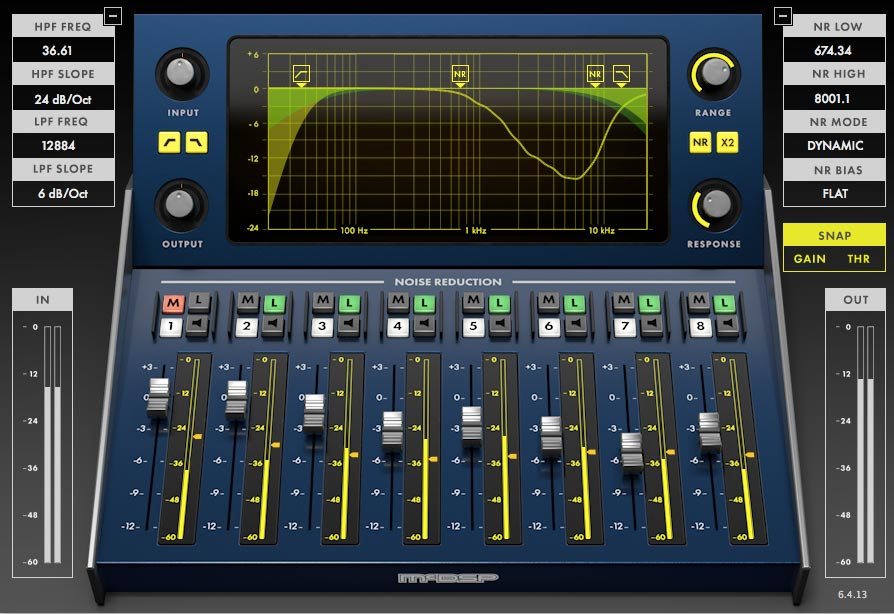
It has eight bands, each with a noise reduction amount fader and a noise detection threshold marker. Master (M) and linked (L) buttons let you move bands together, and each band can be bypassed or soloed to audition how much noise is coming in. Input filters can be set with slopes up to 36 dB/oct.
The maker lists dialog cleanup, noise in field recordings, mic and headphone bleed, and audio restoration as uses. Version 7 is optimized for Apple silicon and current Intel processors, and each license allows two activations.
Key features
Eight focusable bands
Eight bands each have a reduction amount and a threshold, so you can target where the noise sits. Hiss and low rumble in the same recording can be treated with different amounts.
HPF and LPF pre-filtering
Adjustable, steep high-pass and low-pass filters can be set independently of the noise reduction focus points, which helps separate noise from the wanted audio. The plot view shows their response.
Modes and bias options
Noise reduction modes range from smooth to aggressive, and the x2 mode doubles the amounts in all bands. NR Bias sets which amounts are used when snapping gain and thresholds.
Range and Response
Range scales the overall reduction from 100% to 0%. Response controls how quickly the reduction recovers after a noise event, useful as a final trim.
Snap for fast setup
Snap Gain and Snap Threshold set gain and thresholds from the incoming signal. Playing a noise-only section and snapping may give a quick starting point.
Zero latency and double precision
Zero-latency algorithms and double-precision processing are listed among its features, which suits live-leaning use and picture-synced editing.
Mono and stereo versions
Mono and stereo versions exist, so it can be used on mono dialog or stereo tracks. Presets are included.
Specifications
| Item | Details |
|---|---|
| Type | Real-time noise reduction (Native, v7) |
| Bands | 8 |
| Pre-filters | HPF / LPF (up to 36 dB/oct) |
| Formats (Native) | AAX Native, AU, VST3 (VST no longer supported as of v7) |
| OS | macOS 10.13 or higher (64-bit); Windows 7 / 8 / 10 (64-bit) |
| Authorization | iLok2 / iLok3, or a free iLok License Manager account with iLok Cloud |
| Activations | Two per license |
| Demo | 14 days |
What is included and system requirements
- NR800 plugin (Native version)
- Mono and stereo versions
- Presets from award-winning mix engineers
- Updated high-definition interface
How to use it
- Prepare a free iLok License Manager account (an iLok2 or iLok3 key also works).
- Register the license you bought to the iLok and run the installer.
- Insert NR800 on the track you want to clean in your DAW.
- Play a noise-only section and use Snap to set starting thresholds and gain.
- Use the HPF and LPF to cut unwanted low and high ends.
- Fine-tune each band's amount and focus, using Solo to hear the noise in each band.
- Lower Range to reduce the overall amount and set Response for the recovery speed.
- Compare with the original to check that it is not over-processing.
Where it may come in handy
First pass on dialog
It may be worth trying small settings as a first pass on lines carrying hiss or light rumble.
Field recordings and location audio
It could help reduce wind rumble and ambient noise so the intended sound is easier to hear.
Reducing bleed in drum recordings
For mic bleed around cymbals, focusing on specific bands is one possible approach.
Who it may suit
- Video and audio editors cleaning up dialog and location recordings
- People who want band-by-band control
- Users of Pro Tools, Logic, Cubase, and other hosts who need the Native version
Good to know before you buy
- Authorization requires an iLok2/iLok3 key, or a free iLok License Manager account with iLok Cloud.
- VST is no longer supported from v7. Use VST3, AU, or AAX Native.
- For AAX DSP in Pro Tools you need the HD version; this entry is the Native version.
- The maker notes that small adjustments often give better perceived results than aggressive ones.
How it differs from similar products
We do not pick a winner; the official figures are placed side by side.
Waves W43 Noise Reduction
NR800 has eight bands with HPF/LPF pre-filters and noise reduction modes. W43 has four bands and is operated mainly with a threshold and sliders.
Price
$129 (Plugin Boutique, checked 2026-10-27). Prices can vary by region and promotion, so check the official page before buying.
See NR800 Noise Reduction Processor Native v7 on the product page
More of the same kind
We have introduced 11 noise reduction and repair tools. Here are some of the others.
- Descript Studio Sound
- ElevenLabs Voice Isolator
- Accentize dxRevive Pro
- Waves Clarix LB
- iZotope RX Voice De-noise
- Waves W43 Noise Reduction
We have introduced 53 other products from McDSP.
- McDSP NR800 Noise Reduction
- McDSP NF575 Noise Filter
- McDSP 6034 Ultimate Multi-band Native v7
- McDSP 6020 Ultimate EQ Native v7
- McDSP Compressor Bank
For a side-by-side comparison scored on the same criteria, see our comparison of noise reduction and repair tools.
See the full list in Product database: Effects.
Sources: mcdsp.com pluginboutique.com (checked 2026-10-27)










Comments