
Disclosure: This page may contain affiliate links. Prices were checked on the date shown and may change.
An introduction to McDSP 6034 Ultimate Multi-band Native v7, based on information from the maker and distributors: what it does, how to use it and who it may suit. It is not scored.
The 6034 Ultimate Multi-band is a flexible multi-band dynamics processor, offering all the award-winning compression, expansion, and gating modules from the highly acclaimed 6050 Ultimate Channel Strip plug-in, in a four band crossover network.
— McDSP official site
What is 6034 Ultimate Multi-band Native v7?
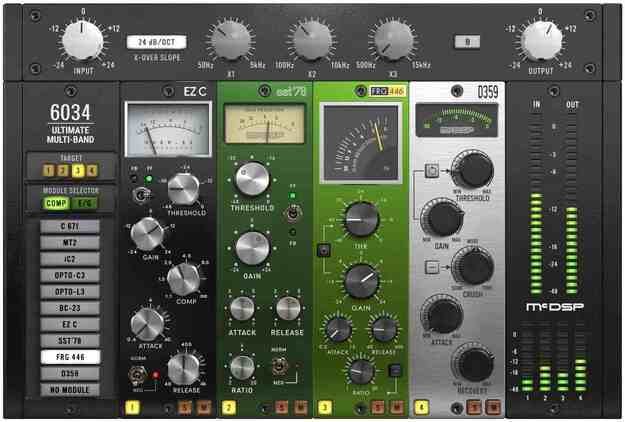
6034 Ultimate Multi-band is a multi-band dynamics plug-in from McDSP. It splits the signal into four bands, and each band can use its own compressor, expander or gate. This page covers the Native version (v7).
Its modules are the compression, expansion and gating modules from McDSP's 6050 Ultimate Channel Strip, placed inside a four-band crossover network. The modules in each band can be swapped on the fly, with the relative settings kept, so different styles can be compared quickly.
The crossover filter slopes can be set to 6, 12 or 24 dB/Oct. The meters show gain reduction and output level for each band, plus main input and output levels, so you can see what each band is doing while you adjust.
Version 7 is optimized for Apple silicon and current Intel processors. It offers zero-latency algorithms, double-precision processing and analog saturation modeling, in mono and stereo versions. Each license allows two activations.
Key features
Four-band crossover
The input is split into four bands and each band is processed separately. For example, the low band can be treated more firmly than the highs, which may suit a mix bus or a master channel.
Modules from the 6050
The compressor, expander and gate modules from the 6050 Ultimate Channel Strip can be used per band. Anyone who already knows the 6050 may find the controls familiar.
On-the-fly module auditioning
The module in each band can be swapped during playback while relative settings are retained. This helps when comparing different types of behavior quickly.
Selectable crossover slopes
The slope at the band edges can be set to 6, 12 or 24 dB/Oct. A steeper slope overlaps less between bands, which may help when you want the processed ranges kept distinct.
Per-band metering
Gain reduction and output level are shown for each band, along with the main input and output levels. You can see how much each band is working while you adjust.
Zero latency and double precision
The algorithms are zero-latency and processing is double precision, with analog saturation modeling. Mono and stereo versions are included.
Specifications
| Item | Details |
|---|---|
| Maker | McDSP |
| Type | Multi-band dynamics (compressor / expander / gate) |
| Bands | 4 |
| Crossover slopes | 6 / 12 / 24 dB/Oct |
| Plug-in formats | AAX Native, AU, VST3 |
| macOS | 10.13 or later (64-bit only) |
| Windows | 7, 8, 10 (64-bit only) |
| Authorization | iLok2 / iLok3, or a free iLok License Manager account with iLok Cloud |
| Activations | Two per license |
What is included and system requirements
- 6034 Ultimate Multi-band plug-in (mono and stereo versions)
- Artist presets from Mike Dean, ROCAsound, David Bottrill, Richard Chycki, Lovy Longomba, Eric Racy, Brujo Caipo and Zakk Cervini
- Formats: AAX Native, AU, VST3 (VST is no longer supported as of v7)
- Compatible with Pro Tools, Logic Pro, Cubase, Nuendo, Ableton Live, LUNA, Reaper, Sonar, Studio One and other hosts
How to use it
- Create a free iLok account and make iLok License Manager or iLok Cloud available.
- After purchase, download and run the McDSP installer.
- Open your DAW and insert the plug-in on the track you want to process, such as a mix bus.
- Choose a module (compressor, expander or gate) for each band.
- Set the crossover frequencies and the slope (6 / 12 / 24 dB/Oct).
- Adjust the threshold and other settings per band while watching gain reduction on the meters.
- Swap modules to compare their behavior and keep the one you prefer.
- You can also start from a preset and fine-tune from there.
Where it may come in handy
Mix bus control
It may be used on a stereo bus when you want to shape dynamics separately in the low, mid and high ranges. Because each band can behave differently, it can be more targeted than compressing the whole signal at once.
Band control for vocals
If only one range of a vocal gets uneven in level, you could let just that band's module work. The expander may also be used to tighten ranges you do not need.
Narration and podcasts
It may help to steady low-end movement in a voice or tidy a breathy range. Setting a gate on one band is another way to reduce unwanted sound in quiet passages.
Drum bus adjustment
You might process the low range where the kick sits and the high range where cymbals sit with different settings. Swapping modules lets you compare how the bus responds.
Who it may suit
- People who want to use compressors and gates separately per band
- People already familiar with the 6050 Ultimate Channel Strip modules
- People looking for a multi-band dynamics plug-in for Pro Tools, Logic Pro, Cubase and similar hosts
- People comfortable managing licenses with iLok
Good to know before you buy
- Authorization requires an iLok2 / iLok3, or a free iLok License Manager account with iLok Cloud.
- VST is no longer supported from v7; AAX Native, AU and VST3 are available.
- A separate HD version for AAX DSP (Pro Tools HDX) exists (regular price 229 USD at Plugin Boutique). This page covers the Native version.
- Each license allows two activations.
- McDSP's website mentions a 14-day demo.
How it differs from similar products
We do not pick a winner; the official figures are placed side by side.
McDSP CompressorBank Native v7
6034 Ultimate Multi-band splits the signal into four bands and processes each band separately. CompressorBank offers three plug-ins (CB101, CB202, CB303) that process the full signal, and CB303 adds static / dynamic EQ.
Price
$179 (Plugin Boutique, checked 2026-10-27). Prices can vary by region and promotion, so check the official page before buying.
See 6034 Ultimate Multi-band Native v7 on the product page
More of the same kind
Other introduction articles of the same kind.
- MeldaProduction MeldaProduction MRingModulatorMB
- Slate Digital Murda Melodies
- Sonnox Oxford Inflator
- Waves Magma StressBox
- Waves MultiMod Rack
- Waves Center
We have introduced 53 other products from McDSP.
- McDSP SA-2 Dialog Processor HD v7
- McDSP SA-2 Dialog Processor
- McDSP SA-2 Dialog Processor v7
- McDSP SA-3 Spectral Processor
- McDSP McDSP 6050 Ultimate Channel Strip HD v7
See the full list in Product database: Effects.
Sources: pluginboutique.com mcdsp.com (checked 2026-10-27)










Comments