
Disclosure: This page may contain affiliate links. Prices were checked on the date shown and may change.
An introduction to AIR Music Technology Ether, based on information from the maker and distributors: what it does, how to use it and who it may suit. It is not scored.
This isn't just another multi-effects processor – Ether is a creative powerhouse that allows you to shape and manipulate your sound like never before.
— AIR Music Technology official site
What is Ether?
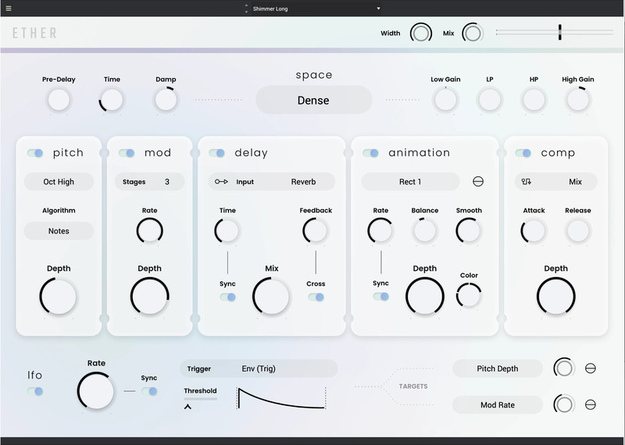
Ether from AIR Music Technology is a reverb whose distinguishing feature is post-reverb shaping: further effects stacked after the reverb to transform the sound.
The core has eight space settings, pre-delay, reverb time and damp. It is followed by EQ and filter, then bypassable modules (pitch, modulation, delay, animation, compressor) and an LFO/envelope section.
Tuning the reverb up is said to add shimmering qualities, while tuning down adds weight and lo-fi crunch. The delay can take its input from dry, pitched, reverb or mix, and cross control makes bouncing echoes.
It can be used on vocals, guitars, synths and drums, aimed at producers, musicians and sound designers.
Key features
Eight spaces
Eight space settings plus pre-delay, reverb time and damp form the reverb base.
Pitch module
Shift by various intervals with a selectable algorithm, for shimmer-like or heavy textures.
Modulation and animation
Modulation has rate, mix and stages. Animation uses selectable shapes for ripples, stutters or pulsing.
Delay
BPM sync, input routing options and cross-feed are included, which may help make bouncing echoes.
Compressor
Three input routing options with attack and release help control dynamics.
LFO / Envelope
Four modulation modes, BPM sync, a retrigger threshold, and two destinations with independent depth and invert.
Specifications
| Item | Details |
|---|---|
| Type | Reverb with post-effects |
| Formats | VST2 / VST3 / AAX / AU |
| OS | macOS 12-15 (Intel and Apple Silicon) / Windows 10-11 |
| Requirements | Dual-core 2.5 GHz CPU, 4 GB RAM (8 GB recommended), 2 GB free disk (20 GB for all content) |
| Authorization | Internet connection required |
What is included and system requirements
- Ether plug-in
- Categorised presets
- VST2 / VST3 / AAX / AU
How to use it
- After purchase, download from your Plugin Boutique account.
- Run the installer.
- Insert it on a track in your DAW.
- Pick a space and adjust reverb time and damp.
- Change pitch in the pitch module.
- Turn on modulation, delay or animation as needed.
- Use the compressor to control the tail's dynamics.
- Add movement with the LFO.
Where it may come in handy
Shimmer ambience
A pitched-up reverb might create a glittering space.
Lo-fi textures
Pitching down could add roughness.
Rhythmic reverb
Animation may chop or pulse the tail.
Sound design
Running synths or effects through it could create new textures.
Who it may suit
- People who want to process the reverb further
- Sound designers and ambient producers
- Users who want many effects in one plug-in
Good to know before you buy
- Internet is required for authorization.
- About 20 GB of free space is recommended for all content.
Price
$99 (Plugin Boutique, checked 2026-10-27). Prices can vary by region and promotion, so check the official page before buying.
More of the same kind
We have introduced 112 reverbs. Here are some of the others.
- United Plugins Verbum Entropic Hall
- AudioThing Springs
- McDSP FutzVerb
- sonible pure:verb
- BLEASS BLEASS Spectral Reverb
- Safari Audio Flamingo Verb V2
We have introduced 21 other products from AIR Music Technology.
- AIR Music Technology Xpand!2
- AIR Music Technology TimewARP 2600
- AIR Music Technology Vocal FX Collection
- AIR Music Technology AIR Music Technology Mini D
- AIR Music Technology Odyssey
For a side-by-side comparison scored on the same criteria, see our comparison of reverbs.
See the full list in Product database: Effects.
Sources: pluginboutique.com (checked 2026-10-27)










Comments