
Disclosure: This page may contain affiliate links. Prices were checked on the date shown and may change.
An introduction to sonible pure:verb, based on information from the maker and distributors: what it does, how to use it and who it may suit. It is not scored.
pure:verb creates reverb effects that are an impeccable fit for any input signal, and offers a straightforward yet powerful control set for sound-shaping.
— sonible official site
What is pure:verb?
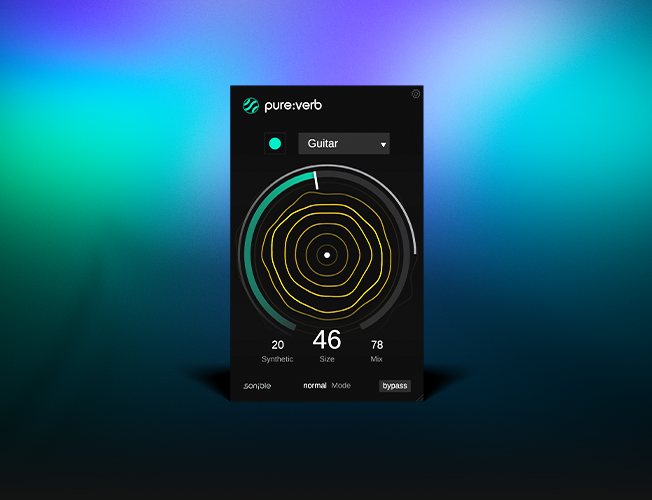
pure:verb is an AI-powered reverb plug-in from sonible of Austria. The official page highlights that it creates reverb effects that fit the input signal automatically, so you can get a suitable sound without elaborate settings.
At its core are a learning function that analyzes the spectral and temporal characteristics of the input, and input-specific profiles. You select a profile and press the button, and pure:verb is said to handle boomy low ends, muddy mids and harsh highs automatically.
The control set is small: Size for the virtual space, Synthetic to move from natural to artificial-sounding spaces, and three reverb modes (Infinite, Reverse and Bounce).
It is part of sonible's pure series (pure:comp, pure:limit, pure:bundle and others) and shares their approach. It supports macOS 10.9 or later and Windows 10 or later, with native Apple Silicon support.
Key features
Learning function matched to the input
It analyzes the spectral and temporal characteristics of the input and computes a reverb to match, reducing the manual work of balancing the reverb.
Input-specific profiles
Choose a profile for the type of source and press the button for automatic adjustment, replacing standard presets with profiles tuned to the input.
Size
Changing the size of the virtual space moves from an intimate sound to a spacious one, for example smaller for vocals and solo instruments and larger for orchestral sounds and pads.
Synthetic
Increasing it transforms a natural-sounding environment reverb into one that is out of this world, which suits creative effects.
Three reverb modes
Infinite, Reverse and Bounce modes give textures different from a conventional reverb.
Broad compatibility
It supports AU, VST2, VST3, AAX and MultiRack Native at sample rates from 44.1 kHz to 192 kHz, in mono and stereo, with machine-based or iLok authorization.
Specifications
| Item | Details |
|---|---|
| Plug-in formats (Mac) | VST / VST3 / AU / AAX |
| Plug-in formats (Windows) | VST / VST3 / AAX |
| Channels | Mono / stereo |
| Sample rates | 44.1 kHz to 192 kHz |
| Authorization | Machine-based or iLok |
| Latest version | 1.0.2 |
| Apple Silicon | Native |
| Supported OS | Windows 10 (64-bit) / macOS 10.9 or later |
| Recommended hardware | 4 GB RAM, Intel DualCore i5 or better, GPU with OpenGL 3.2+ |
| Trial | 30-day free trial (registration required) |
| Education | 40% EDU discount for students and lecturers |
What is included and system requirements
- pure:verb plug-in
- Input-specific profiles
- Three reverb modes (Infinite / Reverse / Bounce)
- Formats: AU / VST2 / VST3 / AAX / MultiRack Native
- A 30-day free trial is offered on the official site
- 40% EDU discount for students and lecturers
How to use it
- Register for the trial on sonible's site or buy the product.
- Install it and authorize the license (machine-based or iLok).
- Load pure:verb on a track or send in your DAW.
- Select the profile that fits your source.
- Press the learn button while playing the input so the reverb can be computed to match it.
- Set the size of the space with Size.
- Move from natural to artificial with Synthetic.
- Try Infinite, Reverse or Bounce modes if needed and set the mix.
Where it may come in handy
Space for vocal mixes
Choosing a vocal profile may help add space quickly with less fine-tuning.
Instruments and synths
A larger Size could add width to orchestral sounds and synth pads.
Video and post-production
sonible lists film and video sound as a use; it may suit adding natural ambience to dialogue and effects.
Creative effects
Raising Synthetic or using Reverse and Infinite modes can build otherworldly spaces.
Who it may suit
- People who find detailed reverb settings difficult and want a fitting sound quickly
- Those adding space to vocals or narration quickly
- Users who want to try for 30 days first
- Existing owners of sonible's pure series
Good to know before you buy
- The official site lists $39.
- Supported systems are macOS 10.9 or later and Windows 10 (64-bit).
- The latest version shown on the official page was 1.0.2 at the time of checking.
How it differs from similar products
We do not pick a winner; the official figures are placed side by side.
Arturia Rev OCEAN
pure:verb features a learning function with input-specific profiles and three modes (Infinite, Reverse, Bounce), listed at $39. Rev OCEAN has three modes (Abyss, Tide, Foam) plus Freeze, listed at $49.
Price
$39 (sonible official site, checked 2026-10-27). Prices can vary by region and promotion, so check the official page before buying.
See pure:verb on the product page
More of the same kind
We have introduced 112 reverbs. Here are some of the others.
- IK Multimedia CSR Inverse Reverb
- AudioThing Things – Texture
- Waves IR1 Convolution Reverb
- PSP Audioware PSP PianoVerb2
- Waves Atlas Reverb
- Rob Papen RP-VERB 2
We have introduced 9 other products from sonible.
- sonible sonible pure:bundle
- sonible pure:EQ
- sonible learn:bundle
- sonible sonible entropy:EQ+
- sonible pure:comp
For a side-by-side comparison scored on the same criteria, see our comparison of reverbs.
See the full list in Product database: Effects.
Sources: sonible.com pluginboutique.com arturia.com (checked 2026-10-27)










Comments