
Disclosure: This page may contain affiliate links. Prices were checked on the date shown and may change.
An introduction to United Plugins FireSnareVerb, based on information from the maker and distributors: what it does, how to use it and who it may suit. It is not scored.
FireSnareVerb allows you to combine up to six distinct algorithms simultaneously.
— United Plugins official site
What is FireSnareVerb?
FireSnareVerb is a reverb plug-in built for snare drums. It is developed by FireSonic and sold through the United Plugins site. The maker says it is aimed at giving a snare weight and character in its tail, rather than being a general-purpose hall for a whole kit.
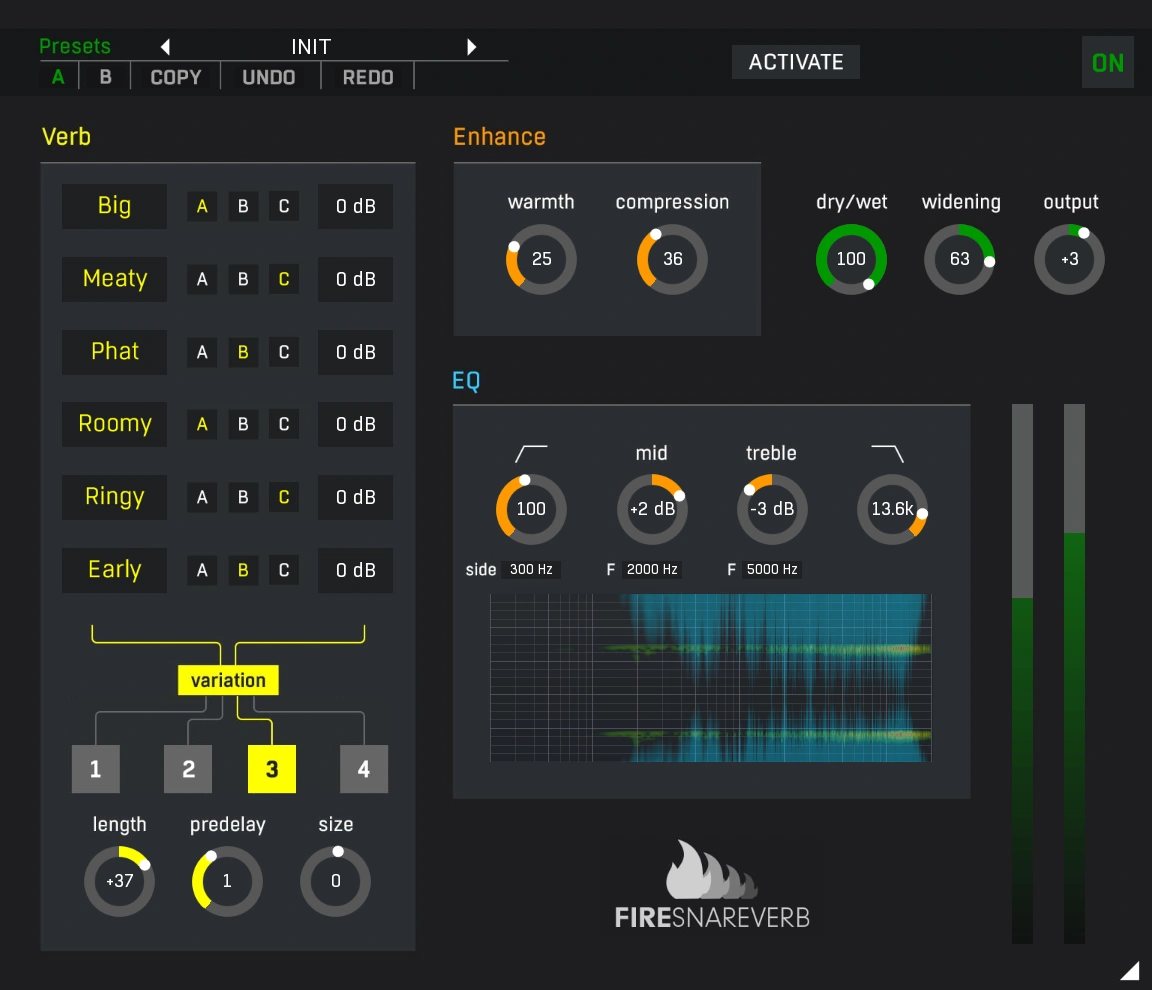
At its centre is a system that lets you blend six reverb engines at once. There are 18 algorithms across six categories (Big, Meaty, Phat, Roomy, Ringy and Early), and each engine has three versions (A, B and C) and its own volume control.
Once you have built a sound, four variations can be switched with buttons. Overall length, pre-delay and size can be adjusted, and the plug-in also has EQ, a Warmth module (analogue-style saturation), an internal compressor and a Widening control for stereo width.
A spectral visualizer lets you watch how EQ cuts and Warmth additions affect the signal. It runs on Windows 10/11 and macOS 10.14 or later in VST, VST3 and AAX formats.
Key features
Blend six engines
Each engine has three versions (A/B/C) and a volume control, and up to six can be mixed at once. You build the reverb texture by layering characters such as Meaty, Ringy and Early.
Designed for a parallel bus
The maker says it is meant to be used on a parallel bus, sending the snare mic signal through it while the original dry transient stays intact.
Four variations
The reverb can be switched between four variations, and a smart toggle lets you pick which settings change per variation. It may be handy when the sound needs to change by song section.
EQ, Warmth and compressor
The EQ has a Side high-pass, a global high-pass, Mid and Treble bands with sweepable frequency, and a low-pass. Warmth adds analogue-style saturation, and the internal compressor is meant to glue the tail to the snare.
Widening and dry/wet
Widening spreads the reverb to the sides while keeping the snare centred, according to the maker. A dry/wet dial sets the balance with the original signal.
Spectral visualizer
A high-definition spectral display shows how the reverb affects each frequency range. It lets you check low-end build-up visually as well as by ear.
Specifications
| Item | Details |
|---|---|
| Type | Snare-focused reverb (effect) |
| Developer | FireSonic (sold by United Plugins) |
| Algorithms | 18 (Big / Meaty / Phat / Roomy / Ringy / Early, each with A/B/C) |
| Variations | 4 |
| Formats | VST / VST3 / AAX (64-bit) |
| Windows | Windows 10/11 (64-bit), Intel/AMD processor with SSE2 |
| macOS | macOS 10.14 Mojave or later (64-bit), Intel / AMD / Apple Silicon |
| Processing | Internal 64-bit audio, any sampling rate |
| Licensing | Licence file (no iLok, dongle or internet needed for activation) |
| Trial | Free 15-day trial |
What is included and system requirements
- FireSnareVerb plug-in (VST / VST3 / AAX)
- Licence-file activation (no iLok needed)
- Free updates (the maker describes them as free for life)
- A free 15-day trial (offered on the maker's site)
How to use it
- In your DAW, create a send from the snare track to a parallel bus.
- Insert FireSnareVerb on the bus and leave the original track playing as it is.
- Raise the volume of the engines you want and choose their A/B/C versions.
- Set overall Length, Predelay and Size to fit the song's tempo and mood.
- Tidy the low end with the EQ (for example the Side High-Pass).
- Add texture with Warmth and the compressor.
- Adjust Widening and dry/wet for width and amount.
- Build the four variations and switch between them by song section.
Where it may come in handy
Rock and metal drums
The maker says it can produce anything from an aggressive stadium crack to a tight studio thump. It may be worth trying when home-recorded drums need more presence.
Snares in programmed drums
The maker says layering reverb on a sample snare can save the effort of manual sample layering. It may speed up beat making.
Cleaning up a muddy mix
Because you can tidy the low end with the EQ and Side high-pass while adding reverb, it may be worth trying on songs where the area around the snare gets muddy.
Who it may suit
- People who want a dedicated tool for the snare's reverb
- People who want to build reverb layers on drums quickly
- People who prefer a licence system without iLok
- People who want to try the free trial before deciding
Good to know before you buy
- The maker says it is designed to be used on a parallel bus.
- No iLok, dongle or internet access is required for activation.
- It is developed by FireSonic and sold on the United Plugins site.
- A 15-day trial is available.
How it differs from similar products
We do not pick a winner; the official figures are placed side by side.
Antelope Audio Shimmer
FireSnareVerb blends 18 algorithms from six categories and is built for snares. Shimmer combines decay of up to 30 seconds with octave pitch-shifting and is an ambient-oriented reverb.
Price
$69 (Plugin Boutique, checked 2026-10-27). Prices can vary by region and promotion, so check the official page before buying.
See FireSnareVerb on the product page
More of the same kind
We have introduced 112 reverbs. Here are some of the others.
- Michael Willis Dragonfly Reverb
- Eventide Temperance Lite
- iZotope Aurora
- Solid State Logic SSL Native FlexVerb
- McDSP Revolver Native v7
- LANDR VoxVerb
We have introduced 34 other products from United Plugins.
- United Plugins Biverb
- United Plugins Verbum Entropic Hall
- United Plugins Cyberdrive
- United Plugins FireEQ
- United Plugins QuickVox
For a side-by-side comparison scored on the same criteria, see our comparison of reverbs.
See the full list in Product database: Effects.
Sources: unitedplugins.com pluginboutique.com (checked 2026-10-27)










Comments