
Disclosure: This page may contain affiliate links. Prices were checked on the date shown and may change.
An introduction to United Plugins Cyberdrive, based on information from the maker and distributors: what it does, how to use it and who it may suit. It is not scored.
Choose from 64 distortion types across eight distinct categories, each meticulously designed to offer a spectrum of sonic possibilities.
— United Plugins official site
What is Cyberdrive?
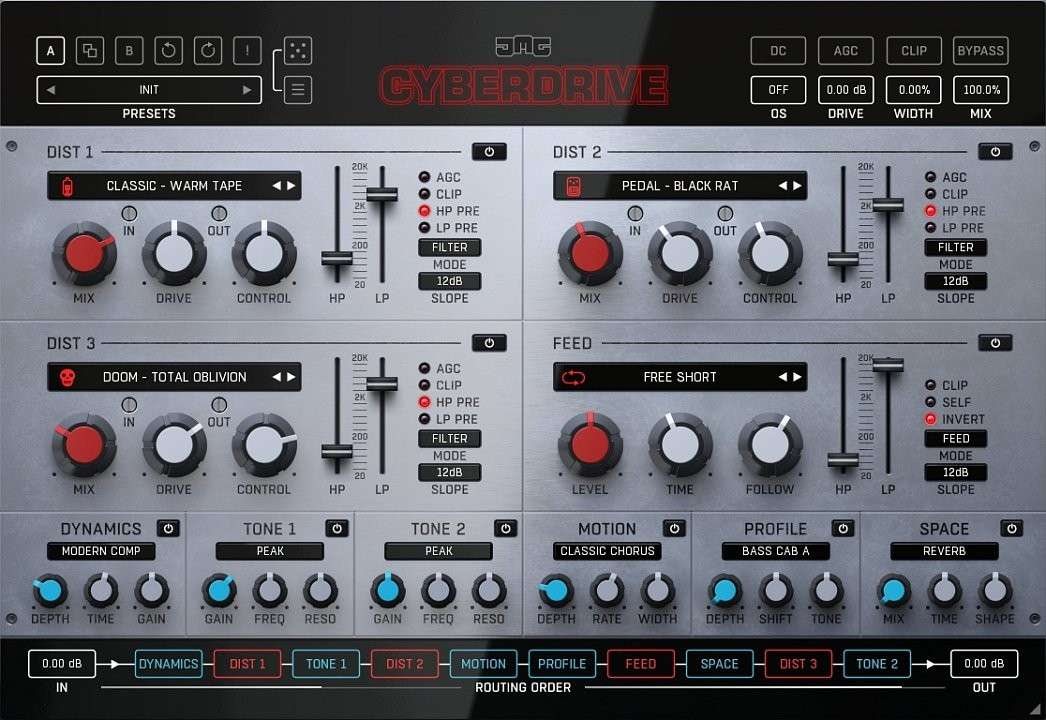
Cyberdrive is a distortion plugin from United Plugins (made by JMG Sound). It holds 64 distortion models in eight categories, and up to three Dist modules can be combined to build your own distortion setup.
Each Dist module has a filter system with high-pass, low-pass and multiband crossover options, plus its own drive and mix. The models are grouped as analogue gear (Classic), guitar pedals (Pedal), amps (Amp), dynamic and wavefolding types (Modern), bit-crushing and similar (Pixel), waveshaping (Shape), extreme types (Doom) and experimental ones such as ring modulation and FM (Freak).
Beyond distortion there is a FEED module for feedback effects and FX modules for Dynamics, Tone, Motion, Profile and Space. Modules can be reordered by drag and drop, and a randomize function helps you stumble on unexpected sounds.
The license also unlocks Cyberdrive Core, a streamlined version. Authorization uses license files without an iLok, and a 15-day unlimited trial is offered.
Key features
64 distortion models in eight categories
Classic, Pedal, Amp, Modern, Pixel, Shape, Doom and Freak. The Control knob adjusts parameters unique to each model so you can fine-tune its character.
Up to three Dist modules
Three distortion modules can work together, each with a filter system and gain-compensated drive and mix. It may suit cases where you want different distortion in different bands.
FEED module
This module creates feedback, with synced, millisecond and pitched delay modes. The feedback can return to its own input or include other modules in its path.
FX modules
Dynamics (compression, gating, transients), Tone (EQs and filters), Motion (chorus, flanger, tremolo), Profile (cabinet simulations, metalizers) and Space (reverb, delay, diffusion) are included.
Order section for signal flow
Drag modules to reorder them and double-click to enable or disable them. This also helps when you want to audition a single module.
Randomization
You can shuffle parameters in a section or across the whole plugin, and undo any change. It may help when you are short of ideas.
Core version included
The same license also unlocks Cyberdrive Core. You can choose the lighter version when you want to work faster.
Specifications
| Item | Details |
|---|---|
| Maker | United Plugins (made by JMG Sound) |
| Type | Distortion effect |
| Distortion models | 64 models in 8 categories |
| Formats (Mac) | VST, VST3, AU, AAX |
| Formats (Windows) | VST, VST3, AAX |
| Supported OS | macOS 10.10 or later (Intel / Apple Silicon); Windows 8 or later (Windows 11 supported) |
| Authorization | License file (no iLok) |
| Trial | 15 days, unlimited |
What is included and system requirements
- Cyberdrive plugin (Mac: VST / VST3 / AU / AAX; Windows: VST / VST3 / AAX)
- Cyberdrive Core (usable with the same license)
- Supported OS: macOS 10.10 or later, Windows 8 or later
- 15-day unlimited trial available
How to use it
- Install the trial from the official site and insert Cyberdrive on a track in your DAW.
- Start with one Dist module and choose a model from a category.
- Use the Control knob to adjust parameters unique to that model.
- Set drive and mix, and use the filter to decide which band is distorted.
- Add a second or third Dist module to layer if needed.
- Add compression, EQ or space with the FX modules.
- Reorder modules in the Order section and listen to the change.
- When stuck, use randomization, and save results you like as presets.
Where it may come in handy
Thickening synths and bass
Layering several distortions and changing the character by band may let you build thickness or grit. It may help bring a part forward when it gets buried in the mix.
Guitar and amp-style tones
The Pedal and Amp categories may add pedal or amp-style distortion to guitar and bass. You could use them to process clean home recordings.
Experimental processing of drums and vocals
Pixel and Freak may be used for bit-crushing or FM-style treatments, useful for creative tracks and sound effects.
Sound design play
The FEED module may create sustained or howling sounds. Together with randomization, it could be used to process source material.
Who it may suit
- Those who want to try many kinds of distortion in one plugin
- Those who want to layer distortions by band
- Those processing synths, bass, guitar, drums and other sources
- Those looking for a plugin that works without an iLok
Good to know before you buy
- Cyberdrive Core works with the same license, so you do not need to buy both separately.
- Formats are VST / VST3 / AU / AAX on Mac and VST / VST3 / AAX on Windows; there is no AU on Windows.
- The trial lasts 15 days with no feature limits, according to the maker.
How it differs from similar products
We do not pick a winner; the official figures are placed side by side.
Cyberdrive CoreUnited Plugins
Cyberdrive Core is a streamlined version using the same 64 distortion models. Cyberdrive adds up to three Dist modules, the FEED module, FX modules and the Order section. The maker describes Core as quick to use.
DarkFireUnited Plugins
DarkFire is a saturator that separates and shapes added harmonics, while Cyberdrive is a distortion plugin with 64 models and a modular layout. The choice depends on whether you want focused harmonic shaping or broad distortion options.
Price
Please check the official page for the price.
See Cyberdrive on the product page
More of the same kind
We have introduced 82 saturation and distortion effects. Here are some of the others.
- MeldaProduction MDistortionMB
- Native Instruments Kolor
- Waves Berzerk Distortion
- W. A. Production Satyrus
- Three-Body Technology Nylon
- Klevgrand Klevgrand LUXE
We have introduced 34 other products from United Plugins.
- United Plugins WideFire
- United Plugins Plamen
- United Plugins Cyberdrive Core
- United Plugins DarkFire
- United Plugins Front DAW
For a side-by-side comparison scored on the same criteria, see our comparison of saturation and distortion effects.
See the full list in Product database: Effects.
Sources: unitedplugins.com pluginboutique.com (checked 2026-10-27)










Comments