
Disclosure: This page may contain affiliate links. Prices were checked on the date shown and may change.
An introduction to AudioThing Things – Crusher, based on information from the maker and distributors: what it does, how to use it and who it may suit. It is not scored.
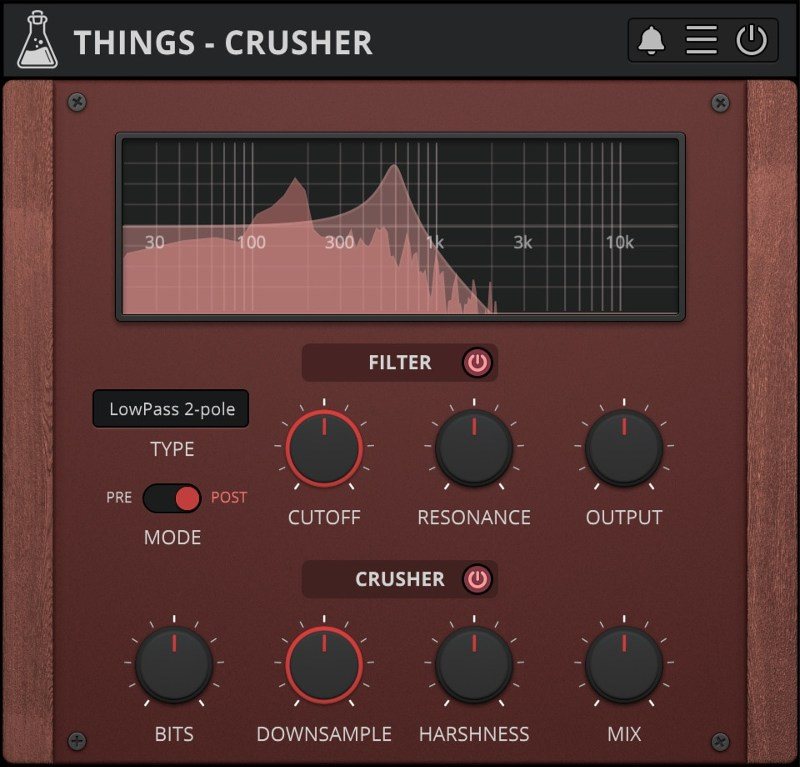
Things – Crusher is an easy-to-use Filter and Bit Crusher effect plugin.
— AudioThing official site
What is Things – Crusher?
Things – Crusher is an AudioThing effect combining a bit crusher with a multimode filter. It is described as inspired by the effect section of the company's instrument plugin Noises.
The filter has four types (lowpass, highpass, bandpass and notch), can be set to 2 or 4 poles, and has an output gain. The bit crusher consists of bits, downsample and mix controls.
The bit crusher is paired with a harshness control taken from the company's Reels plugin, so you can adjust how rough the result becomes.
Its functions are focused and the window is resizable. It may suit cases where you want to lo-fi drums or synths, or cut bands of a sound, with few controls.
Key features
Multimode filter
You can switch between lowpass, highpass, bandpass and notch, with 2- or 4-pole slopes. It can be used to remove unwanted bands or keep a specific band.
Bit crusher
Lowering bits and downsampling creates digital roughness. The mix knob sets the proportion with the original sound.
Harshness
A control taken from the Reels plugin that adjusts how rough the result is. It may be worth trying when you want to fine-tune the bit crusher's texture.
Output gain
Level can be adjusted after the filter, useful for matching the loudness before and after processing.
Oversampling and presets
Oversampling up to 16x (added in v1.2.1) and a preset system with randomizer are available, plus brightness and contrast controls.
Resizable window
The window can be resized to suit your monitor and working environment.
Specifications
| Item | Details |
|---|---|
| Maker | AudioThing |
| Type | Bit crusher / filter |
| Filter | Lowpass / highpass / bandpass / notch (2- and 4-pole) |
| Bit crusher | Bits, downsample, mix, harshness |
| Latest version listed | v1.2.2 (March 2026) |
| Formats (Windows) | VST2 / VST3 / AAX / CLAP (64-bit) |
| Formats (macOS) | VST2 / VST3 / AU / AAX / CLAP (64-bit, Universal 2) |
| Formats (Linux) | VST2 / VST3 / CLAP (64-bit) |
| OS | Windows 7 to 11, macOS 10.13 to macOS 26, Ubuntu 20.04 LTS |
| Requirements | 2GHz CPU, 4GB RAM |
| Authorization | 1 license for up to 3 computers, no iLok, offline activation available |
What is included and system requirements
- Things – Crusher plugin
- Presets and randomizer
- PDF manual (downloadable from the official site)
- A separate iOS/iPadOS version (AUv3 and standalone) is on the App Store
- Formats for Windows, macOS and Linux (see specs above)
How to use it
- Create an AudioThing account and check your license.
- Install the installer for your OS and activate online or offline.
- Insert Things – Crusher on a drum or synth track.
- Lower bits and downsample little by little and listen to the roughness.
- Set the proportion with the original sound using the mix knob.
- Move harshness and check how the roughness changes.
- Choose the filter type and number of poles to shape the band.
- Use output gain to match the level before and after.
Where it may come in handy
Lo-fi drums
You may run a drum loop through it and lower bits and downsample to add a rough texture.
Shaping synth bands
You could remove unwanted highs or lows with the filter and add texture with the bit crusher.
Processing sample material
It may be worth trying on samples to add digital grit.
Mix transitions
Automating the filter could create effects that thin the sound at section changes.
Who it may suit
- Those who want to try lo-fi and bit-crushing textures quickly
- Those who want a filter and bit crusher in one plugin
- Those who prefer few knobs over complex settings
- Those who want to try a demo before buying
Good to know before you buy
- The demo inserts 3 seconds of silence every 45 seconds and disables saving.
- One license can be used on up to 3 computers. No iLok is needed.
- Plugin Boutique sometimes shows time-limited discounts; please check the latest price before purchase.
- The official latest version is v1.2.2 (March 2026), listed as supporting macOS 26.
How it differs from similar products
We do not pick a winner; the official figures are placed side by side.
AudioThing Lines
Things – Crusher is focused on a bit crusher and filter, while Lines is an experimental design with a frequency shifter, feedback and a pulse sequencer.
Price
Please check the official page for the price.
See Things – Crusher on the product page
More of the same kind
We have introduced 34 filters. Here are some of the others.
- Minimal Audio Minimal Audio Hybrid Filter
- McDSP McDSP FilterBank Native v7
- FabFilter FabFilter Micro
- Antelope Audio VEQ-HLF
- Rob Papen FilterField
- MNTRA Mntra FLTRS
We have introduced 34 other products from AudioThing.
- AudioThing Things – Bubbles
- AudioThing Dub Filter
- AudioThing Philicorda
- AudioThing Environments
- AudioThing miniBit
See the full list in Product database: Effects.
Sources: audiothing.net pluginboutique.com (checked 2026-10-27)










Comments