
Disclosure: This page may contain affiliate links. Prices were checked on the date shown and may change.
An introduction to AudioThing miniBit, based on information from the maker and distributors: what it does, how to use it and who it may suit. It is not scored.
miniBit is an 8-bit/chiptune style synthesizer plugin that emulates the sound of 80s game consoles and retro computers.
— AudioThing official site
What is miniBit?
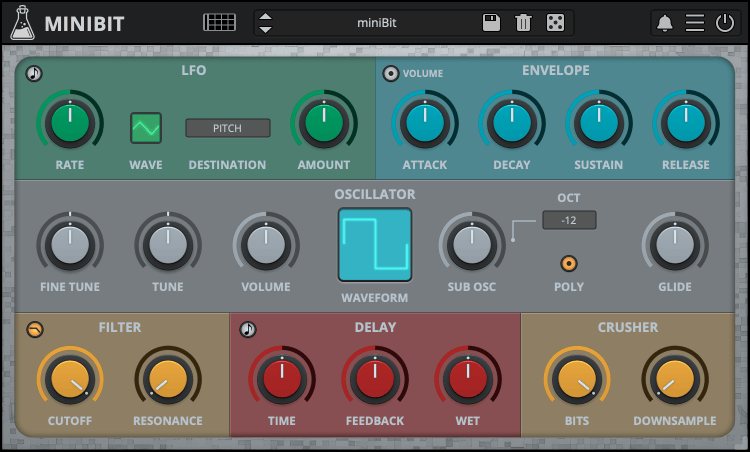
miniBit is an 8-bit/chiptune style synthesizer from AudioThing, modelled on 80s game consoles and retro computers. The maker says it draws on sounds the company has collected over the years.
The main oscillator offers 18 waveforms, paired with a sub oscillator that is a square wave one octave below. The waveforms are not bandlimited, so aliasing is audible and the sound is deliberately gritty.
A built-in bitcrusher adds noisier textures, and an 8-step stepper can automate pitch, volume, cutoff, resonance, waveform and downsampling.
The maker says it can go beyond chiptune, from snare-like noisy steps to ambient subs. A companion effect, miniVerb, is suggested for further chiptune-style processing.
Key features
18 waveforms plus custom waves
Besides 18 built-in waveforms, an editor lets you draw your own with 32 steps and 8 waveform slots per preset, a way to build console-style timbres yourself.
8-step stepper
Pitch, volume, cutoff, resonance, waveform and downsampling can be automated over 8 steps, with dice buttons to randomize. Sequencing waveforms gives sounds reminiscent of early trackers.
Bitcrusher and delay
The built-in bitcrusher roughens the sound and the delay adds space, so aliased textures are possible without external effects.
Poly and mono with glide
Switch between polyphonic and monophonic modes with glide, for glide leads in mono or chords in poly.
Filter, envelopes and LFO
A 2-pole low-pass/high-pass filter, pitch and volume envelopes and an LFO with multiple destinations let you animate simple waveforms.
128 presets and randomizer
128 presets and a preset randomizer provide starting points for sound design.
Companion iOS version
The maker offers a separate AUv3 and standalone version for iPhone and iPad on the App Store, so ideas could be sketched on the go and finished on desktop.
Specifications
| Item | Details |
|---|---|
| Waveforms | 18 + custom waves + sub oscillator |
| Filter | 2-pole low-pass / high-pass |
| Effects | Delay, bitcrusher |
| Stepper | 8 steps |
| Presets | 128 |
| Windows | Windows 7+ / VST2, VST3, AAX, CLAP, Standalone (64-bit) |
| macOS | macOS 10.13+ / AU, VST2, VST3, AAX, CLAP, Standalone (64-bit) |
| Linux | Ubuntu 20.04+ / VST2, VST3, CLAP, Standalone (64-bit) |
What is included and system requirements
- miniBit desktop plugin
- 128 presets
- Windows 7+, macOS 10.13+, Ubuntu 20.04+
- VST2, VST3, AU (Mac), AAX, CLAP and standalone
- An iPhone/iPad AUv3 and standalone version is sold separately on the App Store
- A limited demo (3 seconds of silence every 45 seconds, saving disabled) is available on the official site
How to use it
- Download the demo from the official site or buy a license.
- Run the installer and choose the format for your DAW.
- Rescan plugins in the DAW and load miniBit.
- Pick a preset to hear the character.
- Switch among the 18 waveforms from the waveform menu and add the sub oscillator.
- Assign volume or waveform to the 8 stepper steps to make a pattern.
- Raise the bitcrusher and adjust the roughness.
- Draw your own waveform in the custom waveform editor.
Where it may come in handy
Game-style music and chiptune
Because the sounds are modelled on 80s consoles, it may suit retro-game BGM and chiptune tracks.
Jingles for streams and videos
Short phrases are easy to build, so it may help with stream jingles or video sound effects.
Lo-fi texture
The maker says it can make ambient subs and noisy hits, so it may add rough texture to beats.
8-bit basslines in a DAW
Adding the sub oscillator to a square wave may give a game-music style bassline, and moving pitch in the stepper can give the bass an arpeggio-like motion.
Who it may suit
- Producers of chiptune or retro-game style music
- People who want gritty 8-bit sounds quickly
- Those who want to draw waveforms to build their own timbres
- People making BGM for browser or mobile games
Good to know before you buy
- The waveforms are not bandlimited, and aliasing is part of the design.
- The iOS version for iPhone and iPad is sold separately on the App Store.
- The demo mutes for 3 seconds every 45 seconds and cannot save.
- Linux is supported.
- Each preset keeps its own custom waveforms, so use copy/paste to carry one to another preset or turn off Update Custom Waves in global settings.
How it differs from similar products
We do not pick a winner; the official figures are placed side by side.
SX1000
miniBit has an 18-waveform oscillator, a 2-pole filter and 128 presets, while SX1000 has one oscillator (saw, square, pulse), a 24 dB/oct filter and 4 effects. Both are by AudioThing, but miniBit is based on chiptune sounds and SX1000 on a 1978 Italian analog synth.
Price
$20 (AudioThing official site, checked 2026-10-27). Prices can vary by region and promotion, so check the official page before buying.
See miniBit on the product page
More of the same kind
We have introduced 178 synthesizers. Here are some of the others.
- Tracktion MOK MOK Waverazor
- Arturia ARP 2600 V
- AIR Music Technology AIR Music Technology Mini D
- Arturia Arturia SEM V
- Arturia Synclavier V
- Future Audio Workshop SubLab
We have introduced 34 other products from AudioThing.
- AudioThing SX1000
- AudioThing Materia
- AudioThing RES-09
- AudioThing Things – Texture
- AudioThing Things – Motor
For a side-by-side comparison scored on the same criteria, see our comparison of synthesizers.
See the full list in Product database: Instruments.
Sources: audiothing.net pluginboutique.com (checked 2026-10-27)










Comments