
Disclosure: This page may contain affiliate links. Prices were checked on the date shown and may change.
An introduction to BLEASS BLEASS Sidekick, based on information from the maker and distributors: what it does, how to use it and who it may suit. It is not scored.
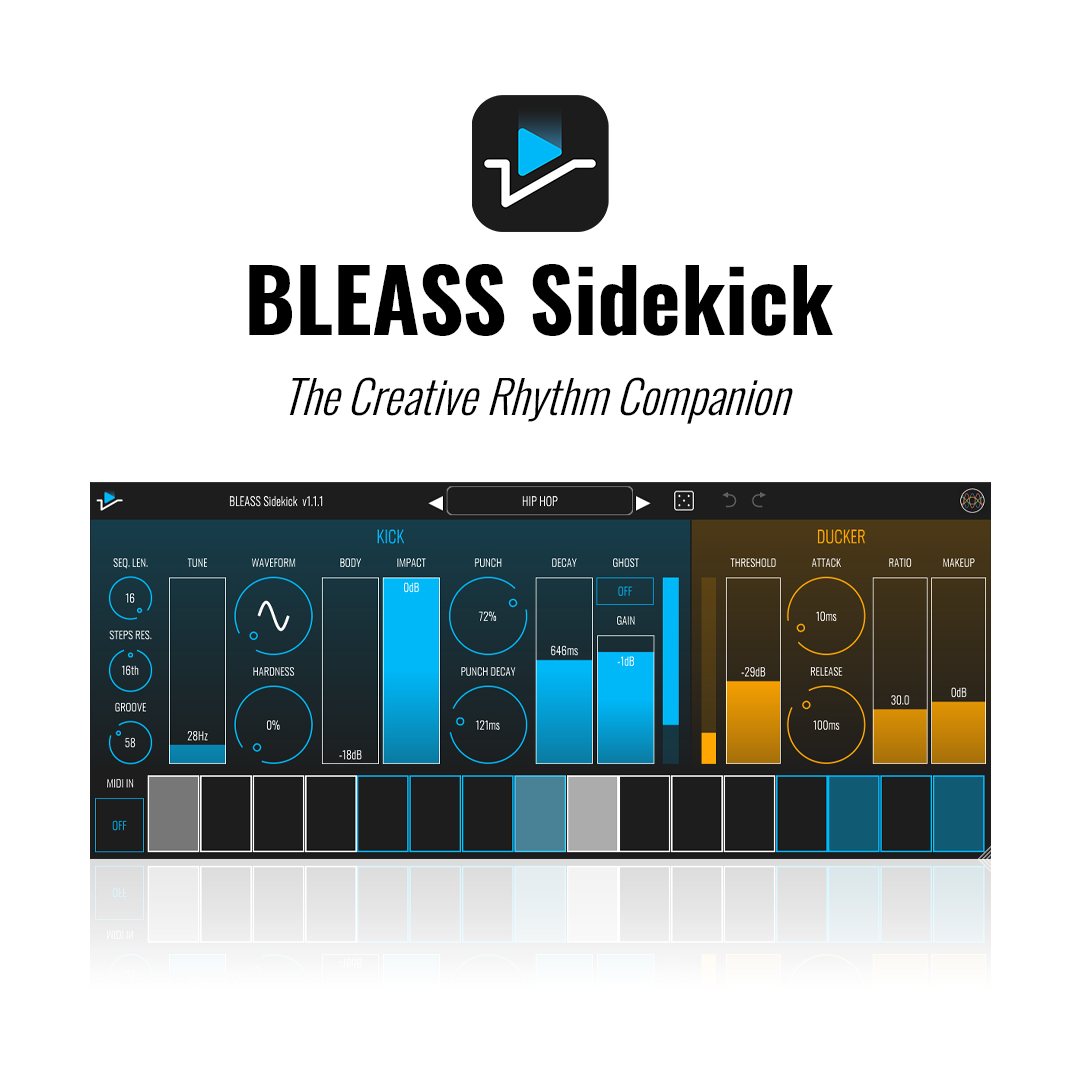
BLEASS Sidekick is a combination of a kick drum synth, a step sequencer, and a ducker (aka a sidechain compressor).
— BLEASS official site
What is BLEASS Sidekick?
BLEASS Sidekick combines a kick drum synth, a step sequencer and a ducker (a sidechain compressor) in one plug-in. It is meant for shaping rhythmic ducking together with a kick pattern.
The kick comes from an engine inspired by analog drum machines and can be triggered by the built-in 16-step sequencer or external MIDI input. Its sound can be mixed with the audio passing through, used to trigger the ducker, or both.
With the ducker engaged, the input level drops each time the kick is triggered. On a drum loop, this can reduce the loop's own kick and replace it with a pattern you design. Using the kick purely as a trigger can produce detailed rhythmic dynamics on a single part or a whole mix.
It supports Windows and macOS in VST3, AU and AAX formats, and an iOS AUv3 version is also listed. It is not standalone and needs a host such as a DAW.
Key features
Analog-style kick synth
Tune (20 to 100 Hz), waveform (sine to triangle), Hardness, Body, Impact, Punch and Decay shape the kick. Body mixes a second oscillator an octave higher and Impact emphasizes the attack.
16-step sequencer
Length (4 to 16 steps), step resolution and swing (Groove) can be set, and per-step velocity is set by dragging within a cell.
MIDI input
With MIDI In enabled, the kick can be triggered from a controller or a MIDI track. Any programmed pattern still plays.
Ducker
A sidechain compressor with Threshold, Attack, Release, Ratio and Makeup. When the kick exceeds the threshold, the passing signal is reduced.
Ghost mode
Ghost removes the kick from the output mix so it only acts as a trigger. In multi-out compatible DAWs the kick can be routed to a separate channel.
Replacing a loop's kick
The official description mentions ducking the loop's own kick and replacing it with your own sound and pattern.
Specifications
| Item | Details |
|---|---|
| Maker | BLEASS |
| Type | Kick synth + step sequencer + ducker |
| Kick controls | Tune 20 to 100 Hz, waveform (sine to triangle), Hardness, Body, Impact, Punch, Punch Decay, Decay, Ghost, Gain |
| Sequencer | 4 to 16 steps, Steps Res., Groove, MIDI In, Step Grid |
| Ducker | Threshold, Attack, Release, Ratio, Makeup |
| Windows | Windows 8 or later, VST3 (64-bit) / AAX |
| macOS | macOS 10.9 or later (64-bit only, M1 supported); VST3 / AU / AAX |
| Format | Requires a host (no standalone) |
| iOS | AUv3 version available |
What is included and system requirements
- BLEASS Sidekick plug-in (VST3, AU, AAX)
- Installer links and a serial are emailed after purchase
- Tutorial videos for Ableton, FL Studio, Pro Tools and Bitwig are listed on the manufacturer page
- A demo is offered on the manufacturer page
How to use it
- Download and install using the links in the email received after purchase.
- Open the plug-in in the DAW and click UNREGISTERED at the top left.
- Enter the serial and the purchase email address with an internet connection and click OK.
- Insert it on the track to be ducked.
- Shape the kick with Tune and Decay, and enter a pattern on the step grid.
- Adjust Threshold, Ratio and Release on the ducker to set how deeply the level moves.
- Enable Ghost when the kick should not be heard.
Where it may come in handy
Making pads or bass pulse with the beat
Ducking from the kick trigger may give pads or bass a breathing motion that follows the beat.
Replacing a loop's kick
Ducking the loop's own kick and layering your own may work.
Adding rhythmic movement to a mix
With Ghost enabled, a detailed ducking pattern can be applied to the whole mix.
Adding a simple kick
The official page also describes using it without the ducker to add a kick to a loop.
Who it may suit
- People who do not want to set up a separate kick for sidechain compression
- People who want to program detailed ducking patterns
- People who want to replace the kick in a drum loop
- People who also want to use the same idea on iOS
Good to know before you buy
- It is not a standalone product and requires a host such as a DAW.
- The serial is registered with the purchase email address over an internet connection.
- Routing the kick to a separate channel requires a multi-out compatible DAW.
Price
$19.99 (BLEASS official site, checked 2026-10-27). Prices can vary by region and promotion, so check the official page before buying.
See BLEASS Sidekick on the product page
More of the same kind
We have introduced 85 compressors. Here are some of the others.
- Relab Development Maselec Maselec MLA-4
- Universal Audio Empirical Labs EL8 Distressor Compressor
- Waves API 2500
- Cockos ReaComp ReaPlugs
- Slate Digital The Monster
- Waves CLA-2A Compressor / Limiter
We have introduced 16 other products from BLEASS.
- BLEASS BLEASS Multiband Compressor
- BLEASS BLEASS Voices
- BLEASS BLEASS Spectral Reverb
- BLEASS BLEASS Delay
- BLEASS BLEASS Motion EQ
For a side-by-side comparison scored on the same criteria, see our comparison of compressors.
See the full list in Product database: Effects.
Sources: bleass.com pluginboutique.com (checked 2026-10-27)










Comments