
Disclosure: This page may contain affiliate links. Prices were checked on the date shown and may change.
An introduction to sonible learn:bundle, based on information from the maker and distributors: what it does, how to use it and who it may suit. It is not scored.
The learn:bundle combines our advanced AI technology and signature pro-sound with intuitive design to help aspiring producers shape their sound with intention and build real mixing confidence.
— sonible official site
What is learn:bundle?
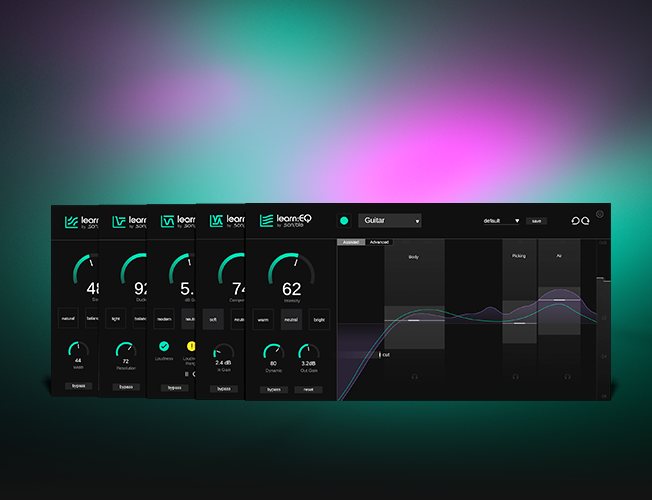
learn:bundle is a set of five plug-ins from Austrian developer sonible, made for learning while you mix. It includes an EQ, a compressor, a limiter, a reverb and a masking-resolution tool.
AI analyzes the audio, suggests settings, and shows the reasoning on screen. Two views, Assisted and Advanced, let you switch between guided operation and detailed control.
The five plug-ins are learn:EQ, learn:comp, learn:limit, learn:reverb and learn:unmask. They map to basic mixing themes: tone, dynamics, loudness, space and frequency clashes.
Formats are VST, VST3, AU and AAX on Mac and VST, VST3 and AAX on Windows. A 30-day trial is mentioned on the official page. It may suit people starting to mix at home who want to learn the reasoning as they work.
Key features
learn:EQ
AI finds problematic frequency areas and proposes an EQ curve automatically. Tone sliders allow intuitive adjustment, and Assisted view offers broad, impactful moves.
learn:comp
The effect of compression is shown with metering and waveform displays. Assisted view uses musical terms and goal-based parameters.
learn:limit
It analyzes the incoming signal and suggests limiting based on loudness standards. With real-time loudness monitoring, it may serve as a guide for streaming levels.
learn:reverb
AI suggests a reverb suited to the source, and a space visualization shows where the sound sits. It may help people who hesitate over reverb amounts.
learn:unmask
A spectral ducking tool that listens to two sources and clears clashing frequencies in real time. It could be used where vocals and guitars overlap.
Assisted and Advanced views
You can switch between a guided simple view and a detailed one, moving to the Advanced view as you gain experience.
Specifications
| Item | Details |
|---|---|
| Type | Mixing bundle (5 plug-ins) |
| Contents | learn:EQ / learn:comp / learn:limit / learn:reverb / learn:unmask |
| Formats (Mac) | VST / VST3 / AU / AAX |
| Formats (Windows) | VST / VST3 / AAX |
| Channels | Mono, stereo |
| Sample rates | 44.1 to 192 kHz |
| Authorization | Machine-based or iLok |
| OS | Mac OS X 10.14 or later (official), Windows 10 (64-bit) |
| Trial | 30 days |
What is included and system requirements
- learn:EQ
- learn:comp
- learn:limit
- learn:reverb
- learn:unmask
- 30-day trial (mentioned on the official page)
How to use it
- Register for the trial and install the plug-ins.
- Insert learn:EQ on one track, such as a vocal, and look at the AI's suggested curve.
- Make broad moves in Assisted view and compare the result.
- Check how compression works on the meters in learn:comp.
- Insert learn:limit on the master track and adjust while watching the loudness display.
- Once comfortable, switch to Advanced view for finer control.
Where it may come in handy
A first vocal mix
Looking at the EQ and compressor suggestions may help you practice working out why those settings were chosen.
Resolving clashes between vocals and instruments
learn:unmask could be used to find where the backing hides the vocal and clear space.
Level checks for streaming
The loudness display in learn:limit may help you check levels for streaming.
Who it may suit
- People new to mixing who want to learn the basics hands-on
- People who want to see the reasoning behind suggested settings
- People who want an EQ-to-limiter set with a consistent feel
Good to know before you buy
- The official page mentions a 40% discount for students and lecturers.
- Authorization is machine-based or iLok.
- The OS requirement differs: the official page says Mac OS X 10.14 or later, while the Plugin Boutique page says macOS 10.13 or later. Check the latest requirements before buying.
Price
$199 (sonible official site, checked 2026-10-27). Prices can vary by region and promotion, so check the official page before buying.
See learn:bundle on the product page
More of the same kind
Other introduction articles of the same kind.
- Waves Signature Series Bass and Drums
- Waves Abbey Road Collection
- McDSP 6060 Ultimate Module Collection
- NUGEN Audio Surround Suite
- iZotope iZotope Mix & Master Bundle Standard
- Apogee Pultec FX Bundle
We have introduced 9 other products from sonible.
- sonible sonible pure:bundle
- sonible smart:bundle
- sonible sonible Metering Bundle
- sonible pure:verb
- sonible pure:EQ
See the full list in Product database: Bundles.
Sources: sonible.com pluginboutique.com (checked 2026-10-27)










Comments