
Disclosure: This page may contain affiliate links. Prices were checked on the date shown and may change.
An introduction to Universal Audio Vibe Analog Machines, based on information from the maker and distributors: what it does, how to use it and who it may suit. It is not scored.
Explore ten retro-futuristic tone machines.
— Universal Audio official site
What is Vibe Analog Machines?
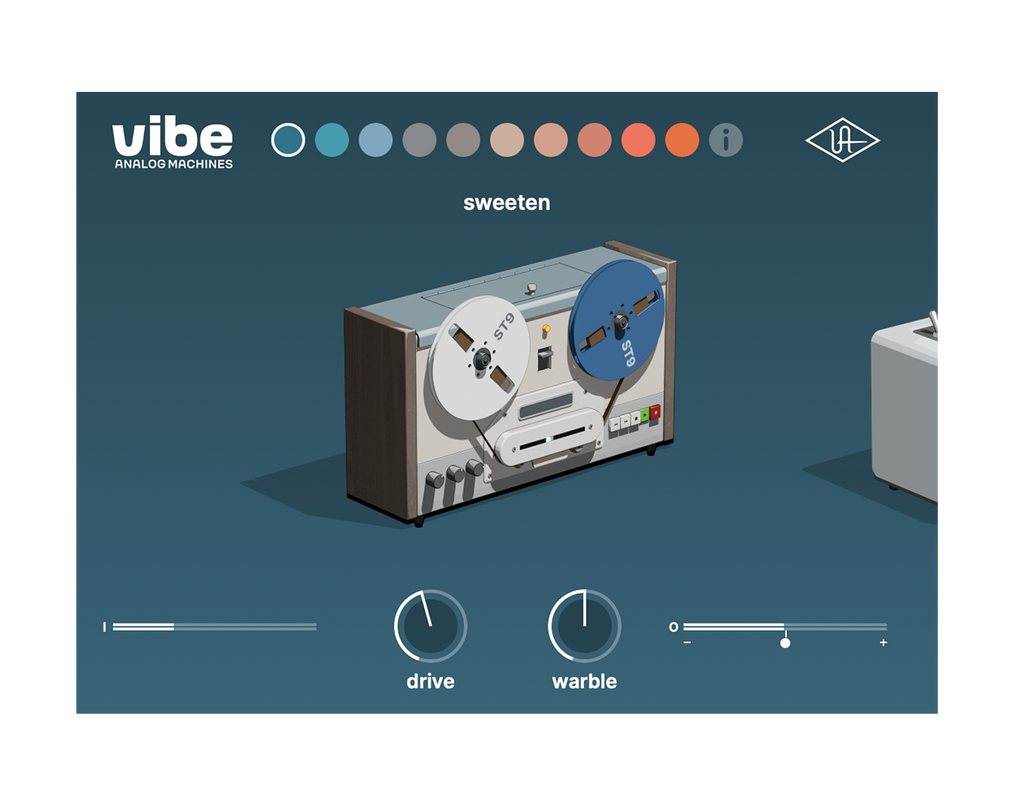
Vibe Analog Machines is an analog-style tone-coloring effect from Universal Audio (UA). It is a UAD Native plugin that runs in a Mac or Windows DAW without UA hardware. The official page describes it as ten retro-futuristic tone machines.
It contains ten 'machines': warm tape, console-style crunch, tube-like harmonics, lo-fi aged tape, and more aggressive broken distortion, covering a range of directions.
Controls are simple, centered on Drive, Tone and tape Warble. The design leans toward choosing a machine you like and setting the amount with the knobs rather than fine-tuning many options.
It is intended for the tones heard in hip-hop, lo-fi, electronic, rock and experimental music, applied to drums, guitars, vocals, synths or a whole mix. Each license can be authorized on three machines and is managed through an iLok account.
Key features
Ten machines
Sweeten, Edge, Glow, Warm, Thicken, Vintagize, Distort, Overdrive, Fire and Sputter. They cover tape-, console- and tube-style directions.
Sweeten for tape warmth
Adds reel-to-reel-style tone that can be overdriven gently, which can be tried on vocals, instruments or a full mix when you want warmth.
Edge and Glow for texture
Edge is like pushing console gain for crunch, and Glow adds tube-preamp-like harmonics. Both offer different ways to add weight to a track that feels thin.
Warm and Thicken for movement
Warm is an older tape with deeper warmth and warble, and Thicken has a lo-fi texture reminiscent of half a century ago. Both can be compared on parts where you want motion.
Vintagize for an aged-recording feel
Pushes the tone toward an old tape-machine character, which can be used to give a modern recording an older feel.
Distort, Overdrive, Fire and Sputter for heavy color
These machines go heavier, with pushed-tube distortion, tape roar, searing analog tone and broken-sounding mayhem, offering options when you want to push a track to its limits.
Simple controls
Adjustment is done with knobs such as Drive, Tone and tape warble. With few detailed settings, it may suit quick decisions by ear.
Specifications
| Item | Details |
|---|---|
| Type | Analog-style tone coloring (UAD Native) |
| Machines | 10 |
| Main controls | Drive, Tone, tape Warble |
| Platform | macOS / Windows; no UA hardware required |
| License | Three authorizations per license, on a computer or an iLok USB key; an iLok account is required |
| Trial | 14-day demos available for eligible Native plugins |
| Price | No confirmed regular price (see note) |
What is included and system requirements
- Plugin containing ten machines (UAD Native)
How to use it
- Prepare a UA account and an iLok account.
- After purchasing or starting a demo, install the plugin with the UAD Native installer.
- Authorize the license to a computer or an iLok USB key.
- Open your DAW and insert Vibe Analog Machines on a track.
- Pick the machine that matches your goal from the ten.
- Set the amount of drive or saturation with Drive.
- Adjust Tone and tape warble to shape the tone.
Where it may come in handy
Adding tape texture to drums
Trying Sweeten or Warm on kick or snare may reveal ways to round edges or add texture.
Creating a lo-fi mood
Thicken or Vintagize may give you a handle for an old-recording atmosphere.
Warming a vocal
Glow or Sweeten applied lightly may be worth trying on a voice that feels thin.
Distorting synths or guitars
Heavier machines such as Overdrive or Fire may suit more drastic tone changes.
Who it may suit
- People who want to try analog-style coloring with simple controls
- Producers shaping lo-fi, hip-hop or electronic textures
- Those who want tape-style and distortion-style options in one plugin
- Users who want UA effects without UA hardware
Good to know before you buy
- An iLok account is required to manage the license; the USB key itself is optional.
- A regular price could not be confirmed on the official UA page, so none is listed.
- UA also offers a separate lighter edition, Vibe Analog Machines Essentials.
Price
Please check the official page for the price.
See Vibe Analog Machines on the product page
More of the same kind
Other introduction articles of the same kind.
- AIR Music Technology Tape Echo
- Eventide H3000 Factory Mk II
- McDSP SA-2 Dialog Processor HD v7
- Pitch Innovations Fluid Pitch
- Waves NLS Non-Linear Summer
- Waves X-FDBK
We have introduced 46 other products from Universal Audio.
- Universal Audio Universal Audio dbx 160 Compressor/Limiter
- Universal Audio Empirical Labs FATSO Tape Simulator
- Universal Audio A-Type Multiband Dynamic Enhancer
- Universal Audio API Vision Channel Strip Collection
- Universal Audio Waterfall Rotary Speaker
See the full list in Product database: Effects.
Sources: uaudio.com pluginboutique.com (checked 2026-10-27)










Comments