
Disclosure: This page may contain affiliate links. Prices were checked on the date shown and may change.
An introduction to Waves X-FDBK, based on information from the maker and distributors: what it does, how to use it and who it may suit. It is not scored.
X-FDBK helps you ring out the PA quickly and accurately, in a set-it-and-forget-it way.
— Waves official site
What is X-FDBK?
X-FDBK is a feedback suppression plugin from Waves for live sound. It aims to find and reduce the howl that occurs between speakers and microphones automatically.
The plugin identifies the main frequencies that cause feedback and notches them out automatically. The listing says it can speed up ringing out the PA.
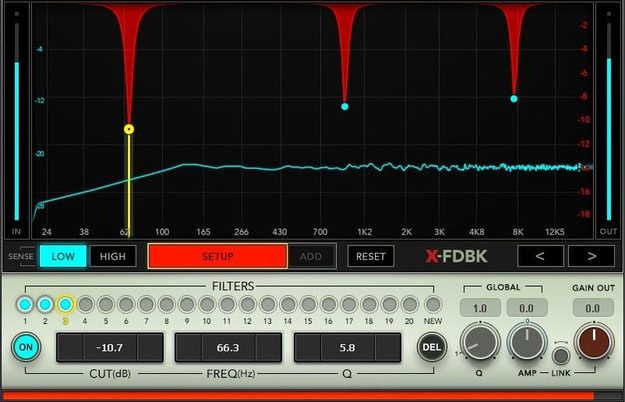
Up to 20 filters are available, and bandwidth and cut amount are optimized automatically. Global controls let you compensate for unexpected changes.
A display analyzes the incoming audio and overlays the notch filter responses. The listing says one person can ring out the PA.
Key features
Automatic feedback detection
It finds frequencies that cause feedback and cuts them automatically, useful before raising monitor or PA levels.
Up to 20 filters
Up to 20 notch filters can be used to cover several frequencies.
Auto-optimized bandwidth and cut
The width and depth of each filter are set automatically, reducing manual fine-tuning.
Global filter controls
When room conditions change, all filters can be adjusted together.
Analysis display
The display shows the input analysis with notch responses overlaid, so you can see which frequencies are cut.
Extra headroom
The listing says you may regain several dB of headroom before feedback occurs.
Specifications
| Item | Details |
|---|---|
| Type | Feedback suppression |
| Formats | VST / AU / AAX (Mac); VST / AAX (Windows) |
| Operating systems | macOS Monterey 12, Ventura 13, Sonoma 14, Sequoia 15; Windows 10 or later |
| Filters | Up to 20 |
What is included and system requirements
- X-FDBK plugin
- Formats: VST / AU / AAX (Mac); VST / AAX (Windows)
How to use it
- Create a Waves account and activate the license in Waves Central.
- Insert X-FDBK on the PA or monitor path in your live host or mixer.
- Raise the level gradually until feedback is about to occur.
- Confirm that notches are created at the detected frequencies.
- Check the display for the frequencies being cut.
- Use the global controls if conditions change.
Where it may come in handy
Live band PA
It may help ring out a PA quickly during rehearsal.
Talks and speeches
It may suit venues with microphones where feedback should be reduced in advance.
Streaming rooms
It may be worth trying when speakers and microphones are close together and feedback is a concern.
Who it may suit
- People who run PA at live venues
- People who handle sound at talks and events
- People who want to automate feedback control
Good to know before you buy
- It is made for live use, not for EQ correction of recorded audio.
- A Waves account and license activation are required. No price is given here because the listing shows a limited-time discount.
How it differs from similar products
We do not pick a winner; the official figures are placed side by side.
Waves SSL E-Channel
X-FDBK is dedicated to feedback suppression, while SSL E-Channel is a mixing plugin with EQ and dynamics. They serve different purposes.
Price
Please check the official page for the price.
See X-FDBK on the product page
More of the same kind
Other introduction articles of the same kind.
- United Plugins JMG Sound Expanse 3D
- Boz Digital Labs Panther Stereo Manipulation
- Blue Cat Audio AcouFiend
- Mellowmuse IR1A Convolver
- Universal Audio Universal Audio dbx 160 Compressor/Limiter
- Sonnox Oxford Envolution
We have introduced 215 other products from Waves.
- Waves CLA Effects
- Waves Scheps Parallel Particles
- Waves OneKnob Brighter
- Waves Key Detector
- Waves Doppler
See the full list in Product database: Effects.
Sources: pluginboutique.com (checked 2026-10-27)










Comments