
Disclosure: This page may contain affiliate links. Prices were checked on the date shown and may change.
An introduction to Bogren Digital Ampknob Fatman, based on information from the maker and distributors: what it does, how to use it and who it may suit. It is not scored.
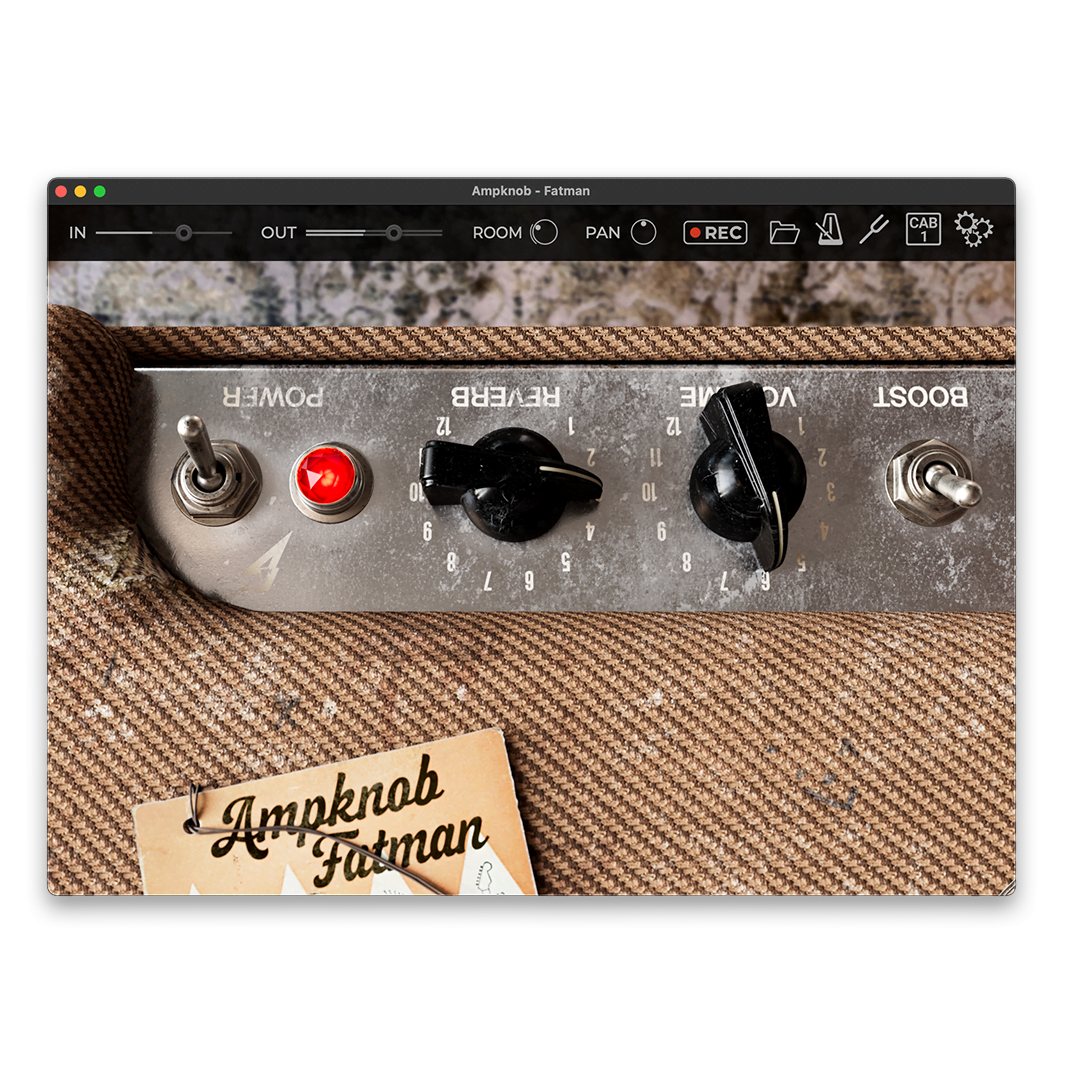
Flick on the included boost pedal and crank the volume knob to drive the amp into creamy and chewy overdrive.
— Bogren Digital official site
What is Ampknob Fatman?
Ampknob Fatman is a guitar amp simulator from Bogren Digital, the plugin brand of producer Jens Bogren. According to the maker, it is modeled on a vintage 1950s amp that was originally designed for bass players, and it aims for a heavy low end without a harsh top.
It keeps the interface simple, in line with the Ampknob series idea of getting into sound design without a long setup. Besides the amp itself, it includes a boost pedal, a spring reverb and a Room control that blends in studio ambience, so you can plug in a guitar and start practicing or sketching ideas quickly.
The cabinet section uses Bogren Digital's own IRDX technology. The maker says IRDX adds a more lifelike dynamic response to the built-in speaker models and to any other cabinet IR you load. The bundled cabs are a matched cab for the amp, an alternative 4×12 and a bass cab.
A standalone version is included next to the plugin formats. The standalone version has a metronome and a riff recorder, so you can capture a phrase without opening your DAW. The tuner and the noise gate are in both the plugin and standalone versions.
Key features
Modeled on a 1950s bass amp
The maker describes it as based on a 1950s amp originally built for bass players, with a 4×10 speaker setup. It may suit cases where you want a thick low end and a full midrange.
Boost pedal and input slider
The included boost pedal and the volume knob add overdrive. The input slider sets how strongly the guitar signal hits the virtual tubes, so you can move from clean tones to the edge of breakup.
Spring reverb and Room
The reverb knob adds spring reverb, and Room blends in the sound of a room. With stereo output, the Pan control places the main guitar separately from the room and reverb.
Three cabinets
A matched cab, an alternative 4×12 and a bass cab are included. The bass cab lets you try the plugin as a bass amp or as a guitar amp with a different voicing.
IRDX on loaded IRs too
IRDX adds a more lifelike dynamic response to the built-in cabs and to any IR you load. You can use IR packs from Bogren Digital or other IRs of your choice.
Standalone version with riff recorder
The standalone version has a metronome and a riff recorder. You can play and record without launching a DAW, then drag the audio file into your DAW later.
Tuner and noise gate
Both versions include a tuner and a noise gate. They may be handy when you want to check tuning and handle noise within one plugin.
Specifications
| Item | Details |
|---|---|
| Type | Guitar amp simulator |
| Modeled on | A 1950s bass amp (per the maker) |
| Cabinets | Three cabs (matched 4×10-style, 4×12, bass) plus IR loading |
| Built-in tools | Boost pedal, spring reverb, Room, tuner, noise gate |
| Standalone version | Yes (metronome, riff recorder) |
| Formats | Standalone / VST3 / AU / AAX |
| System | Windows 10 or newer, macOS 10.13 or newer (Intel and Apple Silicon) |
What is included and system requirements
- The amp (boost pedal, spring reverb, Room, Pan)
- Three cabinets (matched, 4×12, bass)
- IRDX technology
- Tuner and noise gate
- Standalone version (metronome, riff recorder)
- Formats: VST3 / AU / AAX / Standalone; Windows 10 or newer, macOS 10.13 or newer
How to use it
- Download the installer from your Plugin Boutique account and run it.
- Create a track in your DAW, insert Ampknob and enter your serial number on the activation screen.
- Connect your guitar to your audio interface and set up input monitoring.
- Start with the input slider low and set the amount of drive with the volume knob.
- Turn on the boost pedal if you want more push.
- Blend in reverb and Room, and adjust placement with Pan for stereo output.
- Choose one of the three cabs or load an IR you like.
- When you do not need a DAW, open the standalone version and record phrases with the riff recorder.
Where it may come in handy
Recording rock riffs
With the boost pedal on and the volume raised, you may get the thick overdrive described by the maker. You can capture riffs in the standalone version and bring them into your DAW later.
Shaping bass tones
Because a bass cab is included, it may be worth trying when you want to add harmonics to a bass part. Comparing it with your guitar settings makes the different roles easier to hear.
Practicing without a DAW
The metronome and riff recorder let you record short practice takes and listen back. It may lower the barrier on days when you just want to play.
Using your own IRs
IRDX also works on IRs you load, so it may be useful when you want to change how your usual IR packs respond.
Who it may suit
- People who want to start shaping guitar tone with few controls
- People who want to try a thick overdrive and reverb in one plugin
- People who want to practice or record ideas without opening a DAW
- People who want to change how their own IRs respond
Good to know before you buy
- Activation needs the serial number shown in your Plugin Boutique account.
- IRDX is already built into this product; the maker says there is no need to add IRDX Core after Bogren Digital plugins.
- A sale may be running; please check the current price on the store page before buying.
- Descriptions of tone are based on the maker's text; we have not listened to the product ourselves.
How it differs from similar products
We do not pick a winner; the official figures are placed side by side.
Ampknob Duet
Both belong to the Ampknob series and have three cabs, Room, IRDX and a riff recorder. Fatman is based on a 1950s bass amp with a boost pedal and spring reverb, while Duet is based on a 1960s silverface-style amp with spring reverb and tremolo.
Price
Please check the official page for the price.
See Ampknob Fatman on the product page
More of the same kind
We have introduced 28 guitar amp simulators. Here are some of the others.
- Waves Voltage Amps
- Waves PRS SuperModels
- Eventide Spring
- Kuassa Amplifikation Rectifor
- Kuassa Amplifikation Creme
- IK Multimedia AmpliTube 5 SE
We have introduced 12 other products from Bogren Digital.
- Bogren Digital BassKnob Trivium
- Bogren Digital AmpKnob BH4
- Bogren Digital Ampknob BDH 5169
- Bogren Digital Ampknob BDE 120
- Bogren Digital IRDX Core
For a side-by-side comparison scored on the same criteria, see our comparison of guitar amp simulators.
See the full list in Product database: Effects.
Sources: bogrendigital.com pluginboutique.com (checked 2026-10-27)










Comments