
Disclosure: This page may contain affiliate links. Prices were checked on the date shown and may change.
An introduction to Kuassa Amplifikation Caliburn, based on information from the maker and distributors: what it does, how to use it and who it may suit. It is not scored.
What is Amplifikation Caliburn?
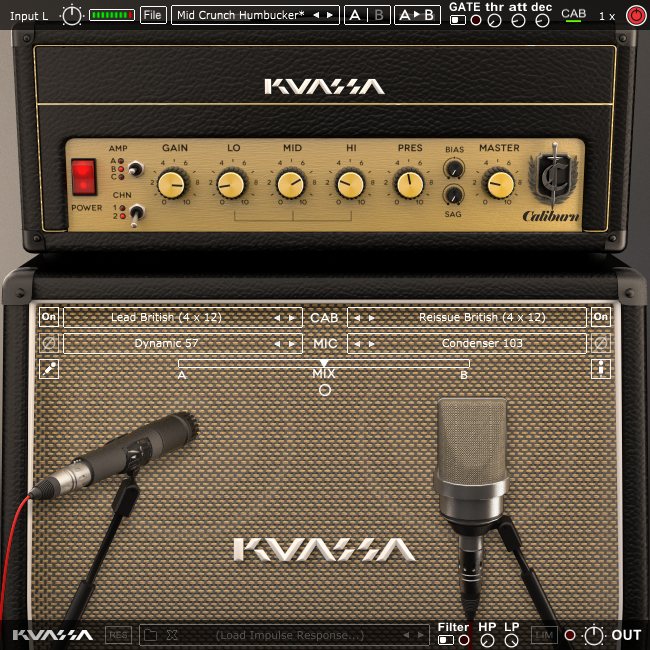
Amplifikation Caliburn is a guitar amp simulator from Kuassa inspired by British Marshall-style amps. The official page says it uses third-generation modeling aimed at a responsive, dynamic feel.
It offers three amps based on the JTM45, JCM800 and JCM900 Master Volume, each with a Clean and a Lead channel.
There are five cabinet types with Celestion speakers and seven microphone models, including SM57, MD421, MD441, Royer 121, AKG C414 and Neumann TLM103.
A noise gate, a limiter and up to 8x oversampling are included. A free demo is offered on the official site so you can try before buying.
Key features
Three amps
Models based on the JTM45, JCM800 and JCM900 Master Volume, each with Clean and Lead channels.
Power amp controls
Bias and sag controls adjust the power amp response, which may help fine-tune playing feel.
Five cabinets, seven mics
Combine Celestion speakers such as G12T, Vintage 30 and Greenback with seven microphones, including dual-miking.
Filters and gate
High-pass and low-pass filters, a noise gate and a limiter help tidy unwanted bands and noise in high-gain tones.
Oversampling
Up to 8x oversampling is supported, with sample rates up to 192 kHz.
Specifications
| Item | Details |
|---|---|
| Amps | 3 (JTM45, JCM800, JCM900 MV based) |
| Cabinets | 5 (Celestion) |
| Microphones | 7 |
| Formats | Standalone / VST / VST3 / AU / AAX / Amplifikation 360 module |
| OS | macOS 10.11 or later / Windows Vista or later (64-bit) |
| System | 4 GB RAM minimum |
What is included and system requirements
- 3 amps (each with Clean and Lead)
- 5 cabinets
- 7 microphones and dual-miking
- Noise gate, limiter and filters
How to use it
- Register the serial on your Kuassa account and get the license file.
- Install Caliburn with the installer.
- Load it as a plugin in your DAW.
- Choose an amp and a channel (Clean or Lead).
- Pick a cabinet and microphone and adjust mic position.
- Set the gate and filters, then save your settings.
Where it may come in handy
Rock guitar recording
It may help you build British-style distortion by trying amp and cabinet pairings.
Re-amping DI tracks
It may be used to replace the tone of recorded guitar.
Demo production
It may help set a tone quickly without bringing in an amp.
Who it may suit
- Players looking for British crunch or lead tones
- Those seeking an affordable amp simulator
- Users who like detailed mic placement
Good to know before you buy
- The license is obtained by registering the serial on Kuassa's member site.
- The free demo adds noise at regular intervals.
Price
$49 (Plugin Boutique, checked 2026-10-27). Prices can vary by region and promotion, so check the official page before buying.
See Amplifikation Caliburn on the product page
More of the same kind
We have introduced 28 guitar amp simulators. Here are some of the others.
- Bogren Digital Ampknob BDH 5169
- Waves PRS SuperModels
- Blue Cat Audio Blue Cat's Axiom 2
- Softube Eden WT800
- Audified GK Amplification 3 Pro
- Bogren Digital IRDX Core
We have introduced 43 other products from Kuassa.
- Kuassa Cerberus Bass Amplifikation
- Kuassa Amplifikation Creme
- Kuassa Amplifikation Matchlock
- Kuassa Amplifikation Vermilion
- Kuassa Amplifikation Rectifor
For a side-by-side comparison scored on the same criteria, see our comparison of guitar amp simulators.
See the full list in Product database: Effects.
Sources: kuassa.com pluginboutique.com (checked 2026-10-27)










Comments