
Disclosure: This page may contain affiliate links. Prices were checked on the date shown and may change.
An introduction to W. A. Production SphereComp, based on information from the maker and distributors: what it does, how to use it and who it may suit. It is not scored.
Dual mode allows YOU to switch from peak compression (regular mode) to RMS compression (buss mode).
— W. A. Production official site
What is SphereComp?
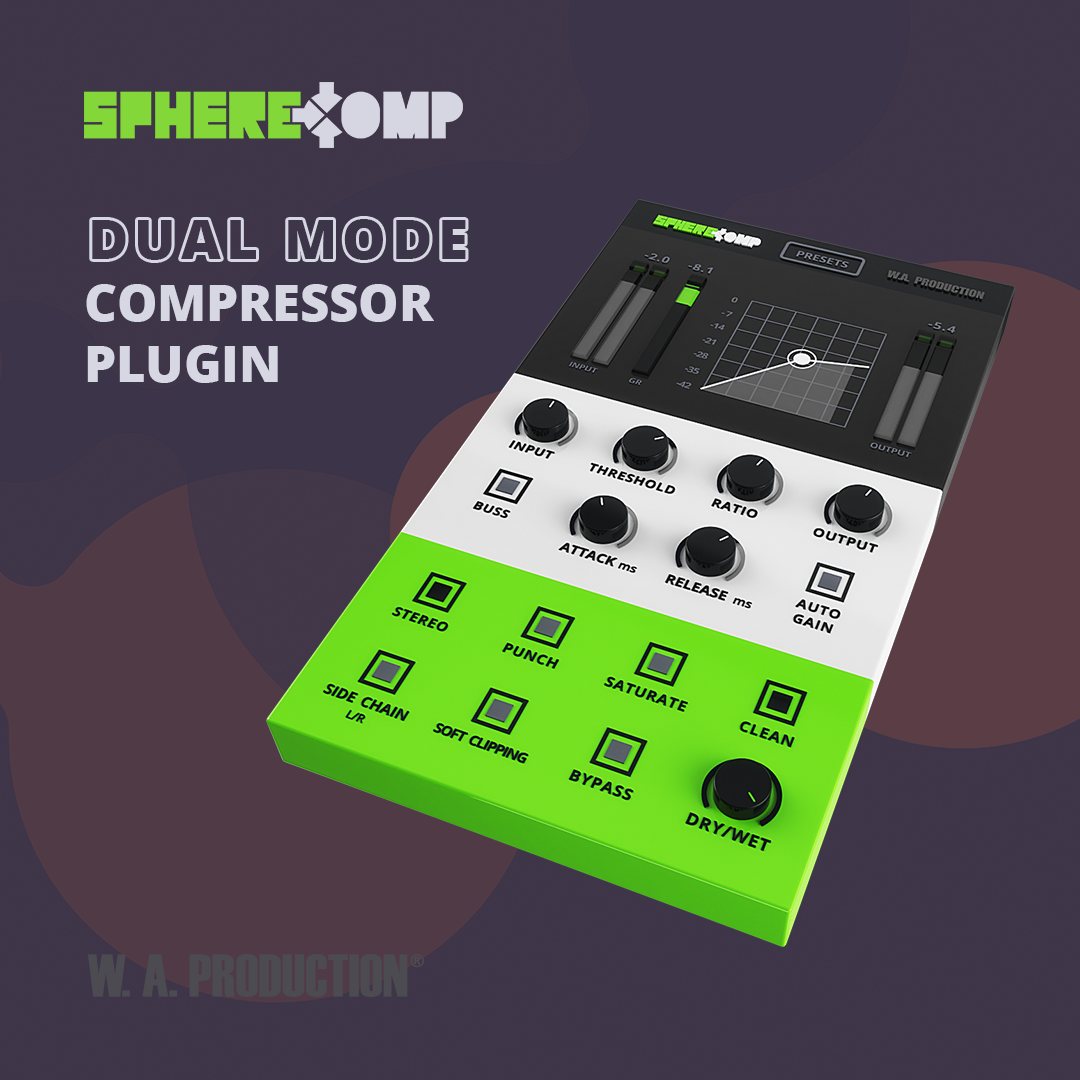
SphereComp is a dual-mode compressor from W. A. Production. According to the maker, it switches between a regular mode that reacts to peaks and a buss mode that reacts to RMS, the average level. It is designed for both individual tracks and groups.
The regular mode responds to signal peaks and is described as suited to shaping the dynamics of individual tracks. The buss mode is meant for group tracks such as drums, tying the individual parts together. Since the better choice depends on the material, the maker suggests trying both.
The main controls are Input and Output (each plus or minus 15 dB), Threshold, Ratio, Attack and Release. Further functions include Punch, which adds parallel processing before compression, Saturate, which adds tube-style saturation to the compressed signal, Clean, Side Chain, Soft Clipping and Dry/Wet.
There are 45 presets for individual instruments, drums, groups, mix buss and mastering, and the manual contains usage tips. It runs on Windows 10/11 (64-bit) and macOS 10.15 or later, in VST, AU, AAX and VST3 formats.
Key features
Peak and RMS dual mode
Switch between regular (peak) and buss (RMS) mode. It may help when individual tracks and groups need different responses.
Punch and Saturate
Punch adds parallel processing before compression, and Saturate adds tube-style saturation after it. They may be worth trying when more energy or thickness is wanted.
Clean switch
It makes the compressor as clean as possible and, when Punch or Saturate is on, reduces their effect, giving different timbre options.
Side chain and soft clipping
The side chain lets a different signal drive the detector, and soft clipping rounds the signal near 0.0 dB so it does not exceed it.
Parallel processing with Dry/Wet
Mixing processed and input signals allows parallel compression, which leaves peaks untouched while raising quieter parts.
45 presets and a manual
Presets cover instruments, drums, groups, mix buss and mastering, and the manual includes tips for learning as you go.
Specifications
| Item | Details |
|---|---|
| Type | Compressor (peak / RMS dual mode) |
| Input / Output | plus or minus 15 dB each |
| Presets | 45 |
| Formats | VST / AU / AAX / VST3 |
| Supported OS | Windows 10/11 (64-bit), macOS 10.15 or later (64-bit) |
| AAX | Pro Tools 12 or higher |
| Version | 1.5.0 (update of June 11, 2020) |
What is included and system requirements
- Plug-in (VST / AU / AAX / VST3)
- 45 presets
- Manual
- A demo version is available
- The maker notes the plug-in may not work properly on older operating systems
How to use it
- After installing, rescan plug-ins in the DAW.
- Insert SphereComp on the track or group track to process.
- Choose the regular mode for individual tracks or the buss mode for groups.
- Adjust Input, then set Threshold and Ratio.
- Shape the response speed with Attack and Release.
- Switch Punch, Saturate and Clean as needed to change the texture.
- Match levels before and after with Auto Gain or Output and compare.
- Set the amount of parallel processing with Dry/Wet.
Where it may come in handy
Gluing drum groups
The maker lists applying the buss mode to a drum group track to tie the parts together.
Leveling individual tracks
The regular mode may be useful for shaping the dynamics of single sounds such as bass or leads.
Parallel compression
Blending in the dry signal with Dry/Wet may leave peaks intact while raising quieter parts.
Checking the mix buss or master
Starting from a mix buss preset may be one way to check how the compression behaves.
Who it may suit
- People who want to switch between peak and RMS compression in one plug-in
- Users who want to learn compression basics with presets and a manual
- Producers who want to try drum group processing quickly
- Beat makers who want parallel processing
Good to know before you buy
- The maker advises trying the demo first, since older operating systems may not work properly.
- Mac users on Apple Silicon should check the maker's compatibility information before purchasing.
- The AAX version requires Pro Tools 12 or higher.
How it differs from similar products
We do not pick a winner; the official figures are placed side by side.
W. A. Production Vocal Compressor
SphereComp is a single compressor that switches between peak and RMS. Vocal Compressor passes audio through three stages (Peaks, Balance and Flavour) and has a gate and a Colour slider.
Price
Please check the official page for the price.
See SphereComp on the product page
More of the same kind
We have introduced 85 compressors. Here are some of the others.
- Solid State Logic SSL Blitzer
- Antelope Audio BA-6A
- McDSP 6030 Ultimate Compressor
- Waves PuigChild Compressor
- Native Instruments Supercharger GT
- Solid State Logic SSL Native X-Comp
We have introduced 42 other products from W. A. Production.
- W. A. Production XTT by VINAI
- W. A. Production Presser by Aiden Kenway
- W. A. Production Vocal Compressor
- W. A. Production Puncher 2
- W. A. Production Mutant Delay
For a side-by-side comparison scored on the same criteria, see our comparison of compressors.
See the full list in Product database: Effects.
Sources: waproduction.com (checked 2026-10-27)









Comments