
Disclosure: This page may contain affiliate links. Prices were checked on the date shown and may change.
An introduction to Waves MaxxVolume, based on information from the maker and distributors: what it does, how to use it and who it may suit. It is not scored.
Leveler maintains consistent levels for voice, instruments, and soundtracks, while the Gate keeps out bothersome low-level noise.
— Waves official site
What is MaxxVolume?
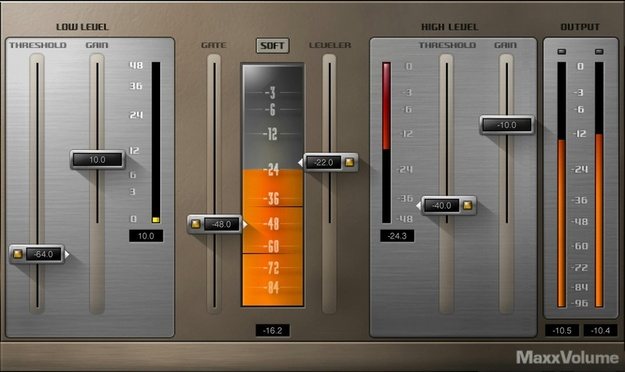
MaxxVolume is a Waves plug-in that combines four dynamics processors: a Low-Level Compressor, a High-Level Compressor, a Leveler and a Gate.
The Low-Level Compressor is described as bringing up small details such as room tone or a voice's human qualities. The High-Level Compressor tames excessive dynamics and unwanted peaks to add intensity.
The Leveler keeps levels consistent for voice, instruments and soundtracks, and the Gate keeps out low-level noise. Each processor has its own mini-interface for easy adjustment.
It is described as suited to individual tracks, buses and masters, with metering to confirm what it is doing. It may be an option when you want to try one plug-in instead of loading several dynamics tools.
Key features
Low-Level Compressor
Brings up small sounds, which may be useful when you want more room tone or vocal detail.
High-Level Compressor
Tames loud sections and unwanted peaks.
Leveler
Keeps levels consistent for voice, instruments and soundtracks, and is also described as providing glue for buses.
Gate
Keeps out low-level noise, which may help if your recording space is noisy.
Per-processor interface
Each of the four processors has its own mini-interface.
Metering
Comprehensive metering shows what the processors are doing.
Specifications
| Item | Details |
|---|---|
| Formats (Mac) | VST / AU / AAX |
| Formats (Windows) | VST / AAX |
| OS (Mac) | macOS Monterey 12 to Sequoia 15 |
| OS (Windows) | Windows 10 or later |
| License | Registration and activation through a Waves account |
What is included and system requirements
- Mac: macOS Monterey 12 / Ventura 13 / Sonoma 14 / Sequoia 15 (VST, AU, AAX)
- Windows: Windows 10 or later (VST, AAX)
- Four dynamics processors
How to use it
- Create a Waves account (or log in if you already have one).
- In 'Register New Products', enter the serial number shown in your Plugin Boutique account.
- Download and install Waves Central, then log in.
- On the 'Install Products' tab, tick the product and click 'Install & Activate'.
- Open your DAW and insert the plug-in on a track or bus.
- Insert MaxxVolume, start with small amounts on the Leveler and compressors, and adjust each processor while watching the meters.
Where it may come in handy
Narration and streaming voice
You might try the Leveler and Gate when you want steadier voice levels.
Instrument dynamics
You could try it on a track where the gap between quiet and loud parts bothers you.
Bus glue
You might insert it on a bus or master to see how the overall levels behave.
Who it may suit
- People who want dynamics control in one plug-in
- People who want to even out voice or narration levels
- People who also want a gate for noise
Good to know before you buy
- A Waves account and license activation are required (for purchases through Plugin Boutique, the serial number is registered to a Waves account).
- Supported systems are listed as macOS Monterey 12 through Sequoia 15 on Mac and Windows 10 or later on Windows.
Price
Please check the official page for the price.
See MaxxVolume on the product page
More of the same kind
Other introduction articles of the same kind.
- Boz Digital Labs Pan Knob
- FKFX Audio Noise Bleach
- Mellowmuse Mellowmuse ATA Auto Time Adjuster
- FLUX:: Alchemist
- NUGEN Audio Halo Downmix
- NUGEN Audio Halo Upmix
We have introduced 215 other products from Waves.
- Waves CLA MixDown
- Waves Waves Tune Real-Time
- Waves eMo Generator
- Waves C6 Multiband Compressor
- Waves JJP Strings & Keys
See the full list in Product database: Effects.
Sources: pluginboutique.com (checked 2026-10-27)










Comments