
Disclosure: This page may contain affiliate links. Prices were checked on the date shown and may change.
An introduction to NUGEN Audio Halo Downmix, based on information from the maker and distributors: what it does, how to use it and who it may suit. It is not scored.
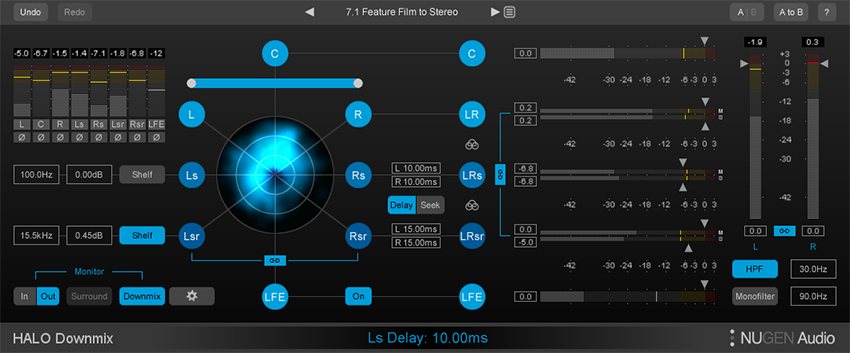
Halo Downmix enables precise downmixing, surround balancing, mix monitoring and sophisticated stereo fold-down.
— NUGEN Audio official site
What is Halo Downmix?
Halo Downmix, from the UK developer NUGEN Audio, is a plugin for folding surround (5.1/7.1) mixes down to stereo. It is aimed at film, broadcast and streaming work where both surround and stereo deliverables are needed.
The maker explains that standard downmix coefficients can give unsatisfactory results, especially when legacy upmix practices were used for the original surround mix. Halo Downmix is said to reduce excess diffuse sound from artificial reverb and delay artefacts in the rear channels to produce a more coherent stereo mix.
A surround-to-surround mode lets you adjust channel levels and the direct/diffuse balance when you cannot access the original mix. With the included NUGEN Receive plugin, you can run surround and stereo in parallel and check them against each other.
Formats are AAX, VST, VST3, AU and AudioSuite, and a surround-capable host (5.1/7.1, such as Pro Tools HD) is required. The official price is $299.
Key features
Surround-to-stereo downmix
When folding 5.1 or 7.1 down to stereo, you can adjust relative levels, timing and the direct/ambient balance with visual controls.
Surround-to-surround adjustment
You can adjust per-channel levels and the direct/diffuse balance of an existing 5.1 or 7.1 mix, which helps when the original mix is not available.
Dialogue and low-frequency control
The maker lists maintaining dialogue clarity and regulating low-frequency content as uses. A 2019 update added LFE controls.
Parallel surround and stereo checks
With the included Receive plugin, you can switch quickly between the surround mix and the stereo downmix.
Customizable interface
It has Advanced and Compact modes, in-place monitoring and linked solo/mute controls, so you can adapt it to your screen space.
3D Immersive Extension (optional)
An optional extension adds downmixing from 7.1.2 and 7.1.4 for immersive projects.
Specifications
| Item | Details |
|---|---|
| Maker | NUGEN Audio |
| Type | Surround downmix plugin |
| Channel formats | 5.1 / 7.1 (7.1.2 / 7.1.4 with the 3D Immersive Extension) |
| Formats | AAX (64-bit), VST, VST3, AU, AudioSuite |
| Minimum system | Mac OS X 10.7+ / Windows (64-bit) Vista+, 512 MB RAM (per Plugin Boutique) |
| Requirement | A surround-capable host (5.1/7.1) |
| Included | NUGEN Receive plugin |
| Trial | Free demo available |
What is included and system requirements
- Halo Downmix
- NUGEN Receive plugin (for parallel checks)
- Formats: AAX (64-bit), VST, VST3, AU, AudioSuite
- Optional: 3D Immersive Extension
How to use it
- Try the free demo from the official site to confirm it works in your DAW.
- Prepare tracks in a surround (5.1/7.1) session.
- Load Halo Downmix on the surround master or bus.
- Adjust the level balance of the stereo result using the on-screen controls.
- Check for buried dialogue, excess low frequencies or prominent rear reverb.
- Place the Receive plugin on the stereo side and compare surround and stereo.
- If needed, use surround-to-surround mode to adjust the original mix.
Where it may come in handy
Stereo deliverables for film and TV
It may help when you need a stereo version of a surround mix that keeps dialogue intelligible.
Broadcast and streaming exports
It may suit projects that deliver both surround and stereo, letting you check them in parallel.
Revisiting older surround mixes
When the original mix is unavailable, the surround-to-surround mode may be useful.
Surround audio for games and video
It can be used to check how the stereo side sounds for content played in both formats.
Who it may suit
- Audio engineers delivering both surround and stereo for video or broadcast
- People who want to balance dialogue and low frequencies in the stereo version
- Those learning or producing surround content
Good to know before you buy
- A DAW that supports surround (5.1/7.1) is required; it will not work in a stereo-only host.
- The 3D Immersive Extension is an optional add-on.
- A free demo is available on the official site so you can test it before buying.
- The listed OS requirements use older wording (such as Mac OS X 10.7 and later), so check compatibility for your OS with the maker before buying.
Price
$299 (NUGEN Audio official site, checked 2026-10-27). Prices can vary by region and promotion, so check the official page before buying.
See Halo Downmix on the product page
More of the same kind
Other introduction articles of the same kind.
- Waves PAZ Analyzer
- Waves CLA Drums
- McDSP 6060 Ultimate Module Collection Native v7
- Mastering The Mix FASTER MASTER
- Fiedler Audio armada
- LEWITT Space Replicator Essential
We have introduced 30 other products from NUGEN Audio.
- NUGEN Audio Monofilter
- NUGEN Audio LM-Correct
- NUGEN Audio Visualizer
- NUGEN Audio NUGEN Audio SEQ-S
- NUGEN Audio Aligner
See the full list in Product database: Effects.
Sources: nugenaudio.com pluginboutique.com (checked 2026-10-27)










Comments