
Disclosure: This page may contain affiliate links. Prices were checked on the date shown and may change.
An introduction to Waves MV2, based on information from the maker and distributors: what it does, how to use it and who it may suit. It is not scored.
MV2 is no ordinary compressor—sure, it can compress audio above a threshold. But it can also compress low-level audio upward.
— Waves official site
What is MV2?
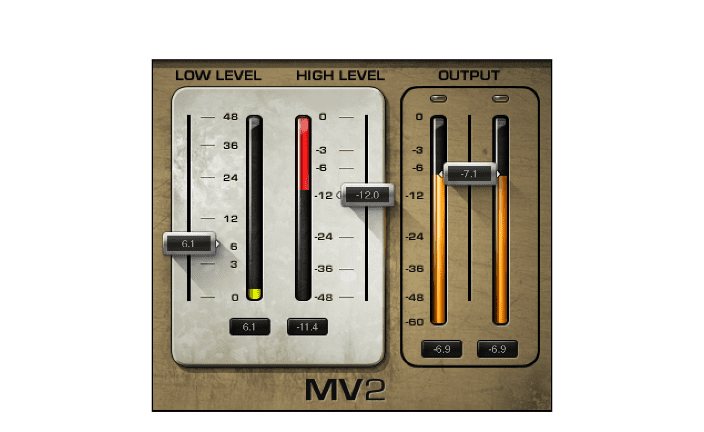
MV2 is a Waves compressor plug-in that can reduce loud parts and also compress in the upward direction, bringing up quiet parts. The Japanese distributor describes it as a simpler product based on the MaxxVolume engine.
The distributor's page carries the heading about leveling volume without squashing it. High-level and low-level compression are handled with a small number of parameters, so it can be used without learning a complicated set of controls.
Plugin Boutique describes it as two special-purpose compressors combined in one plug-in. Listed uses include bringing up a drum's room sound without compromising the peaks, and sharpening the focus on tracks that were recorded or mixed too low without lowering everything else.
The official descriptions mention controlling vocal peaks while amplifying lower levels, accenting the room sound of acoustic instruments while keeping dynamics, and leveling dialogue or narration. It supports mono and stereo and runs in AAX Native, AudioSuite, AU and VST3 formats.
Key features
Compression in both directions
In addition to normal compression of audio above the threshold, it can lift low-level audio. This can help when you want to even out material with a wide volume range without squashing it.
Engine derived from MaxxVolume
According to the Japanese distributor, it is a simplified version based on the MaxxVolume engine. High- and low-level compression are controlled with few parameters, so there is little to get lost in.
Vocal leveling
Controlling peaks while lifting lower levels is listed as a use in the official description. It could be tried before a downstream compressor when a vocal has large level differences.
Room sound on acoustic instruments
The description mentions bringing out room ambience and detail while keeping dynamics. It can be tried on drum room mics when you want more air without changing the peaks.
Leveling dialogue and narration
Leveling dialogue and narration in post-production is listed as a use. It may be useful for evening out the volume of video narration or voice for streaming.
Double-precision and mono / stereo
The Japanese distributor's description lists double-precision bit processing and both mono and stereo components.
Specifications
| Item | Details |
|---|---|
| Type | Compressor (high- and low-level processing) |
| Plug-in formats | AAX Native, AudioSuite, AU, VST3 (as listed by the Japanese distributor) |
| Channels | Mono / Stereo |
| Processing | Double-precision bit resolution |
| Supported OS (Mac) | macOS Ventura 13 / Sonoma 14 / Sequoia 15 / Tahoe 26 |
| Supported OS (Windows) | Windows 10 64-bit / Windows 11 |
What is included and system requirements
- MV2 plug-in (mono / stereo)
- Formats: AAX Native, AudioSuite, AU, VST3
- SoundGrid version (as listed by the Japanese distributor)
How to use it
- Use the demo to check that it runs in your DAW.
- After installing, rescan plug-ins in your DAW.
- Insert it on a vocal or narration track that has level differences.
- Move the high-level setting and decide how much the loud parts are reduced by ear.
- Move the low-level setting and check how the quiet parts come up.
- Try it on drum room mics too, and listen to how the peaks are preserved.
- Since the volume changes, match levels before and after when comparing.
Where it may come in handy
Evening out a vocal
When there is a big difference between quiet and loud passages, it could be used up front to narrow the gap. It may reduce peaks while bringing up quieter parts.
Narration and streaming voice
It may be worth trying when you want to level video narration or a streaming voice without complicated settings.
Drum room mics
The official description presents lifting room sound while preserving peaks. It can be tried when you want to add the air of an acoustic kit.
Tracks recorded too quietly
It could be used to bring out a track that is buried in the mix without lowering the other tracks.
Who it may suit
- People who want to level vocals or narration with large volume differences
- People who want a compressor with few controls
- People who want to bring out drum room sound while keeping the peaks
Good to know before you buy
- The number of controls is described as two by the Japanese distributor and as three by Plugin Boutique. Check the actual interface in the demo before buying.
- Waves offers perpetual licenses and subscriptions. A 7-day demo is mentioned on the Japanese distributor's page.
- System support can vary by product, so check the official compatibility table for your host and OS.
How it differs from similar products
We do not pick a winner; the official figures are placed side by side.
Waves Renaissance Compressor
MV2 focuses on leveling with high- and low-level compression using few parameters. Renaissance Compressor has Opto / Electro modes, Warm, ARC (automatic release control) and soft-knee upward expansion. No ranking is implied; the features of each are listed.
Price
Please check the official page for the price.
More of the same kind
Other introduction articles of the same kind.
- MeldaProduction MMatcher
- Sonarworks SoundID VoiceAI K-pop voices
- Nomad Factory COSMOS
- Zynaptiq ORANGE VOCODER NANO
- Universal Audio Empirical Labs FATSO Tape Simulator
- United Plugins QuickMuse
We have introduced 215 other products from Waves.
- Waves eMo Generator
- Waves MaxxVolume
- Waves OneKnob Wetter
- Waves Greg Wells PianoCentric
- Waves Maserati DRM
See the full list in Product database: Effects.
Sources: minet.jp pluginboutique.com (checked 2026-10-27)










Comments