
Disclosure: This page may contain affiliate links. Prices were checked on the date shown and may change.
An introduction to Waves OneKnob Pumper, based on information from the maker and distributors: what it does, how to use it and who it may suit. It is not scored.
Choose your rhythm, turn a knob, and start pumping.
— Waves official site
What is OneKnob Pumper?
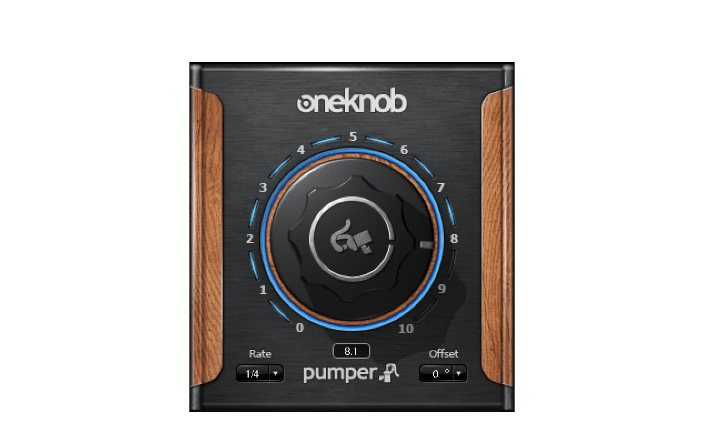
OneKnob Pumper is a plug-in in Waves' OneKnob series, designed to create the ducking (pumping) effect—volume dipping in time with the kick—that became widely known through EDM. The Japanese distributor describes it as simulating sidechain compression.
Normally this effect requires routing a kick track to the sidechain input of a compressor on another track. The official description says that, without that setup, you can choose a rhythm and turn one knob to give a single track or a whole mix movement in time with the beat.
Plugin Boutique lists ten rhythms, from 1/32 notes up to bars, plus three rhythmic timing offsets for counter-rhythms. It also suggests using it subtly on pads, bass, keyboards, effect buses and drums to add a gentle pulse in any genre, not just EDM.
As with the OneKnob series in general, the default setting is 0, a neutral state in which the output is nearly the same as the input. The plug-ins are designed for use as track inserts, and use on AUX send/return setups is not recommended. It runs on Mac and Windows in AAX Native, AudioSuite, AU and VST3 formats.
Key features
One-knob control
The depth of the effect is set with a single knob. Because there are no detailed parameters to adjust, it may be convenient while you are still trying out ideas.
10 rhythms
You choose from ten ducking rhythms, from 1/32 notes to bars. Fast chops and slow, breathing motions are both available to fit the tempo of a song.
No sidechain routing needed
Plugin Boutique states that ducking is created instantly without sidechaining. Since there is no need to set up a kick send, it may be approachable for people who are not yet used to DAW routing.
3 timing offsets
Three offsets shift the position of the rhythm, so you can try a dip on the opposite side of the beat as well as on the downbeat. This can be a way to build counter-rhythms that fill gaps around the kick.
Subtle use
The official description says the knob does not have to be turned up all the way. A light setting on pads, bass or drums can add a motion that follows the beat.
Native floating-point processing
The OneKnob series uses floating-point processing and does not clip inside the plug-in. If the output gets too hot, lower the level downstream, for example with a fader.
Specifications
| Item | Details |
|---|---|
| Type | Ducking / pumping effect (OneKnob series) |
| Plug-in formats | AAX Native, AudioSuite, AU, VST3 |
| Supported OS (Mac) | macOS Ventura 13 / Sonoma 14 / Sequoia 15 / Tahoe 26 |
| Supported OS (Windows) | Windows 10 64-bit / Windows 11 |
| Recommended system | 16 GB RAM or more, 30 GB free on the system drive, 1920×1080 display recommended |
| Rhythms | 10 rhythms from 1/32 notes to bars, 3 timing offsets |
What is included and system requirements
- OneKnob Pumper plug-in
- Formats: AAX Native, AudioSuite, AU, VST3
- Official video (a one-minute walkthrough)
How to use it
- After installing, rescan plug-ins in your DAW.
- Insert it on the track or bus you want to pump (use on an AUX send is not recommended).
- Choose one of the ten rhythms to match the tempo of the song.
- Raise the knob gradually and set the depth of ducking by ear.
- If needed, switch the timing offset and compare different positions.
- Try subtle settings on pads and bass.
- If the output gets loud, lower the level with a fader or similar.
Where it may come in handy
EDM and dance tracks
It may be useful when you want to add ducking in time with the kick to synths or pads quickly. It can be tried without wiring up a sidechain.
Pulsing pads and bass
A light setting, short of full, could add gentle movement to pads or bass. It may be an option in any genre when you want a song to feel like it breathes.
Mix bus and drums
The offsets can be used to build counter-rhythms that shift the position of the beat. The official description also mentions adding rhythmic intensity to guitar power chords.
Who it may suit
- People who want to try ducking without setting up sidechain routing
- People who want movement in time with the beat in EDM or dance tracks
- People who want to add a subtle pulse to pads and bass
Good to know before you buy
- The OneKnob series is intended for use as track inserts; use on AUX send/return setups is not recommended.
- The output may exceed 0 dBFS. Lower the level with a DAW fader or similar to avoid clipping at the D/A converter (from the Japanese distributor's notes).
- Waves offers perpetual licenses and subscriptions. The Japanese distributor's page states that a 7-day demo is available.
How it differs from similar products
We do not pick a winner; the official figures are placed side by side.
Waves MV2
OneKnob Pumper ducks volume in time with a rhythm. MV2 is a leveling compressor that brings up quiet parts and controls loud parts. Both are designed to be used with few controls, but they serve different purposes.
Price
Please check the official page for the price.
See OneKnob Pumper on the product page
More of the same kind
Other introduction articles of the same kind.
- Eventide H949 Harmonizer
- Klevgrand Rum
- Krotos Dehumaniser Simple Monsters
- LANDR LANDR FX Acoustic
- Audio Blast BreadSlicer Pro
- FLUX:: Alchemist
We have introduced 215 other products from Waves.
See the full list in Product database: Effects.
Sources: minet.jp pluginboutique.com (checked 2026-10-27)










Comments