
Disclosure: This page may contain affiliate links. Prices were checked on the date shown and may change.
An introduction to Boz Digital Labs Manic Compressor, based on information from the maker and distributors: what it does, how to use it and who it may suit. It is not scored.
With true parallel processing, it features six compressor models and the ability to switch between them instantly without changing settings.
— Boz Digital Labs official site
What is Manic Compressor?
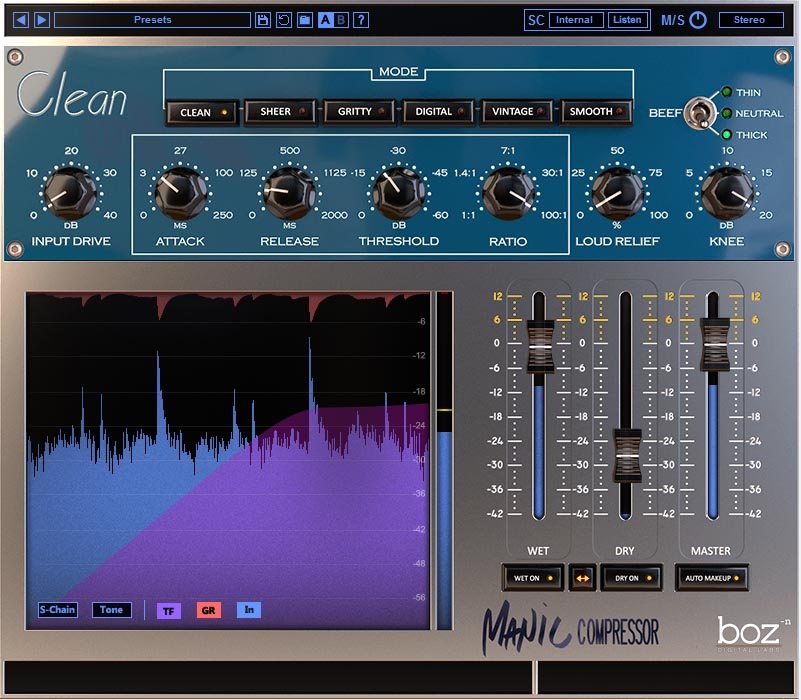
Manic Compressor is a compressor plugin from Boz Digital Labs designed around parallel compression. It contains six compressor models that you can switch between instantly without changing settings.
For parallel work it has independent faders for the compressed (Wet), uncompressed (Dry) and master levels. A Wet/Dry mix button lets the two faders act like a single mix knob when you prefer that.
It has two EQ sections. The Sidechain EQ affects only the detector and is not audible; the Tone EQ affects the output and is designed around the frequency bands associated with parallel compression. Each has its own preset manager.
The design is meant to take extreme settings, and the Loud Relief control softens how the compressor reacts to loud transients under heavy compression. Boz Digital Labs lists the price on its site as $149.
Key features
Six compressor models
Six models can be switched with settings retained, so you can compare characters without re-matching settings.
Separate Wet, Dry and Master faders
Compressed and uncompressed signals have their own faders, which may allow parallel compression per track without complex routing.
Beef switch
A three-position switch (Thin, Neutral, Thick) that changes how the compressor responds to the input.
Loud Relief
Relaxes the response to loud transients under heavy compression, which may help when exploring heavy settings.
Sidechain EQ and Tone EQ
One EQ affects only detection, the other affects output, each with preset management; the Tone EQ can be applied to wet or dry.
M/S panner and operating modes
Dual Mono, Stereo, Mid and Side operation, a mid/side panner usable as a simple widener, internal/external sidechain and an A/B bank.
Specifications
| Item | Details |
|---|---|
| Compressor models | 6 |
| Modes | Dual Mono / Stereo / Mid / Side |
| Formats (Mac) | VST2 / VST3 / AU / RTAS / AAX Native |
| Formats (Windows) | VST2 / VST3 / RTAS / AAX Native |
| OS | Mac: OS X 10.5+ / Windows: XP+ |
| M1 Mac | Not yet native; runs under Rosetta |
What is included and system requirements
- Manic Compressor plugin (Mac/Windows, 32- and 64-bit except RTAS which is 32-bit only)
- A/B bank
- Sidechain EQ and Tone EQ, each with preset management
How to use it
- If bought at Plugin Boutique, retrieve the code from your account and register it with a Boz Digital Labs account.
- Run the installer and choose the formats you want.
- Insert Manic Compressor on a drum track, bus or other track in your DAW.
- Switch between the six compressor models and compare their response.
- Set the parallel balance with the Wet and Dry faders.
- Explore heavier textures with the Beef switch and Loud Relief if needed.
- Shape the compressor’s response and tone with the Sidechain EQ and Tone EQ.
- Set the output and compare settings with the A/B bank.
Where it may come in handy
Parallel drum compression
The independent Wet and Dry faders may make parallel processing quick to set up on drum tracks; the maker files it under Drums/Bass.
Creating heavy textures
Combining heavy compression with Loud Relief may help explore textures that are harder to get from a standard compressor.
Mid/side processing
Mid and Side modes may let you treat the center and sides of a stereo bus separately.
Who it may suit
- People who want to try parallel compression without routing setups
- Those who want to compare compressor characters without changing settings
- Users who want heavy compression on drums or buses
Good to know before you buy
- The product page says there is no native Apple Silicon (M1) build yet; it should work under Rosetta.
- The listed OS requirements are Mac OS X 10.5+ and Windows XP+; check support for your current OS before buying.
- Plugin Boutique purchases require retrieving the code and registering with a Boz Digital Labs account.
Price
$149 (Boz Digital Labs official site, checked 2026-10-27). Prices can vary by region and promotion, so check the official page before buying.
See Manic Compressor on the product page
More of the same kind
We have introduced 85 compressors. Here are some of the others.
- Universal Audio API 2500 Bus Compressor
- Harrison Consoles MPC Compressor
- Waves Abbey Road RS124 Compressor
- PSP Audioware PSP oldTimerMB
- Kuassa EFEKTOR CP3603 Compressor
- Harrison Multi-Band Compressor
We have introduced 9 other products from Boz Digital Labs.
- Boz Digital Labs ProVocative
- Boz Digital Labs Imperial Delay
- Boz Digital Labs David Bendeth's The Hoser 2
- Boz Digital Labs Mongoose 2
- Boz Digital Labs Panther Stereo Manipulation
For a side-by-side comparison scored on the same criteria, see our comparison of compressors.
See the full list in Product database: Effects.
Sources: bozdigitallabs.com pluginboutique.com (checked 2026-10-27)










Comments