
Disclosure: This page may contain affiliate links. Prices were checked on the date shown and may change.
An introduction to Universal Audio API 2500 Bus Compressor, based on information from the maker and distributors: what it does, how to use it and who it may suit. It is not scored.
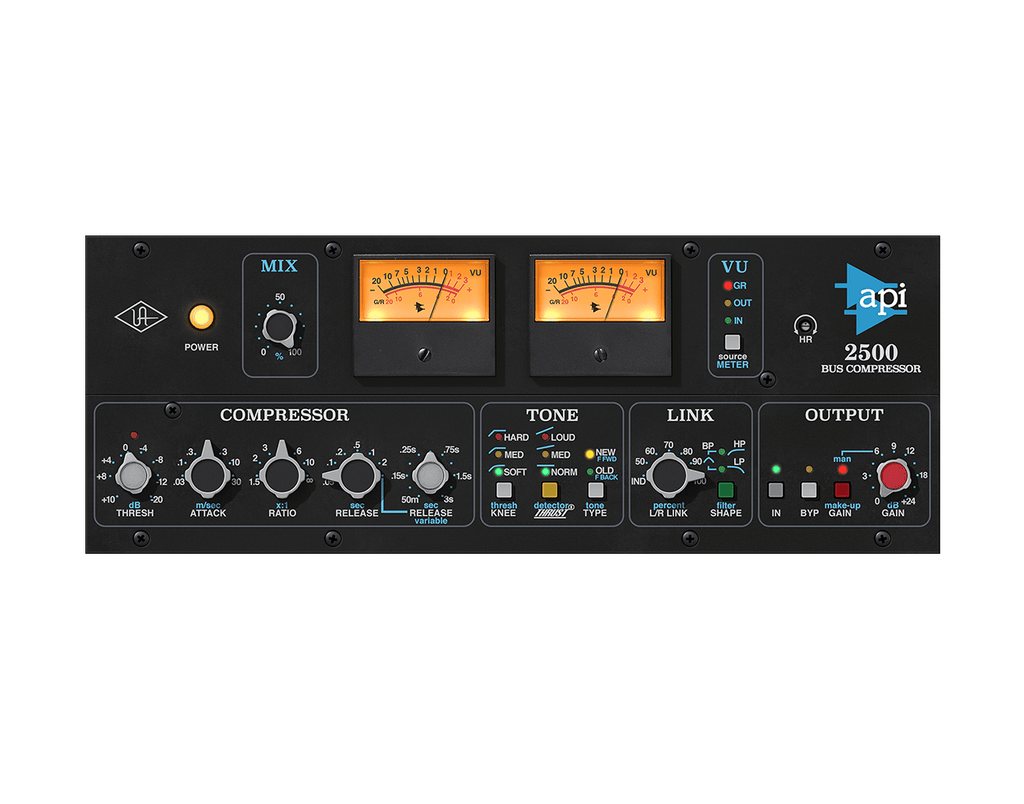
Select between "Old" and "New" compression, with feedback or feed-forward sounds
— Universal Audio official site
What is API 2500 Bus Compressor?
API 2500 Bus Compressor is a plug-in version of the API 2500 stereo bus compressor, developed by Universal Audio (UA) with API. It is intended for the stereo bus and subgroups, where it is used to shape how a mix holds together and moves.
According to UA, the model was built from schematics supplied by API, analyzing two hardware units (a rackmount and an in-console one) and checking the results with API engineers. The company points to its modeling of the transformers and the 2510 and 2520 op amps.
Compression behavior can be set to "Old" or "New". Old is described as peak detection reminiscent of API's 525, and New as a modern feed-forward sound. The knee can also be set to Soft, Medium or Hard.
Both a UAD Native version and a version that runs on Apollo interfaces and UAD-2 hardware are included with purchase, so it runs on Mac and Windows without UA hardware. Plug-in-only Mix and Headroom controls are also provided.
Key features
Old and New compression
Old uses peak-detection behavior and New uses a feed-forward design. The same settings can behave differently between the two, so you might switch between them depending on whether you want movement on a drum bus or a calmer glue across a full mix.
Thrust circuit
Taken from API's Paragon-series consoles, Thrust places a filter before the detector so that low and high frequencies trigger the compressor more evenly. It may be worth trying on bass-heavy buses where the kick drum dominates the detector.
Soft, Medium and Hard knee
Three knee settings change how compression begins, from gradual to more defined. You can adapt how the compressor engages to the dynamics of the material.
L/R Link and Shape
Instead of a simple link on/off switch, the left/right interaction can be set as a percentage, and a Shape control refines the dynamic contour. This could help when you want to adjust stereo movement and width.
Mix and Headroom
The plug-in-only Mix control blends in the dry signal, which allows parallel-style compression. Headroom adjusts level handling at the input and adds flexibility beyond the hardware.
Artist presets
Presets from engineers such as Jeff Balding, Vance Powell and Ryan Hewitt are included. They could serve as starting points before you build settings from scratch.
Specifications
| Item | Details |
|---|---|
| Type | Stereo bus compressor plug-in |
| Compression types | Old / New |
| Knee | Soft / Medium / Hard |
| Plug-in formats | VST3 / AU / AAX |
| macOS | Big Sur 11 through Tahoe 26 |
| Windows | Windows 10 / 11 (64-bit) |
| Licensing | Free iLok account required (USB key not required) |
| Versions | UAD Native, Apollo Realtime / UAD-2 |
What is included and system requirements
- UAD Native version (runs on Mac and Windows without UA hardware)
- Apollo Realtime / UAD-2 version (runs on Apollo interfaces and UAD-2 hardware)
- Artist presets
- Internet connection (for authorizing UAD Native), free iLok account, and the UA Connect app
How to use it
- Buy the plug-in on UA's site and install the UA Connect app.
- Prepare a free iLok account and authorize the license.
- Open your DAW and insert the plug-in on the stereo bus or a subgroup.
- Choose Old or New compression.
- Pick Soft, Medium or Hard knee, then set Threshold and Ratio.
- Set Attack and Release, and turn on Thrust if needed.
- Adjust L/R Link and Shape for stereo interaction.
- Set Mix and output level, then bypass to compare loudness before and after.
Where it may come in handy
Mix bus glue
You might insert it on the stereo bus for light overall compression, using Mix to bring the dry signal back and keep the effect subtle.
Drum bus
On a drum subgroup, Thrust could help reduce the detector's bias toward low frequencies while adding movement.
Home recordings and band mixes
It could be a pre-finishing step for stereo material recorded at home, with light compression that you compare against the original.
Stereo interaction
You could change L/R Link to hear how left and right movement changes.
Who it may suit
- People looking for a compressor for the stereo bus or subgroups
- People interested in the API 2500's circuit and controls
- Users who want UAD-family plug-ins without UA hardware
- Anyone who wants to adjust movement on a drum bus or two-bus
Good to know before you buy
- A free iLok account is required (an iLok USB key is not).
- UAD Native plug-ins require an internet connection for authorization.
- A DAW that supports VST3, AU or AAX is required.
- UA's page offers a free trial (Try It For Free) if you want to test it before buying.
Price
$199 (Universal Audio official site, checked 2026-10-27). Prices can vary by region and promotion, so check the official page before buying.
See API 2500 Bus Compressor on the product page
More of the same kind
We have introduced 85 compressors. Here are some of the others.
- W. A. Production Presser by Aiden Kenway
- Boz Digital Labs Manic Compressor
- FLUX:: Syrah
- Harrison Consoles Lookahead Compressor
- Safari Audio Safari Audio The Herd V2
- Waves V-Comp
We have introduced 46 other products from Universal Audio.
- Universal Audio Empirical Labs EL8 Distressor Compressor
- Universal Audio Century Tube Channel Strip
- Universal Audio SSL 4000 G Bus Compressor
- Universal Audio UA 175B & 176 Tube Compressor Collection
- Universal Audio 1176 Classic Limiter Collection
For a side-by-side comparison scored on the same criteria, see our comparison of compressors.
See the full list in Product database: Effects.
Sources: uaudio.com pluginboutique.com (checked 2026-10-27)










Comments