
Disclosure: This page may contain affiliate links. Prices were checked on the date shown and may change.
An introduction to Leapwing Audio CenterOne 3, based on information from the maker and distributors: what it does, how to use it and who it may suit. It is not scored.
CenterOne 3 gives you precise control over the phantom center of a stereo source — without relying on conventional Mid-Side processing.
— Leapwing Audio official site
What is CenterOne 3?
CenterOne 3 is a spatial plug-in from Leapwing Audio. It isolates the phantom center of a stereo source, the content that appears in the middle between two speakers, so its level and tone can be adjusted.
The official page says it uses a proprietary technology called Center Prominence rather than conventional Mid-Side processing. Mid is the information shared by both channels, and the maker explains that this is not the same as the phantom center. The design aims to change the amount of center without touching information unique to left or right.
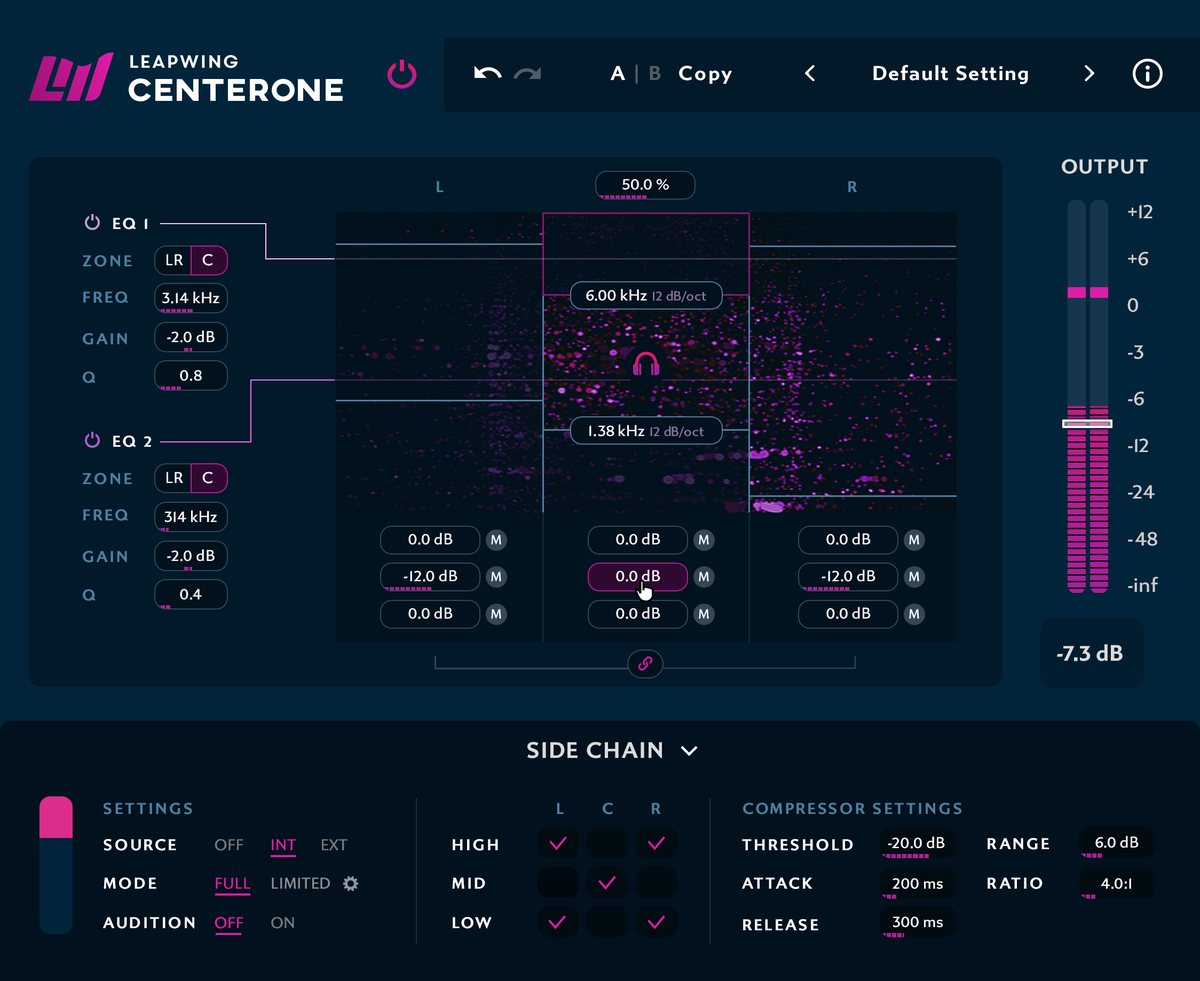
Version 3 adds EQ that can act on the center and the sides separately, multiband control of center prominence, and sidechain so the processing can react to another signal. The maker says this controls not only how much center is heard but where and when it is processed.
Formats are VST2, VST3 and AAX on Windows and VST2, VST3, AU and AAX on Mac. A 30-day free trial is offered on the official site. It is described as suitable for single instruments, buses, stems and complete mixes.
Key features
Phantom-center extraction
Left, center and right are handled separately and the amount of center can be changed. It may be tried to bring a vocal forward or to open space in a crowded mix.
EQ for center and sides
Two parametric bands can be assigned to either the left/right zone or the center zone, for example adding presence to the center or tidying low frequencies on the sides.
Multiband center control
Center prominence can be set per frequency band, with independent gain and mute for L, C and R in each band, for example keeping lows focused while opening the highs.
Internal and external sidechain
Processing can follow an internal or external signal, with threshold, ratio, attack, release and range controls. One idea is to open space around a lead vocal when it enters.
Aux outputs and workflow tools
In compatible hosts the extracted L, C and R can be taken as auxiliary outputs. A/B comparison, copy, undo/redo, preset management and full automation are included.
Extraction width
An extraction-width control sets how tightly the phantom center is isolated, so the cut can be adapted to the material.
Specifications
| Item | Details |
|---|---|
| Type | Stereo center-processing plug-in |
| Formats (Windows) | VST2, VST3, AAX (64-bit) |
| Formats (Mac) | VST2, VST3, AU, AAX (64-bit) |
| EQ | Two parametric bands (assignable to LR or center) |
| Sidechain | Internal / external |
| Trial | 30 days, fully functional (official) |
| Authorization | Leapwing account and serial number |
What is included and system requirements
- CenterOne 3 plug-in (single product)
- System requirements listed on Plugin Boutique: Windows 8-10 (64-bit), macOS 10.10 or later (64-bit)
- Formats: VST2, VST3, AAX on Windows; VST2, VST3, AU, AAX on Mac
- Preset management
- Extracted L, C and R auxiliary outputs (compatible hosts only)
How to use it
- Create a Leapwing Audio account and register the serial number after purchase.
- Download and run the installer.
- Insert CenterOne 3 on a stereo track, bus or master in the DAW.
- Move the center amount a little at a time and listen to how a vocal moves forward or back.
- Adjust the extraction width to suit the material.
- Assign EQ to the center or the sides to shape the tone if needed.
- Use the multiband controls to treat lows and highs differently.
- Use A/B comparison with matched levels to check before and after.
Where it may come in handy
Bringing a vocal forward
It may be used to adjust the center amount so a vocal sits further forward, one of the uses the maker lists.
Making space in a dense mix
Pulling back the elements gathered in the center could open room around them.
Managing low-frequency width
Multiband control could keep the lows centered while opening the highs.
Fine-tuning a master's image
It may help when the center amount of a finished mix needs a small change.
Who it may suit
- People who want fine control over the amount of center in a mix
- People who find Mid-Side processing insufficient
- People who want to adjust vocal position and open space
- People who want a 30-day trial before buying
Good to know before you buy
- The official site shows a time-limited price, so check the current price before buying.
- The maker explains that it is not a stereo widener but a tool for controlling the amount of center.
- Auxiliary outputs work only in compatible hosts.
- Plugin Boutique lists Windows 8-10 and macOS 10.10 or later.
How it differs from similar products
We do not pick a winner; the official figures are placed side by side.
MeldaProduction MStereoGenerator
CenterOne 3 changes the amount of center in a stereo signal and the maker says it is not a stereo widener. MStereoGenerator expands mono sounds into stereo. Their purposes differ.
Price
Please check the official page for the price.
See CenterOne 3 on the product page
More of the same kind
Other introduction articles of the same kind.
- Sonnox Oxford Inflator
- McDSP Analog Channel HD v7
- New Audio Technology Spatial Audio Designer
- MeldaProduction MMorph
- MeldaProduction MAutoVolume
- MAAT LINSurround
We have introduced 5 other products from Leapwing Audio.
- Leapwing Audio RootOne
- Leapwing Audio Al Schmitt
- Leapwing Audio StageOne 2
- Leapwing Audio Joe Chiccarelli
- Leapwing Audio UltraVox 2
See the full list in Product database: Effects.
Sources: leapwingaudio.com pluginboutique.com (checked 2026-10-27)










Comments