
Disclosure: This page may contain affiliate links. Prices were checked on the date shown and may change.
An introduction to MeldaProduction MAutoVolume, based on information from the maker and distributors: what it does, how to use it and who it may suit. It is not scored.
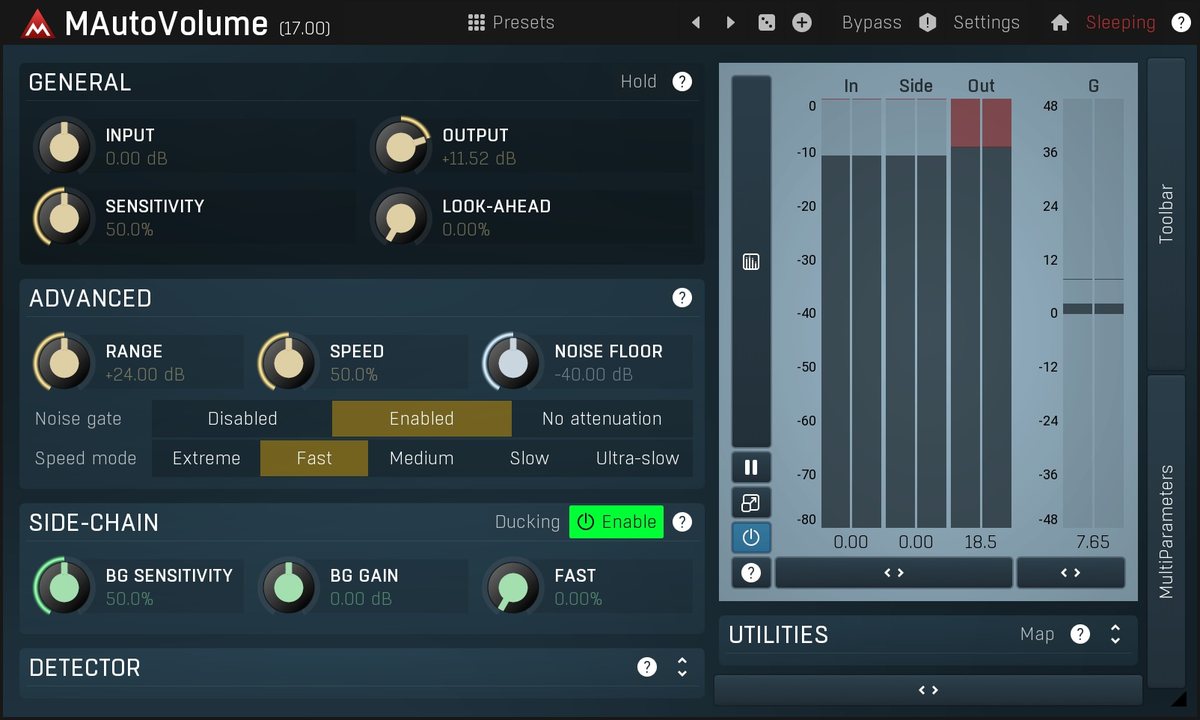
Feed everything except for the vocal to the MAutoVolume side-chain
— MeldaProduction official site
What is MAutoVolume?
MAutoVolume is a plug-in that MeldaProduction classes as a Unique tool, made to adjust a track's level automatically. It targets parts you want to stay forward in the mix, such as vocals, bass, solo guitars and saxophones.
Traditionally this was done with compressors or with fader automation. The maker says both take time or effort, and presents MAutoVolume as doing the job with very little effort.
The side-chain input is the distinctive way to use it. According to MeldaProduction, sending everything except the vocal to the side-chain lets the vocal level follow changes in the mix so that it stays on top.
The usual MeldaProduction common features are also included: up to 16x upsampling, channel modes such as M/S and surround, A-H preset slots and an integrated help system.
Key features
Adapts to the mix via side-chain
Sending the rest of the mix to the side-chain lets the level react to the mix. It may suit a vocal that tends to get buried as the arrangement changes.
Automatic gain compensation and safety limiter
Automatic gain compensation (AGC) and a safety limiter are included to help keep level changes from getting out of hand.
Adjustable up-sampling 1x to 16x
Up-sampling can be set from 1x to 16x, balancing audio quality against processing load.
Modulators and MIDI control
Versatile modulators are included, and MIDI controllers can be assigned with MIDI learn, which may help when building moving settings.
M/S and surround processing
M/S, single channel and up to 8-channel surround processing are available, so material beyond plain stereo is covered.
Preset management and free updates
Global preset management and online preset exchange are included. Updates are listed as free for life, and no dongle or internet access is needed for activation.
Specifications
| Item | Details |
|---|---|
| Maker | MeldaProduction |
| Type | Automatic level control (Unique tool) |
| Up-sampling | 1x to 16x |
| Channel modes | Stereo, M/S, single channel, up to 8 channels |
| Formats | VST, VST3, AU, AAX (Windows and Mac, 64-bit) |
| Windows OS | Windows 8 / 10 / 11 (64-bit) |
| Mac OS | macOS 10.14 or later (native Apple Silicon) |
| Activation | No dongle or internet access required |
What is included and system requirements
- MAutoVolume (the plug-in)
- A free trial is offered
- VST / VST3 / AU / AAX on Windows and macOS (64-bit)
How to use it
- Create a MeldaProduction account, then buy it or download the free trial.
- After installing, load the plug-in in your DAW.
- Insert MAutoVolume on the track you want to level, such as a vocal.
- Route all the other tracks to its side-chain input (the method differs by DAW).
- While playing, adjust the settings that control how strongly it follows.
- Turn on automatic gain compensation and compare before and after at similar levels.
- If needed, store settings in the A-H slots to switch between them.
- Check the result and make sure it is not applied too strongly.
Where it may come in handy
Keeping a vocal forward
When the accompaniment changes density and the vocal gets buried, sending the backing to the side-chain may be worth trying.
Voice-over or streaming
It may be tried to even out a voice level while background music changes.
Bass or solo instruments
The maker describes use on parts such as bass, solo guitars and saxophones that should stay forward.
Less hand-drawn automation
It may be tried in place of drawing detailed fader automation.
Who it may suit
- People who want to spend less time leveling vocals or narration
- People looking for something between a compressor and fader riding
- People who already use other MeldaProduction plug-ins
- People who want to try a free trial first
Good to know before you buy
- The way side-chain routing is set up differs between DAWs, so check your DAW's manual.
- MeldaProduction runs promotions from time to time.
- A trial version is available on the official site.
Price
Please check the official page for the price.
See MAutoVolume on the product page
More of the same kind
Other introduction articles of the same kind.
- Bogren Digital Ampknob BDM 410 JVH
- Waves TRACT SPL Meter
- Waves Scheps Parallel Particles
- Sound Particles Air
- Nathan Blair HALO 3D PAN
- Leapwing Audio Al Schmitt
We have introduced 32 other products from MeldaProduction.
- MeldaProduction MVintageRotary
- MeldaProduction MAmp
- MeldaProduction MMatcher
- MeldaProduction MCompare
- MeldaProduction MeldaProduction MRingModulatorMB
See the full list in Product database: Effects.
Sources: meldaproduction.com pluginboutique.com (checked 2026-10-27)










Comments