
Disclosure: This page may contain affiliate links. Prices were checked on the date shown and may change.
An introduction to Waves Eddie Kramer Vocal Channel, based on information from the maker and distributors: what it does, how to use it and who it may suit. It is not scored.
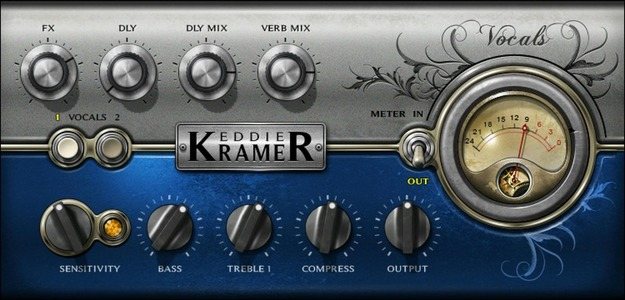
Choose Vocals 1 when mixing intense, aggressive, raw vocals, or Vocals 2 for smoother, steadier vocals.
— Waves official site
What is Eddie Kramer Vocal Channel?
Eddie Kramer Vocal Channel is a vocal channel-strip plugin that Waves developed with recording engineer Eddie Kramer, known for his work with bands such as the Rolling Stones and Led Zeppelin. It is built so that his approach to vocals can be reached with only a few controls.
It contains two processing chains. Vocals 1 is meant for intense, raw vocals, and Vocals 2 for smoother, steadier ones. Choosing one changes the combination of processors behind the controls.
For the finishing touches there are controls for punchy dynamics, bass, treble, reverb and delay. Rather than asking you to work through many parameters, it lets you set a direction with a handful of knobs, which may help when you want to keep the number of mixing steps down.
A Sensitivity control with an indicator is included for setting the input level. Matching the level before the signal enters the processing may be a useful first step for home recordings whose levels vary from song to song.
Key features
Two selectable chains
Vocals 1 is intended for raw, intense vocals and Vocals 2 for smoother, steadier ones. You pick one according to the voice and the song, then adjust with the remaining controls.
Designed for rock-style mixes
The product description says it is meant to help lead vocals sit comfortably in rock mixes. It may be worth trying when you want the vocal placed forward in a band arrangement.
Bass, treble and compression
Bass and treble controls and compression sit in one plugin. Basic shaping may be possible here without opening separate plugins.
Delay and reverb
Controls for delay and reverb add ambience. This may suit cases where you want to avoid setting up separate time-based effects.
Sensitivity control and indicator
A control and indicator set how sensitive the processing is to the input. Aligning the level beforehand may make it easier to judge how the knobs respond.
Co-developed with Eddie Kramer
The product description states that it was designed together with Eddie Kramer. It is a named vocal chain that you recall in a single plugin.
Specifications
| Item | Details |
|---|---|
| Type | Vocal channel-strip plugin |
| Mac | macOS Monterey 12 / Ventura 13 / Sonoma 14 / Sequoia 15; VST, AU, AAX |
| Windows | Windows 10 or later; VST, AAX |
| Chains | Vocals 1 / Vocals 2 |
| Controls | Dynamics, bass, treble, reverb, delay, Sensitivity |
What is included and system requirements
- The plugin (Waves license)
- Mac: VST / AU / AAX
- Windows: VST / AAX
- When bought through Plugin Boutique, the serial number is registered to a Waves account and installed with Waves Central
How to use it
- Create a Waves account, or log in if you already have one.
- After purchase, register the serial number shown in your Plugin Boutique account to the Waves account.
- Download and install Waves Central.
- Log in to Waves Central and install the plugin from the Install Products tab.
- Open your DAW and insert the plugin on the vocal track.
- First adjust Sensitivity while watching the indicator to match the input level.
- Switch between Vocals 1 and Vocals 2 and choose the one that suits the voice.
- Use the bass, treble, dynamics, reverb and delay controls to adjust how the vocal sits in the mix.
Where it may come in handy
Recording vocals for band-style songs
It may be worth trying when guitars and drums are central and you want the vocal in front. Vocals 1 and Vocals 2 can be chosen to fit energetic or calmer performances.
Shaping a home-recorded vocal quickly
You could set the direction with this one plugin before lining up several others. With few controls, it may suit work where you do not want to spend long.
Starting point for rough mixes
It may serve as a starting point when you build a rough vocal mix, with finer adjustments added later using other plugins.
Who it may suit
- People who want to set a vocal direction with few controls
- People who often handle vocals in rock-style songs
- People looking for a channel-strip style vocal processor
- People who want a starting point before stacking several plugins
Good to know before you buy
- The Waves license requires registration to a Waves account and installation through Waves Central.
- Supported systems are listed as macOS 12 to 15 on Mac and Windows 10 or later on Windows.
- Formats are VST, AU and AAX on Mac and VST and AAX on Windows.
- Please check the store page for the current price.
Price
Please check the official page for the price.
See Eddie Kramer Vocal Channel on the product page
More of the same kind
We have introduced 51 channel strips. Here are some of the others.
- Universal Audio SSL 4000 E Channel Strip
- Solid State Logic SSL 4K E
- Wave Arts TrackPlug 7
- McDSP 6050 Ultimate Channel Strip
- United Plugins UniChannel
- Solid State Logic SSL Guitarstrip
We have introduced 215 other products from Waves.
- Waves CLA MixHub
- Waves Waves Eddie Kramer Drum Channel
- Waves AudioTrack
- Waves Scheps Omni Channel 2
- Waves SSL EV2 Channel
See the full list in Product database: Effects.
Sources: pluginboutique.com (checked 2026-10-27)










Comments