
Disclosure: This page may contain affiliate links. Prices were checked on the date shown and may change.
An introduction to Waves CLA Drums, based on information from the maker and distributors: what it does, how to use it and who it may suit. It is not scored.
With separate processing for individual drum tracks, each sound has its own focus that contributes strength and detail in the final mix.
— Waves official site
What is CLA Drums?
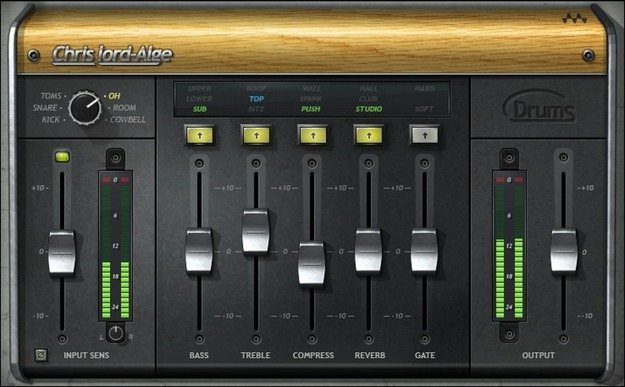
CLA Drums is a plug-in for individual drum tracks that Waves developed with Grammy-winning mixer Chris Lord-Alge. One plug-in offers processing matched to kick, snare, toms, room, overhead and cymbals/hi-hats.
According to the Plugin Boutique description, it has five effects, each with three modes, optimized for the five drum sounds. Processing each track separately is meant to give every sound its own role in the final mix.
Equalization uses treble and bass controls, which can add snap and depth or reduce harshness and mud. Compression can be applied to some drums and not others, three reverb modes add space, and hard or soft gating can create gated-drum effects.
It can also be used with individual outputs from samplers and drum machines. It supports VST, AU and AAX on macOS and VST and AAX on Windows.
Key features
Processing by drum type
Processing can be chosen for tom, snare, kick, room, overhead or cymbal/hat tracks. It may make it easier to keep a consistent direction across drum tracks without hunting for separate plug-ins.
Five effects with three modes
Five effects are optimized for five drum sounds, and each has three modes. Switching modes lets you try different textures on the same track.
Treble and bass EQ
Two EQ controls add snap and depth or trim harshness and mud. It may suit recordings that sound heavy and need clearing.
Selective compression
Compression can be applied to some drums and not to others. For example, it can be used on kick and snare while overheads are left alone.
Three reverb modes
Three reverb modes add ambience and space to drums. They may be worth trying when no room mic was recorded or programmed drums need more air.
Hard and soft gating
Hard and soft gating can create gated-drum effects. It can be used to cut the tail short for a tighter result.
Works with individual sampler and drum-machine outputs
The listing says it can be used with individual outputs from samplers and drum machines, giving a way to shape each part of a programmed kit.
Specifications
| Item | Details |
|---|---|
| Target tracks | Tom / snare / kick / room / overhead / cymbal-hats |
| Effects | 5 (3 modes each) |
| EQ | Treble / bass |
| Reverb | 3 modes |
| Gate | Hard / soft |
| macOS | macOS Monterey 12 to Sequoia 15 / VST, AU, AAX |
| Windows | Windows 10+ / VST, AAX |
What is included and system requirements
- CLA Drums plug-in
- macOS: VST / AU / AAX (macOS Monterey 12, Ventura 13, Sonoma 14, Sequoia 15)
- Windows: VST / AAX (Windows 10+)
- Authorization through a Waves account and installation through Waves Central
How to use it
- Create a Waves account and register the serial number after purchase.
- Download and install Waves Central, then log in.
- In Install Products, select CLA Drums and click Install & Activate.
- Open the DAW and insert CLA Drums on an individual drum track.
- Choose the processing that matches the track type (kick, snare, tom and so on).
- Switch among the three modes to compare textures.
- Use treble and bass to shape snap and depth.
- Add or reduce compression, reverb and gate while checking the overall balance.
Where it may come in handy
Cleaning up multitrack drum recordings
It may be worth trying on kick, snare and other multitrack drum recordings, one track type at a time.
Shaping programmed drums
Used on individual outputs from a sampler or drum machine, it may help build the character of each part.
Gated-drum effects
It may suit tight sounds that cut the tail with the gate, or combinations of gate and reverb.
Who it may suit
- People who record or mix drums on individual tracks
- People who want drum processing in a single plug-in
- People who want to add character and space to programmed drums
Good to know before you buy
- Authorization through a Waves account and installation through Waves Central are required.
- The supported systems and formats are those listed on Plugin Boutique at the time of writing; check Waves for the latest requirements before buying.
Price
Please check the official page for the price.
See CLA Drums on the product page
More of the same kind
Other introduction articles of the same kind.
- Sonarworks SoundID VoiceAI
- Blue Cat Audio AcouFiend
- MeldaProduction MMatcher
- Sonarworks Apollo Monitor Correction Add-on
- Tokyo Dawn Labs OD DeEdger
- Klevgrand DAW Cassette
We have introduced 215 other products from Waves.
- Waves Dugan Speech
- Waves Abbey Road Reel ADT
- Waves MV2
- Waves Magma StressBox
- Waves JJP Strings & Keys
See the full list in Product database: Effects.
Sources: pluginboutique.com (checked 2026-10-27)










Comments