
Disclosure: This page may contain affiliate links. Prices were checked on the date shown and may change.
An introduction to Fiedler Audio Mastering Console, based on information from the maker and distributors: what it does, how to use it and who it may suit. It is not scored.
Master your Dolby Atmos mixes through OBAM plug-ins in the Master Channel with the same ease as you would master a stereo track.
— Fiedler Audio official site
What is Mastering Console?
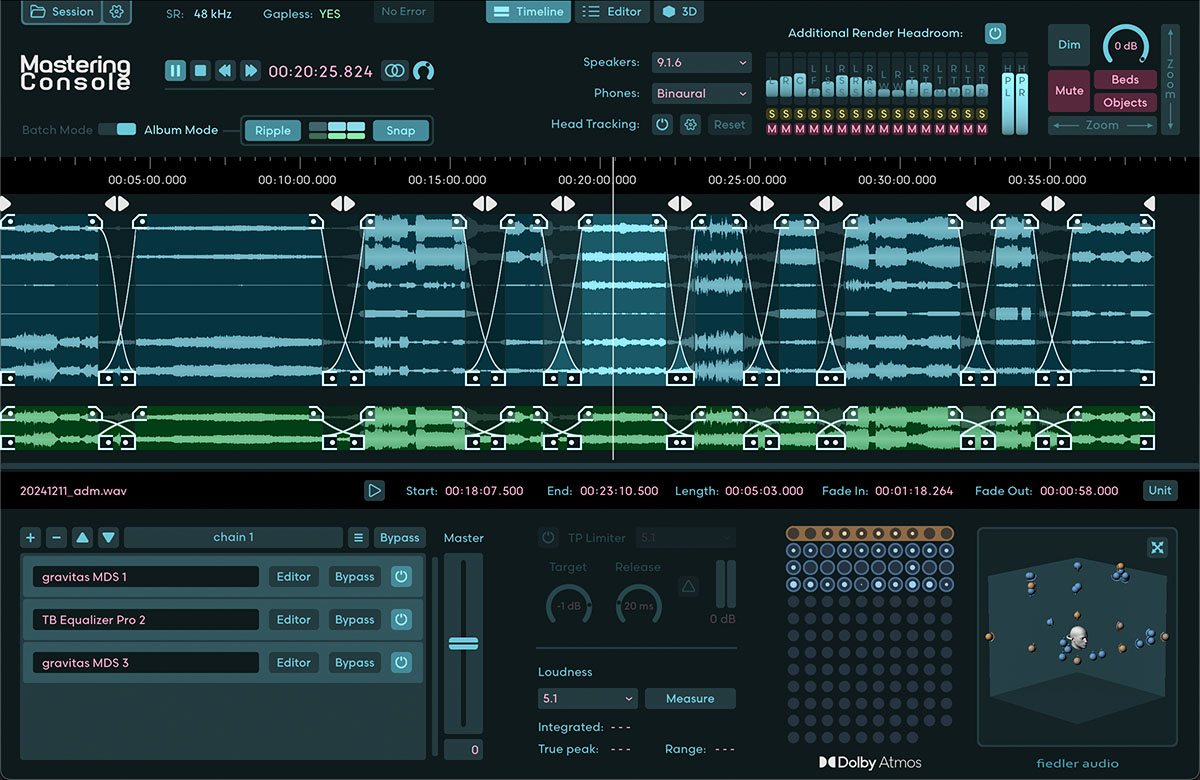
Mastering Console is a Dolby Atmos mastering application from Fiedler Audio of Germany. The official page names it Mastering Console, while Plugin Boutique lists it as Mastering Console 2. An upgrade path to v2 is offered for owners of version 1 and Dolby Atmos Composer.
ADM/BWF Atmos mixes are handled with the same approach as stereo mastering. OBAM plug-ins can be hosted in the Master Channel, and an existing VST3 plug-in collection can be used on the stereo versions.
Built-in functions include batch processing of several ADM/BWF files and their stereo counterparts, album creation with crossfades, loudness measurement with automatic LKFS adjustment, and a True Peak limiter. The product is described as approved by Dolby Labs.
Monitoring covers stereo, binaural, surround formats from 5.1 to 9.1.6 and Apple Spatial Audio. Routing allows speakers and headphones to be used at the same time, and each speaker can be calibrated for level, delay and EQ.
Key features
OBAM plug-ins in the Master Channel
Atmos mixes can be processed through OBAM plug-ins, and VST3 plug-ins can be used on the stereo mixes.
Album editing and batch processing
Several ADM/BWF files and their stereo counterparts can be processed together, and gapless albums can be assembled using crossfades.
Loudness and True Peak limiter
Loudness is measured and LKFS can be adjusted automatically, and the built-in True Peak limiter may help keep a master within a loudness specification.
Wide monitoring support
Stereo, binaural, 5.1, 5.1.2, 5.1.4, 7.1, 7.1.2, 7.1.4, 9.1.4, 9.1.6 and Apple Spatial Audio are supported, with several head-tracking options.
Routing and speaker calibration
Routing lets speakers and headphones be heard together without rewiring, and each speaker can be tuned for level, delay and EQ, with presets.
3D view and channel editing
Beds and dynamic objects can be viewed in 3D. Channels can be reordered or disabled, silent channels are detected and removed automatically, and downmix, trim and balance can be edited.
Export and 96 kHz support
ADM/BWF, multichannel re-renders, binaural, Apple Spatial Audio and stereo reference can be exported together at high speed. 48 and 96 kHz workflows are supported, including batch downsampling from 96 to 48 kHz.
Specifications
| Item | Details |
|---|---|
| Type | Dolby Atmos mastering application |
| Formats | ADM / BWF |
| Sample rates | 48 kHz / 96 kHz |
| Monitoring | Stereo, binaural, 5.1 to 9.1.6, Apple Spatial Audio |
| macOS | macOS 11 to 15.x; Intel min. 2 GHz with SSE3, or Apple Silicon |
| Windows | Windows 10 and 11; Intel min. 2 GHz with SSE3 |
| Graphics | Min. 1440 x 900, OpenGL 3.3 or newer |
| Memory | Min. 4 GB RAM |
What is included and system requirements
- Mastering Console application (Mac / Windows)
- OBAM plug-in hosting
- True Peak limiter
- Manual (PDF) and installer
How to use it
- Buy from Fiedler Audio or a retailer, then download and install the installer.
- Activate the licence; offline activation is also described.
- Load the ADM/BWF files to be mastered and their stereo counterparts.
- Set the monitoring format, routing and speaker calibration.
- Load OBAM plug-ins in the Master Channel and process the mix.
- Measure loudness, adjust the LKFS value if needed and use the True Peak limiter.
- Export the formats needed, such as ADM/BWF, binaural or stereo.
Where it may come in handy
Mastering Dolby Atmos releases
Finishing an Atmos mix with OBAM plug-ins, checking loudness and exporting could be handled in one application.
Album production
Songs can be linked with crossfades and stereo versions handled in the same place, which may suit finishing Atmos and stereo in parallel.
Speaker and headphone checks
Because both can be heard without rewiring, it may help when Atmos placement is to be checked on more than one playback system.
Who it may suit
- Users who master Dolby Atmos material
- Users who want to finish Atmos and stereo together
- Users who want to check on both speakers and headphones
Good to know before you buy
- The official page names the product Mastering Console, while Plugin Boutique writes Mastering Console 2.
- Upgrade and crossgrade versions for owners of version 1 or Dolby Atmos Composer are sold separately.
- A Rent to Own payment plan is described on the official page.
Price
$399 (Fiedler Audio official site, checked 2026-10-27). Prices can vary by region and promotion, so check the official page before buying.
See Mastering Console on the product page
More of the same kind
We have introduced 8 mastering tools. Here are some of the others.
- IK Multimedia IK Multimedia ONE T-RackS
- Techivation M-Exciter
- Wave Arts FinalPlug 7
- Slate Digital Virtu
- Safari Audio Mastering Console V2
- W. A. Production The King 2
We have introduced 4 other products from Fiedler Audio.
- Fiedler Audio gravitas MDS
- Fiedler Audio armada
- Fiedler Audio Dolby Atmos Composer
- Fiedler Audio Spacelab Interstellar
For a side-by-side comparison scored on the same criteria, see our comparison of mastering tools.
See the full list in Product database: Streaming and recording software and others.
Sources: fiedler-audio.com pluginboutique.com (checked 2026-10-27)










Comments