
Disclosure: This page may contain affiliate links. Prices were checked on the date shown and may change.
An introduction to Rob Papen MasterMagic, based on information from the maker and distributors: what it does, how to use it and who it may suit. It is not scored.
Just place -MasterMagic- at the very end of the master FX chain and be surprised how much it can do for your track!
— Rob Papen official site
What is MasterMagic?
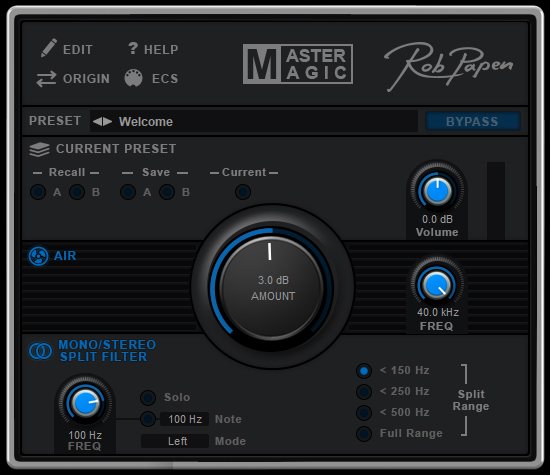
MasterMagic is an effect plug-in from Rob Papen, the Dutch synth and effect developer, intended to sit at the end of the master chain of a mix. It is deliberately small, built around two sections: Air and Mono/Stereo.
Air is a wide-bandwidth boost of very high frequencies, which the official page describes as adding a sense of breathing space. Amount and centre frequency can be set, and the section can be switched on or off independently.
Mono/Stereo is a split filter that divides the signal into a mono part and a stereo part at a chosen frequency. Everything below the set frequency is summed to mono, which the official page says tightens the low end. The mono mode can be Left, Right, L+R or L-R.
Operation features include two preset slots (A/B), MIDI learn through the ECS menu, MIDI Program Change support and preset cycling from the computer keyboard. A demo version is offered.
Key features
Air boost
A wide-bandwidth lift of very high frequencies with adjustable amount and centre frequency. The official page notes it can be used in small amounts. It may be tried when a little brightness is wanted at the end of a chain.
Mono/Stereo split filter
Everything below the set frequency is converted to mono. It may help when the low end should be kept centred, for example kick and bass.
Solo switch
This lets the converted mono part be heard on its own, which helps when searching for the right frequency.
Four mono modes
Left, Right, the average of L+R, or the difference L-R can be chosen, so the mode can be tried against different material.
A/B presets
Each preset holds two variations for comparing settings. The Edit button lights while a preset is changed, and Origin returns it to the saved state.
MIDI control
MIDI controllers can be latched to controls, and settings can be saved and loaded from the ECS menu. Capture mode avoids sudden jumps when a latched controller is touched.
Bypass and back panel
Bypass switches off both sections. Clicking the logo opens a back panel with global settings such as MIDI channel (1-16 / Omni) and keyboard control.
Specifications
| Item | Details |
|---|---|
| Type | Master-bus effect (Air / Mono-Stereo) |
| Windows formats | VST3 / AAX / VST (64-bit, Windows 7 or higher; AAX for Pro Tools 12 or higher) |
| macOS formats | AU / VST3 / AAX / VST (64-bit, OS 10.15 or higher, ARM compatible) |
| Licence | Serial activation (offline activation; installable on 2 computers) |
| Official price | $39 / EUR 39 |
What is included and system requirements
- MasterMagic plug-in (Windows / Mac)
- Air section and Mono/Stereo section
- A/B preset slots and factory presets
- PDF manual (opened from the help icon in the plug-in)
How to use it
- Create an account at robpapen.com and register the purchased serial number.
- After registration, download the installer for the format your DAW uses and install it.
- Insert MasterMagic at the very end of the master track's effect chain.
- Switch on Mono/Stereo and set the frequency; engage Solo to hear the part being converted to mono.
- Choose the mono mode (Left, Right, L+R or L-R).
- Switch on Air, raise the amount gradually and adjust the centre frequency.
- Store another setting in the A/B slot and compare by switching.
Where it may come in handy
Finishing a mix
Placed last on the master track, it could be used to keep low-end width in check or to add a little brightness at the top. Small amounts may be a good place to start.
Tidying a single track
It could be used on a bass or synth track to fold the low range to mono. The official page also mentions use on individual tracks.
Checking stereo width
By changing the mono frequency and using Solo, it may help to understand how much stereo information sits in the low end.
Who it may suit
- Users who want a simple low-end mono tool plus a high-frequency adjustment at the end of the master
- Users who prefer a focused tool to a large mastering suite
- Users who collect Rob Papen effects
Good to know before you buy
- The plug-in has two functions, Air and Mono/Stereo; it has no compressor or limiter.
- Activation is offline and the software can be installed on two computers.
- A demo version is offered before purchase.
Price
$39 (Rob Papen official site, checked 2026-10-27). Prices can vary by region and promotion, so check the official page before buying.
See MasterMagic on the product page
More of the same kind
Other introduction articles of the same kind.
- Waves Waves CLA Nx
- MAAT RSPhaseShifter
- Nathan Blair HALO 3D PAN
- UJAM UFX LOFI
- NUGEN Audio Aligner
- McDSP Analog Channel
We have introduced 17 other products from Rob Papen.
- Rob Papen LowSane
- Rob Papen UniMagic
- Rob Papen RAW-Kick 2
- Rob Papen Rob Papen RAW-2
- Rob Papen BLUE-III
See the full list in Product database: Effects.
Sources: robpapen.com pluginboutique.com (checked 2026-10-27)










Comments