
Disclosure: This page may contain affiliate links. Prices were checked on the date shown and may change.
An introduction to MAAT RSPhaseShifter, based on information from the maker and distributors: what it does, how to use it and who it may suit. It is not scored.
Creating a very high fidelity, phase shifted version of the input, RSPhaseShifter provides a fast, convenient and musical means of aligning individual mix elements for best subjective result.
— MAAT official site
What is RSPhaseShifter?
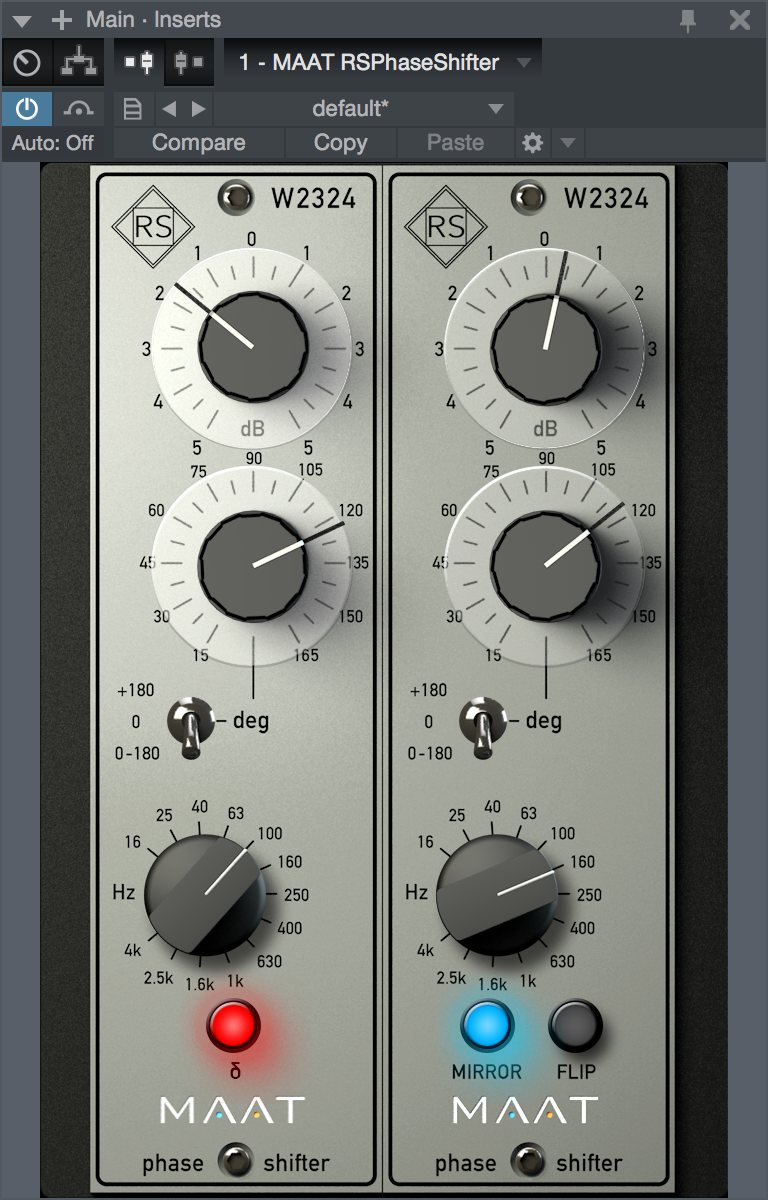
RSPhaseShifter is a phase rotator plugin from MAAT. It is an officially licensed digital version of the Phase Shifter W2324 hardware by Roger Schult and German Audio Lab, centered on aligning the phase of elements in a mix.
It does not add or remove content but creates a phase-shifted version of the input. It may help where phase offsets thin out a sound, such as multiple microphones on one source or a bass that mixes a DI with a re-amped track.
The maker says it is a digital recreation of the W2324 topology rather than a modeling algorithm. Elements such as noise, hum and transformer coloration are left out on purpose.
The phase angle moves continuously from 15 to 180 degrees and can be extended to 360 degrees with a range switch. Frequency can be selected from 16 Hz to 4 kHz in 13 steps, and stereo modes are included.
Key features
Phase angle control
The phase angle moves continuously from 15 to 180 degrees, and the range switch reaches 180 to 360 degrees. The center bypass position allows quick comparison with the unprocessed sound.
Frequency selection
Frequency spans 16 Hz to 4 kHz with 13 steps or continuous control. Steps make settings repeatable, while continuous control suits fine tuning.
Gain refinement
Filter gain is adjusted in 41 steps within plus or minus 5 dB. It helps rebalance level after shifting phase.
MIRROR, FLIP and DELTA
For stereo work, MIRROR ganges both sides, FLIP inverts, and the DELTA mode changes stereo spread in an MS workflow. They speed up settings on stereo material.
Linear scale
The original hardware has a non-linear scale with ten marks; the plugin uses a linear scale of eleven marks in 15-degree steps, which makes values easier to read.
64-bit processing and high sample rates
Internal 64-bit processing runs at standard sample rates from 44.1 to 384 kHz. AU, VST and AAX versions exist for Mac and Windows.
Specifications
| Item | Details |
|---|---|
| Type | Phase shifter (phase rotator) |
| Phase angle | 15 to 180 degrees (up to 360 with range switch) |
| Frequency | 16 Hz to 4 kHz (13 steps) |
| Gain | Plus or minus 5 dB (41 steps) |
| Operation | Mono / stereo (MIRROR, FLIP, DELTA) |
| Sample rates | 44.1 kHz to 384 kHz |
| Formats | AAX (Pro Tools 10.3.10 or later) / AU / VST2 / VST3 |
| Supported OS | macOS 10.9 or later, Windows 7 or later per the maker |
What is included and system requirements
- RSPhaseShifter plugin
- Formats: AAX, AU, VST2, VST3
- User manual (PDF with production tips available from the maker)
How to use it
- Get a license from the maker's site or a retailer.
- Run the installer and authorize the license.
- Launch the DAW and rescan plugins.
- Insert RSPhaseShifter on one of the tracks whose phase you want to align.
- Begin with a low frequency and sweep the phase angle while listening.
- Refine the frequency near a good position and adjust gain for level.
- On stereo material, use MIRROR to gang both sides while searching.
- Switch to the center bypass to compare with the unprocessed sound.
Where it may come in handy
Aligning multi-mic recordings
It may help when mixing two close sources such as snare top and bottom mics or an acoustic guitar mic with a piezo. Insert it on the closer track and search by ear.
Bass mixing DI and re-amped tracks
The maker's example describes fixing a mismatch between a DI bass and a re-amped track by rotating the phase of the DI. Starting from a low frequency is suggested.
Stacked guitar amps
When the same riff is layered through different guitars or amps, moving the phase of one side can help them blend. MIRROR mode gangs both sides while you search.
Who it may suit
- People who need to adjust phase between multiple microphones
- Those who blend DI and re-amped tracks and handle phase between tracks
- Users who want to change stereo spread in an MS workflow
- Anyone who prefers a plugin that follows an analog unit's controls
Good to know before you buy
- The maker says it usually makes sense to use it on one channel or track rather than both sides of a stereo pair.
- There is no automatic phase correction; you search by ear.
- The maker's site offers a trial through Try It Now.
- Both mono and stereo operation are available.
How it differs from similar products
We do not pick a winner; the official figures are placed side by side.
Minimal Audio Ripple Phaser
RSPhaseShifter sets a phase angle from 15 to 180 degrees (up to 360 with a range switch) and is centered on aligning phase between tracks. Ripple Phaser has seven modes, up to 24 notches and an LFO for creative movement.
Price
$99 (MAAT official site, checked 2026-10-27). Prices can vary by region and promotion, so check the official page before buying.
See RSPhaseShifter on the product page
More of the same kind
Other introduction articles of the same kind.
- Universal Audio A-Type Multiband Dynamic Enhancer
- W. A. Production DJFX
- Waves OneKnob Louder
- ToneLib TL NoiseReducer
- UJAM Finisher DYNAMO
- NUGEN Audio NUGEN Audio Stereoplacer Elements
We have introduced 9 other products from MAAT.
See the full list in Product database: Effects.
Sources: maat.digital pluginboutique.com (checked 2026-10-27)










Comments