
Disclosure: This page may contain affiliate links. Prices were checked on the date shown and may change.
An introduction to sonible pure:unmask, based on information from the maker and distributors: what it does, how to use it and who it may suit. It is not scored.
pure:unmask effortlessly tidies up your mix and prevents, thanks to spectral unmasking, any audio interference in the frequency spectrum between two tracks.
— sonible official site
What is pure:unmask?
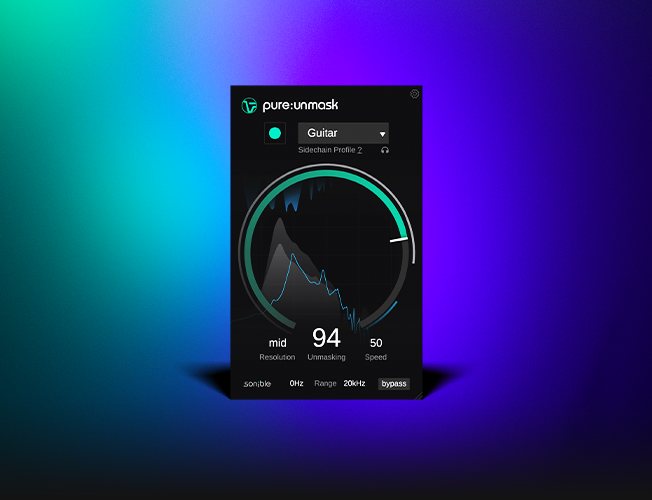
pure:unmask is a plug-in from sonible of Austria that reduces masking, where two tracks compete in the same frequency range. It uses AI-based analysis and spectral processing to automatically lower the competing range of one sound.
According to the official description, the workflow is to load it on the track that needs to make space, route a sidechain from the prioritized track and choose a profile that fits the sidechain signal. It dynamically lowers the competing frequencies in the background track so the prioritized one stands out.
There are four main controls. Unmasking is the large central knob for overall amount, Resolution sets the width of the processing bands, Speed lengthens or shortens attack and release, and Range limits processing to a low and high frequency range. Speed is meant to suit slower harmonic contexts such as piano and guitar, or faster rhythmic ones such as kick and bass.
It supports VST, VST3, AU and AAX on Windows 10 or later and macOS. A 30-day trial is offered on the official page.
Key features
Sidechain-based unmasking
Competing bands in one track are lowered based on the prioritized track, which may suit mixes where a lead element such as a vocal should stand out.
Sidechain profiles
A profile matching the sidechain signal is selected; the official page presents this with AI-based processing as a way to reach suitable results.
Unmasking knob
The overall amount of the effect is raised or lowered so users can judge a suitable setting by ear.
Resolution and Speed
Resolution sets the width of the processing bands and Speed sets attack and release, adapting to slow or fast material.
Range
The processed low and high frequency limits can be set, which may help when a certain region should be treated.
Automatic parametrization
According to the official page, automatic parameter setting is meant to reach results with minimal setup.
Specifications
| Item | Details |
|---|---|
| Type | Spectral unmasking (uses sidechain) |
| Formats | Mac: VST, VST3, AU, AAX; Windows: VST, VST3, AAX |
| Sample rates | 44.1 to 192 kHz |
| OS | Windows 10 (64-bit); macOS (Plugin Boutique lists 10.13+) |
| Apple silicon | Native |
| Authorization | Machine-based or iLok |
What is included and system requirements
- The plug-in
- 30-day trial (registration on the official site)
- Compatible DAWs listed include Logic Pro, Ableton Live, Pro Tools 11+, Reaper, Cubase, Nuendo, FL Studio and Studio One
How to use it
- Run the installer and rescan plug-ins in the DAW.
- Insert pure:unmask on the background track that should make space.
- Send a sidechain from the prioritized track.
- Select a profile that fits the sidechain signal.
- Set the amount with the Unmasking knob.
- Adjust Speed to rhythmic or slower material.
- Adjust Resolution and Range as needed.
- Compare with bypass to check whether the prioritized sound is easier to hear.
Where it may come in handy
Organizing vocals and backing
To bring a vocal forward, it may help clear competing bands in guitar or synth parts.
Kick and bass
It may be worth trying where two sounds clash in the low end; the official page gives fast Speed settings as an example.
Piano and guitar
It may suit organizing slower harmonic instruments.
Narration and background music
It may help lower competing bands in music so that a voice is easier to follow.
Who it may suit
- People who find backing parts mask vocals or dialogue
- Those who want to spend less time with manual EQ cuts
- Users familiar with basic sidechain routing
Good to know before you buy
- Sidechain routing is required, and the method differs between DAWs.
- Results depend on the material, so compare with bypass.
- It is also part of the pure:bundle.
How it differs from similar products
We do not pick a winner; the official figures are placed side by side.
sonible pure:level
pure:unmask reduces frequency clashes between two tracks, while pure:level evens out the level of one track.
Price
$39 (sonible official site, checked 2026-10-27). Prices can vary by region and promotion, so check the official page before buying.
See pure:unmask on the product page
More of the same kind
Other introduction articles of the same kind.
- Waves CLA MixDown
- Sound Particles Doppler
- W. A. Production Noizzer
- SIR Audio Tools StandardCLIP
- Sound Particles Density
- New Audio Technology Spatial Sound Card – Spatial Sound Card Pro
We have introduced 9 other products from sonible.
- sonible pure:level
- sonible pure:comp
- sonible learn:bundle
- sonible sonible entropy:EQ+
- sonible sonible Metering Bundle
See the full list in Product database: Effects.
Sources: sonible.com pluginboutique.com (checked 2026-10-27)










Comments