
Disclosure: This page may contain affiliate links. Prices were checked on the date shown and may change.
An introduction to Sound Particles Doppler, based on information from the maker and distributors: what it does, how to use it and who it may suit. It is not scored.
Doppler simulates the behavior of objects moving through air, providing audio with highly accurate characteristics of sounds passing-by.
— Sound Particles official site
What is Doppler?
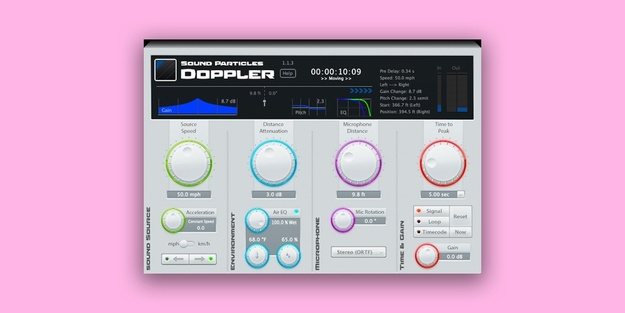
Doppler is a plug-in from Sound Particles that creates the Doppler effect of passing sounds. It simulates the changes in pitch, level and frequency response when an object moves through the air.
It is used when you want to represent a moving source, such as the change in pitch when an ambulance passes. The product page says the plug-in uses the same engine as Sound Particles' 3D audio software, which is used in Hollywood studios.
It supports not only stereo but also multichannel output such as 5.1, 7.1, 9.1 Dolby Atmos beds and Ambisonics up to 3rd order. A function lets you specify the time of the Doppler peak so that it can sync with the picture.
It looks suited to sound design for picture and audio post, but it may also be worth trying for game and video material.
Key features
Physically based Doppler
You can specify the parameters that physically affect pitch, level and EQ. Setting speed and distance builds the change of a moving source.
Immersive audio support
You can select microphones: mono (omni, cardioid, figure-of-eight), stereo (MS, XY, ORTF, Blumlein, AB), 5.1, 7.1, 9.1 Dolby Atmos bed, or Ambisonics up to 3rd order.
Image sync
Specify the time at which the Doppler peak should occur and the other parameters adjust to sync with the picture.
Distance EQ
Besides level and pitch, it applies a frequency response that reflects air damping over distance.
World units
It supports both meters and feet and km/h and mph, so you can enter values in familiar units.
Control surface support
Plug-in parameters can be operated with control surfaces such as AVID S6. This is a feature aimed at post-production work.
Specifications
| Item | Details |
|---|---|
| Maker | Sound Particles |
| Type | Doppler effect |
| Plug-in formats (Mac) | AAX Native / AU / VST / VST3 |
| Plug-in formats (Windows) | AAX Native / VST / VST3 |
| OS | Mac OS X 10.9 or higher, Windows 7 SP1 or higher |
| Requirements | 2-core CPU or higher (4-core recommended), 4 GB RAM and 600 MB disk (8 GB RAM recommended) |
| Note | AAX requires 64-bit Pro Tools 11 or above |
What is included and system requirements
- Doppler plug-in
- Supported microphone formats: mono / stereo / 5.1 / 7.1 / 9.1 Dolby Atmos bed / Ambisonics (up to 3rd order)
How to use it
- In your DAW, insert Doppler on the track of the sound you want to pass by.
- Select the type of microphone (stereo or multichannel).
- Set the speed and distance of the moving source.
- Choose familiar units (meters or feet, etc.).
- Specify the time at which the Doppler peak should occur.
- Listen to the effect of the distance EQ and adjust it.
- Play together with the picture and check the sync.
- Write parameters as automation if needed.
Where it may come in handy
Sound effects for picture
Adding the Doppler effect to the sound of a car or plane crossing may be worth trying.
Making game material
Rendering the pass-by of a moving source as short material is one possible use.
Post-production
It may be useful when aligning the Doppler peak to the picture and refining effects.
Multichannel work
Building sounds that move in three dimensions with Atmos or Ambisonics is also conceivable.
Who it may suit
- People who create sound effects or audio for picture
- People who want to create pass-by sounds naturally
- People working in Atmos or Ambisonics
- People who want to adjust the peak of a sound to the picture
Good to know before you buy
- The listed OS support is Mac OS X 10.9+ and Windows 7 SP1+. Please check support for newer OS versions on the official site before purchasing.
- AAX requires 64-bit Pro Tools 11 or above.
- It is aimed mainly at sound effects and audio for picture rather than music production.
How it differs from similar products
We do not pick a winner; the official figures are placed side by side.
Sound Particles
Doppler is focused on reproducing pass-by sounds, with a choice of microphone formats for multichannel output.
Price
$99 (Plugin Boutique, checked 2026-10-27). Prices can vary by region and promotion, so check the official page before buying.
See Doppler on the product page
More of the same kind
Other introduction articles of the same kind.
- NivanT Labs NT-S VOICE BALANCE
- Universal Audio Empirical Labs FATSO Tape Simulator
- Waves SoundShifter
- Moog Moogerfooger MF-105S MuRF
- Waves Waves Maserati ACG
- Waves MultiMod Rack
We have introduced 14 other products from Sound Particles.
- Sound Particles Energy Panner 2
- Sound Particles Brightness Panner 2
- Sound Particles AudioMatrix
- Sound Particles Density
- Sound Particles Air
See the full list in Product database: Effects.
Sources: pluginboutique.com (checked 2026-10-27)










Comments