
Disclosure: This page may contain affiliate links. Prices were checked on the date shown and may change.
An introduction to sonible sonible Metering Bundle, based on information from the maker and distributors: what it does, how to use it and who it may suit. It is not scored.
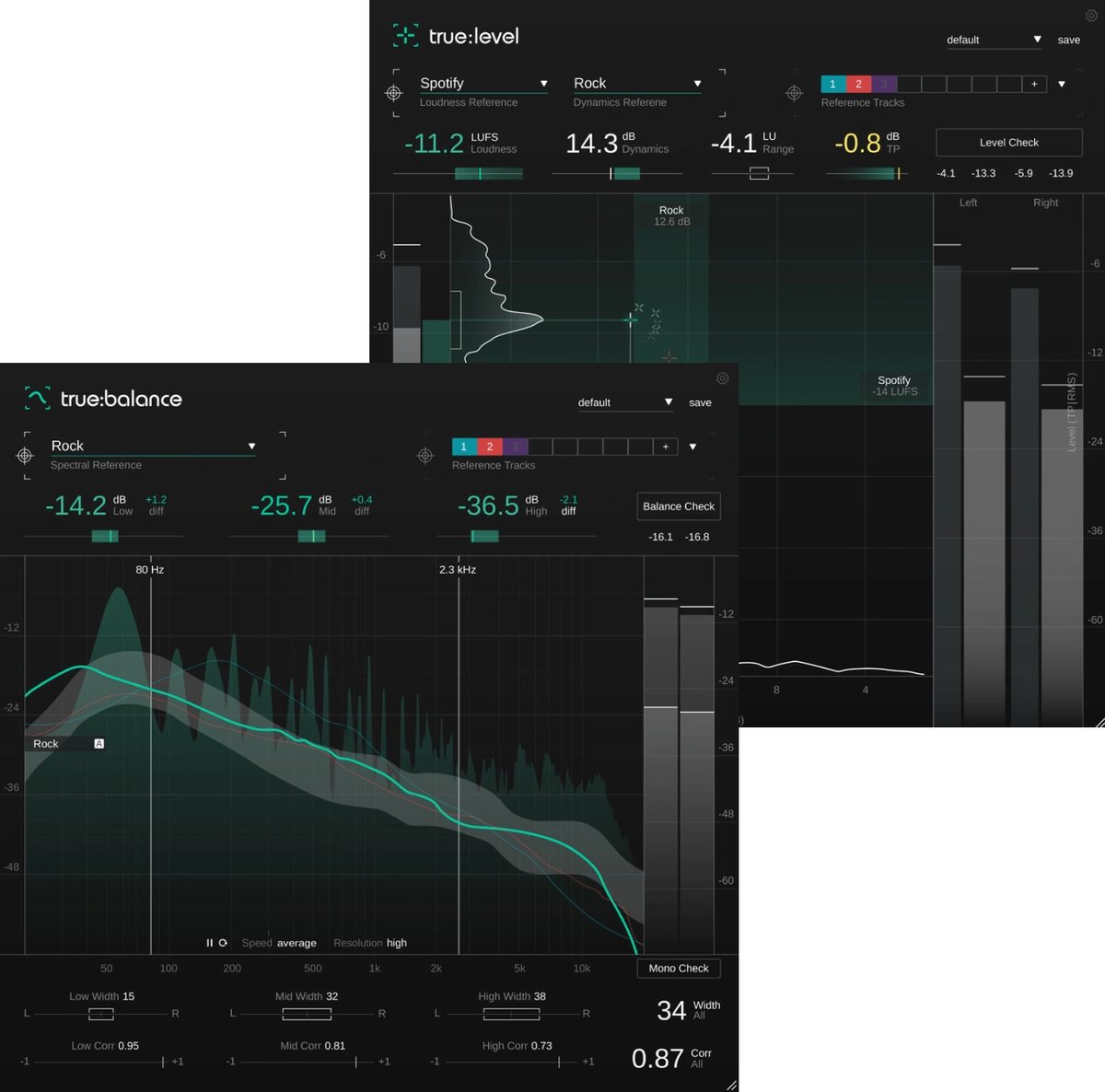
While true:balance precisely monitors the spectral balance of your track, true:level enables you to keep an eye on the interplay of loudness and dynamics.
— sonible official site
What is sonible Metering Bundle?
The sonible Metering Bundle packs two measurement plug-ins from sonible in Austria. It contains true:balance, which looks at the spectral balance of a track, and true:level, which looks at loudness and dynamics. They do not process audio; they are tools for checking the state of a mix or master.
true:balance is a meter for the balance across frequencies (spectrum) and for mono compatibility. It shows the real-time spectrum of the input together with the average spectrum over time, and lets you compare against genre references or reference tracks you load yourself. Target indicators show whether the levels of the low, mid and high ranges are close to the chosen reference.
true:level is a meter that displays loudness (LUFS), dynamics, loudness range and true peak together. You can choose streaming-service loudness standards or genre-based dynamics references to compare with. The maker explains that it was made as a stand-alone meter based on the monitoring section of its limiter, smart:limit.
Both let you load up to eight reference tracks and have a check function that suggests in text what to adjust. This article organises the functions and suitable situations from the official site and Plugin Boutique. No score and no impressions of sound are written.
Key features
true:balance: check spectral balance
Displays the real-time spectrum and the average spectrum. Low, mid and high levels are shown relative to the reference, which the maker says keeps attention on the overall balance rather than small details.
Balance Check: suggestions in text
Compares the current spectral distribution with the reference and suggests in text what to change. It is meant as a clue for those with less mixing experience who want to approach the reference.
Stereo width, correlation and Mono Check
The channel data section shows stereo width and correlation values. Mono Check points out possible problems when summed to mono and issues such as a blurry low end.
true:level: loudness and dynamics together
Shows LUFS (integrated, short-term, momentary), loudness range, dynamics based on the peak-to-loudness ratio, and true peak using oversampling. Its visualisation presents the balance of loudness and dynamics in one view.
Platform and genre references
Includes loudness standards for publishing platforms and genre-appropriate dynamics references. You can see whether the track falls in the reference zone, and the Level Check suggests actions to take.
Up to eight reference tracks
Both plug-ins can load up to eight reference tracks. This is intended for comparison when you want consistency across multiple songs, such as an album.
Specifications
| Item | Details |
|---|---|
| Included products | true:balance / true:level |
| Formats | Mac: VST / VST3 / AU / AAX, Windows: VST / VST3 / AAX |
| Channels | Mono, stereo, Dolby Surround 5.1 |
| Sample rates | 44.1 kHz to 192 kHz |
| Authorisation | Machine-based or iLok |
| Apple Silicon | Native support |
| Mac | macOS 10.12 or newer, Intel Core i5 or Apple Silicon, 4 GB RAM, OpenGL 3.2 or newer |
| Windows | Windows 10 (64-bit) |
| Trial | 30-day trial (official site) |
| Latest version | 1.0 |
What is included and system requirements
- true:balance (spectral balance and mono compatibility meter)
- true:level (loudness, dynamics and true peak meter)
- Genre and platform reference data
How to use it
- After purchase, register the licence in your sonible account and download the installer.
- Install and authorise with machine-based authorisation or iLok.
- Insert true:balance where you want to measure, such as at the end of the master bus.
- Choose a genre reference or load reference tracks and check the spectrum and band target indicators.
- Look at the Balance Check suggestions and adjust with EQ or other tools.
- Insert true:level at the same point and choose a platform standard or reference.
- Finish while watching LUFS, dynamics and true peak, using the Level Check suggestions as a guide.
Where it may come in handy
Checking the frequency balance of a mix
It could be used to see where the low, mid and high ranges sit relative to a genre reference. It may suit people who want numbers to support a judgement made by ear.
Checking loudness before release
It could be used to choose a streaming platform standard and confirm that LUFS and true peak are within range, as a check before publishing.
Keeping an album consistent
Loading up to eight reference tracks to look at differences in level and balance between songs is one possible use.
Mono compatibility check
Correlation and Mono Check could be used to look for problems when the music is heard in mono, such as on a phone speaker.
Who it may suit
- People who want to check a mix or master against a reference.
- People who want to check loudness and true peak before release.
- People who want text suggestions as a clue to the direction of adjustment.
Good to know before you buy
- These are measurement plug-ins, not processors.
- The official site lists version 1.0. Check the latest supported environments on the official site before buying.
- The official site mentions a 40% education discount for students and lecturers.
How it differs from similar products
We do not pick a winner; the official figures are placed side by side.
true:balance true:level
true:balance looks at balance across frequencies, stereo width and correlation, while true:level looks at LUFS, dynamics and true peak. They look at different things.
Price
$99 (sonible official site, checked 2026-10-27). Prices can vary by region and promotion, so check the official page before buying.
See sonible Metering Bundle on the product page
More of the same kind
Other introduction articles of the same kind.
- Waves JJP Analog Legends
- AIR Music Technology Fabric Vintage Synths Vol. 2
- Zynaptiq Mac Audio Apps Bundle 2
- LANDR LANDR Ultimate Bundle
- IK Multimedia Fulltone Collection
- UJAM Finisher Bundle
We have introduced 9 other products from sonible.
- sonible learn:bundle
- sonible sonible pure:bundle
- sonible smart:bundle
- sonible sonible entropy:EQ+
- sonible pure:unmask
See the full list in Product database: Bundles.
Sources: sonible.com pluginboutique.com (checked 2026-10-27)










Comments