
Disclosure: This page may contain affiliate links. Prices were checked on the date shown and may change.
An introduction to Zynaptiq Mac Audio Apps Bundle 2, based on information from the maker and distributors: what it does, how to use it and who it may suit. It is not scored.
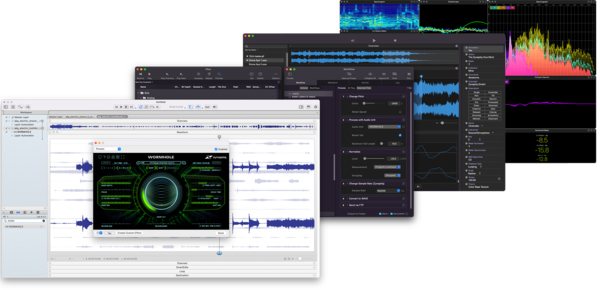
Edit, design, morph and assemble sound using TRIUMPH 3, batch process your files with MYRIAD 4, author loops with LOOP EDITOR 2, and analyze your audio across the network using SPECTRE.
— Zynaptiq official site
What is Mac Audio Apps Bundle 2?
Mac Audio Apps Bundle 2 is a set of audio applications for Mac from Zynaptiq. It combines four apps, TRIUMPH 3, MYRIAD 4, LOOP EDITOR 2 and SPECTRE, with the multi-effects plug-in WORMHOLE.
Version 2 is the commercial release sold to new users under the Zynaptiq brand, with support. It runs natively on Apple Silicon, and TRIUMPH has been updated to its third generation. Copy protection is PACE (iLok), and a dongle is not required.
Each app has its own role. TRIUMPH handles editing, sound design and assembling, MYRIAD 4 handles batch processing of files, LOOP EDITOR makes loops, and SPECTRE does metering and analysis. You can go from editing to pre-delivery processing and checking on a Mac.
The official site offers a 30-day free trial. An upgrade version is also offered for people who already own a license for one of the included apps.
Key features
TRIUMPH 3: layer-based editing
An editor that handles audio in layers, like an image editor. Layers can be combined by morphing, vocoding, ring modulation or cross-fade, which suits both sound design and editing.
MYRIAD 4: batch processing
A batch processor for large numbers of audio files. Normalizing (peak, RMS or LUFS), sample rate conversion, fades, channel operations and format conversion can be assembled into workflows.
LOOP EDITOR 2: loop authoring
It handles sampler-style sustain and release loops as well as ACIDized WAV and Apple Loops. It can author metadata and slice audio, and lets you preview how a loop sounds when stretched or pitched in the DAW.
SPECTRE: metering and analysis
A stand-alone app with 20 meter types including spectrogram, analyzers, level meters, Lissajous, correlation meters and oscilloscopes. It can analyze files, hardware inputs and network streams.
WORMHOLE: multi-effects
A plug-in with pitch / frequency shifting, spectral warping, dual reverbs and dry / wet morphing, included in the bundle.
ZTX time stretching and pitch shifting
TRIUMPH 3 includes time stretching and pitch / formant shifting based on ZTX Pro, for changing the length or pitch of material.
Specifications
| Item | Details |
|---|---|
| Type | Mac-only audio application set (4 apps + 1 plug-in) |
| Included | TRIUMPH 3.x, MYRIAD 4.x, SPECTRE 1.x, LOOP EDITOR 2.x, WORMHOLE |
| OS | Mac (native Apple Silicon support / Intel with 2 cores or more). Not for Windows |
| WORMHOLE formats | AU / VST 2.4 / VST 3 / AAX Native (macOS 10.15 or later) |
| Activation | Activation through an iLok account (internet connection required) |
| Trial | 30-day free trial |
What is included and system requirements
- TRIUMPH 3.x (audio editor)
- MYRIAD 4.x (batch processor)
- LOOP EDITOR 2.x (loop authoring)
- SPECTRE 1.x (metering and analysis)
- WORMHOLE (multi-effects plug-in)
- System: Mac, Apple Silicon (native) or Intel with 2 cores or more, iLok.com account
- PDF manuals for all apps
How to use it
- Create a free account at iLok.com.
- After buying, get the installer from the download link.
- Run the installer to install the apps and plug-in.
- Launch an app and enter the activation code.
- Log in with your iLok account and choose where to activate (computer or iLok).
- In TRIUMPH, open material and edit or process it by stacking layers.
- For many files, assemble a workflow in MYRIAD and process them in one go.
- Use SPECTRE's meters to check the result.
Where it may come in handy
Sound design
You may be able to try combining layers with morphing and vocoding to build sounds.
Batch processing before delivery
It may help when normalizing, converting sample rates and formats for many files at once.
Making sample and loop material
People who produce sample libraries or loops could use LOOP EDITOR to set loop points and metadata.
Checking recordings and mixes
One could line up SPECTRE's meters to watch the signal while recording or mixing.
Who it may suit
- People who edit audio or do sound design on a Mac
- People who want to batch process many audio files
- People who make sample libraries or loop material
- People who want a set of meters and analysis tools
Good to know before you buy
- Mac only; it does not run on Windows.
- Activation requires an iLok.com account and an internet connection. The first-generation (blue) iLok is not supported.
- The license is for a single user and a single seat.
- If you already own a license for TRIUMPH, MYRIAD, SPECTRE, LOOP EDITOR and so on, an upgrade version is offered.
- A 30-day free trial is available on the official site.
- The dollar price on the official site and the price at Plugin Boutique differ, so check the store page before buying.
Price
Please check the official page for the price.
See Mac Audio Apps Bundle 2 on the product page
More of the same kind
Other introduction articles of the same kind.
- Applied Acoustics Systems Modeling Collection
- Krotos Krotos Everything Bundle 6
- Soundtoys Soundtoys 5
- Waves Restoration
- Cherry Audio Novachord + Solovox
- Waves CLA Classic Compressors
We have introduced 10 other products from Zynaptiq.
- Zynaptiq REPAIR Bundle / ZAP Bundle
- Zynaptiq BALANCE
- Zynaptiq MORPH 3 PRO
- Zynaptiq UNVEIL
- Zynaptiq TIME FACTORY II
See the full list in Product database: Bundles.
Sources: zynaptiq.com pluginboutique.com (checked 2026-10-27)










Comments