
Disclosure: This page may contain affiliate links. Prices were checked on the date shown and may change.
An introduction to United Plugins DIFIX, based on information from the maker and distributors: what it does, how to use it and who it may suit. It is not scored.
A lot of sound cards claim to have a Hi-Z instrument input. But in reality, the input impedance is not high enough to make your pick-ups work properly.
— United Plugins official site
What is DIFIX?
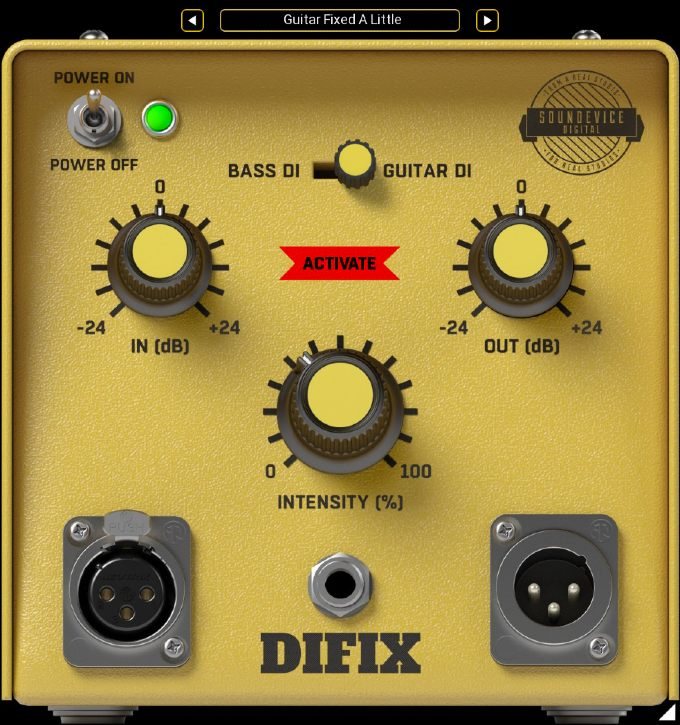
DIFIX is a plug-in from United Plugins (developed by Soundevice Digital) that corrects guitar or bass recorded directly into an audio interface. It is positioned as a supplement, not a replacement for a DI box.
The official description says some sound cards' Hi-Z inputs have an impedance that is not high enough, which can make a pickup's signal lose brilliance or sound dull. DIFIX is designed to compensate for that effect.
Inside, several independent processes level the sound and add a little analog-style saturation, as if a real DI box had been used. Operation consists of choosing guitar or bass and setting how much correction to apply.
There is a recording mode with dynamic processing and a mixing mode based on spectral dynamics. Activation uses license files, with no iLok, dongle or internet access required.
Key features
Compensating for weak Hi-Z inputs
Its aim is to restore brilliance that can be lost at an interface's instrument input. It may be worth trying as an aid when a line-recorded guitar or bass sounds dull.
Guitar / bass switch
You choose whether you are recording guitar or bass and decide how much correction to apply. There are few controls, so the workflow is simple.
Rec and Mix modes
The recording mode uses dynamic processing and can be used while tracking. The later-added mixing mode is based on spectral dynamics and may add latency on some machines, so it is recommended for mixing only.
First in the chain
The official advice is to insert DIFIX at the start of the guitar track's chain and then use your usual effects and amp simulations after it.
Resizable interface
The hardware-style GUI can be resized by dragging the corner at the bottom right: smaller to save screen space, larger for easier reading.
15-day trial and free updates
A 15-day unlimited trial is offered with no saving limits, and updates are described as free.
Specifications
| Item | Details |
|---|---|
| Maker | United Plugins (Soundevice Digital) |
| Type | Correction for direct-recorded guitar and bass |
| Formats (Mac) | VST2, VST3, AAX, AU |
| Formats (Windows) | VST2, VST3, AAX |
| OS (Mac) | macOS 10.10 or later (64-bit, Apple Silicon supported) |
| OS (Windows) | Windows 8 to 11 (32/64-bit) |
| Internal processing | 64-bit |
| Activation | License file (no iLok, dongle or internet) |
| Trial | 15 days |
What is included and system requirements
- The DIFIX plug-in
- Formats: VST2/VST3/AAX/AU on Mac; VST2/VST3/AAX on Windows
- A 15-day unlimited trial
How to use it
- Install DIFIX from the trial or the files you get after purchase.
- Activate it with the license file (no internet required).
- Prepare a guitar or bass track in your DAW.
- Insert DIFIX at the start of the chain.
- Choose guitar or bass.
- Move the correction amount and check whether the dullness is reduced.
- Use the recording mode while tracking and the mixing mode while mixing.
Where it may come in handy
Guitar recorded straight into an interface
In setups without a DI box, it may be tried on a guitar plugged directly into the instrument input.
Line-recorded bass
It may be used to supplement the definition of a bass recorded directly.
Revisiting old recordings
The maker says it can also help when remixing older recordings.
Who it may suit
- People recording guitar or bass at home without a DI box
- Those who want to correct already-recorded tracks
- Users who prefer a plug-in with few controls
Good to know before you buy
- The maker recommends a proper DI box for serious direct recording.
- The mixing mode may add latency on some machines.
- There is no AU format for Windows.
Price
Please check the official page for the price.
More of the same kind
Other introduction articles of the same kind.
- Waves CLA Bass
- UJAM Finisher RETRO
- Waves Waves Maserati ACG
- Klevgrand Spinn
- W. A. Production ChopBeast 2
- Nomad Factory COSMOS
We have introduced 34 other products from United Plugins.
- United Plugins Electrum
- United Plugins Phantomix
- United Plugins Transmutator
- United Plugins FirePreamp
- United Plugins QuickBass
See the full list in Product database: Effects.
Sources: unitedplugins.com pluginboutique.com (checked 2026-10-27)










Comments