
Disclosure: This page may contain affiliate links. Prices were checked on the date shown and may change.
An introduction to Tracktion StageBox, based on information from the maker and distributors: what it does, how to use it and who it may suit. It is not scored.
StageBox™ is a standalone plugin host and setlist manager for live keyboard players
— Tracktion official site
What is StageBox?
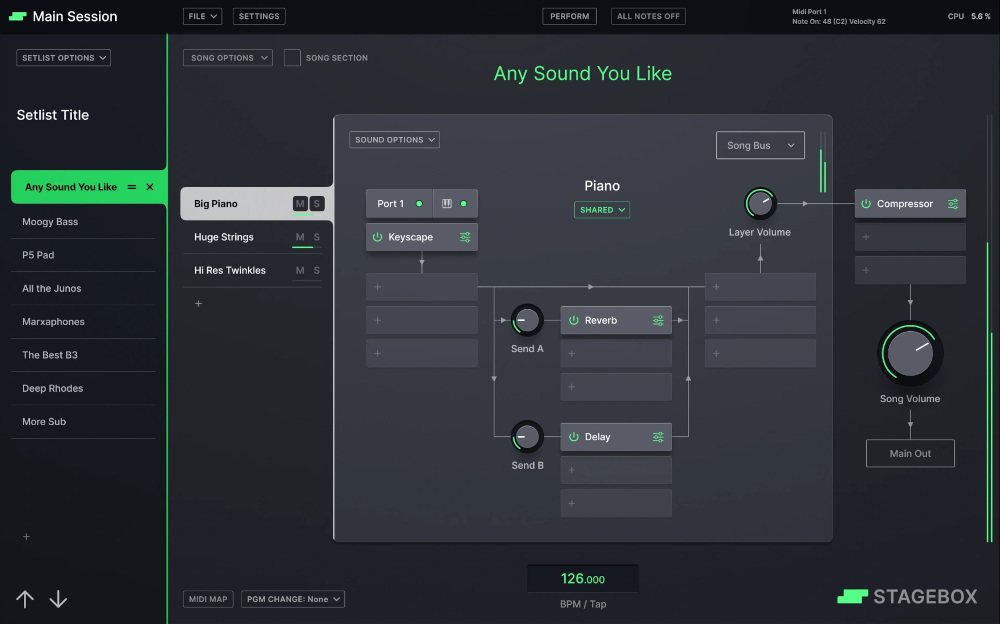
StageBox is a plugin host and setlist manager for live performance from Tracktion. It loads VST3 and Audio Units instruments and effects so that a keyboard rig can be built for the stage.
Sound combinations are built per song, and songs are arranged into a setlist. The official page says songs can be reordered by drag and drop, and that the layout shows only what you need to see.
It was developed by composer and musical director Matt Robertson, a three-time Grammy nominee, together with Jules Storer, creator of JUCE and Tracktion Engine. The page says it was made with ease of use and efficiency in mind after frustration with overly complicated live setups.
Supported systems are macOS 13 or later (Apple Silicon recommended) and Windows 10 and 11 (64-bit). A 30-day free trial is offered.
Key features
Hosts VST3 and Audio Units
It hosts VST3 and Audio Units instruments and effects; AAX is not supported. It may be useful if you want to take the keyboard instruments you already own on stage.
Songs and setlists
Songs are created and arranged into setlists. Reordering is done by drag and drop, which suits last-minute changes before a show.
Layers and splits
Layers of several instruments and keyboard splits can be set per song. An instrument can also be shared between songs to save RAM.
Effects per sound
The official FAQ says each sound can have up to 15 effects: three pre-send, three each on Send 1 and Send 2, three post-send and three on the whole song.
MIDI controller management
It supports multiple MIDI devices, and MIDI Map assigns faders and knobs to parameters in StageBox and hosted plug-ins. The official page also mentions selecting songs with external program-change messages.
Multi-output routing
Sounds can be sent to different outputs of a multi-output audio interface. The page gives the example of sending piano and organ to separate outputs.
Specifications
| Item | Details |
|---|---|
| Maker | Tracktion |
| Type | Plugin host / setlist manager (standalone) |
| Supported plug-ins | VST3, Audio Units (no AAX) |
| OS | macOS 13 or later (Apple Silicon recommended), Windows 10 and 11 (64-bit) |
| Trial | 30 days, free |
| Effects | Up to 15 per sound |
What is included and system requirements
- StageBox itself (a standalone application)
- A 30-day free trial
- Instruments and effects are not included; you load your own plug-ins
How to use it
- Download the free trial from the official site and install it.
- Connect the MIDI keyboard and audio interface you use on stage.
- Add the VST3 or Audio Units instruments and effects you want to load.
- Create layers or splits for each song.
- Set per-sound effects and sends if needed.
- Arrange songs into a setlist by drag and drop.
- Assign faders and knobs with MIDI Map and rehearse in the same state as the show.
Where it may come in handy
Keyboard live shows with a band
It may let you manage piano, synth and organ combinations per song together with the setlist.
Session and support players
When the setlist changes from gig to gig, it may help to prepare by reordering songs.
Worship and theater
For performances where set sounds are switched from song to song, it may be useful.
Who it may suit
- Keyboard players who want to use software instruments live
- People who want song-by-song sound changes and a setlist in one place
- Those who find using a DAW for live use troublesome
Good to know before you buy
- No instruments or effects are included; you load your own plug-ins.
- AAX plug-ins cannot be used.
- Large sample-based instruments need extra disk space and RAM (official FAQ).
- The official FAQ suggests an audio interface with balanced outputs for live use.
How it differs from similar products
We do not pick a winner; the official figures are placed side by side.
MainStage
The official FAQ says StageBox makes setlist management and MIDI mapping easier, while complicated setups needing backing tracks and lyric sheets may be better served by MainStage.
Price
Please check the official page for the price.
See StageBox on the product page
More of the same kind
Other introduction articles of the same kind.
- Digital Brain Instruments DSP Manager 2
- Voicemod Voicemod
- Stagecraft Software Universal Plug
- Blue Cat Audio Fader Hub
- Waves COSMOS Sample Finder
- Digital Brain Instruments Oscar
We have introduced 19 other products from Tracktion.
- Tracktion RetroMod 106
- Tracktion SpaceCraft
- Tracktion RetroMod LoFreq Classic
- Tracktion Dawesome MYTH
- Tracktion F.'em
See the full list in Product database: Streaming and recording software and others.
Sources: tracktion.com pluginboutique.com (checked 2026-10-27)










Comments