
Disclosure: This page may contain affiliate links. Prices were checked on the date shown and may change.
An introduction to Waves X-Noise, based on information from the maker and distributors: what it does, how to use it and who it may suit. It is not scored.
Isolate a section of the audio with the noise you want to remove, click Learn, and X-Noise subtracts the noise where it appears in the audio.
— Waves official site
What is X-Noise?
X-Noise is a broadband noise-reduction plug-in from Waves. The store description lists use cases such as preamp hiss on a vocal, room rumble reaching a ribbon mic, computer noise picked up by a guitar, and noise magnified by high-gain amp sims.
It works with a noiseprint. Select a section containing the noise and click Learn, and X-Noise learns the noise's character and subtracts it from the audio. A few more tweaks finish the job. It is described as a way to avoid re-recording a track.
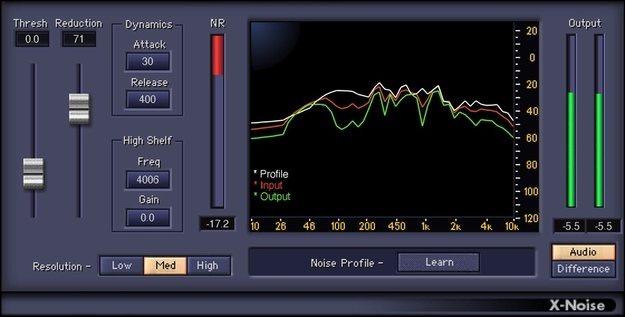
The controls resemble a dynamics processor: Threshold and Reduction set how much is removed, and Attack and Release smooth the change. A frequency-based spectral display gives visual feedback while adjusting.
When the noise cannot be isolated, there are 13 factory presets. It supports macOS Monterey 12 through Sequoia 15 (VST / AU / AAX) and Windows 10 or later (VST / AAX).
Key features
Noiseprint-based removal
The noise-only section is learned and subtracted from the audio, which may suit fairly constant noise such as hiss or air-conditioning.
Dynamics-style controls
Threshold and Reduction set the amount of reduction, and Attack and Release shape its response, a layout that is familiar to people used to compressors.
Spectral display
A frequency-based display shows how much is being reduced in each range while adjusting.
Two saved noise profiles
Two noise profiles can be saved for comparison, which may help when comparing recordings from different places or equipment.
Difference mode
This mode monitors only the removed noise, useful for checking what is being taken out, and the store also points to sound-design use.
High-shelf filter and resolution setting
A high-shelf filter boosts or cuts the top end, and resolution can be optimized toward frequency or time domain. There are 13 factory presets.
Specifications
| Item | Details |
|---|---|
| Type | Broadband noise reduction |
| Main controls | Learn, Threshold, Reduction, Attack, Release, high-shelf |
| Presets | 13 factory presets |
| Supported OS | macOS Monterey 12, Ventura 13, Sonoma 14, Sequoia 15; Windows 10 or later |
| Plug-in formats | Mac: VST / AU / AAX; Windows: VST / AAX |
What is included and system requirements
- X-Noise plug-in
- 13 factory presets
- Supported OS: macOS Monterey 12 to Sequoia 15, Windows 10 or later
- Formats: VST / AU / AAX on Mac, VST / AAX on Windows
How to use it
- Install the product and activate the license, for example through Waves Central.
- Insert X-Noise on the noisy track.
- Play a section that contains only the noise.
- Click Learn to create the noiseprint.
- Set the amount of removal with Threshold and Reduction.
- Smooth it with Attack and Release and adjust the high-shelf if needed.
- Use Difference mode to check what is being removed.
Where it may come in handy
Vocal recording
For a recording with noticeable preamp hiss, a quiet section can be learned and used for reduction.
Guitar and amp sims
It can be tried on noise that stands out with high-gain settings.
Whole-mix processing
The store says it works on individual tracks or complete mixes.
Sound design
Difference mode lets the removed content be monitored and, as the store suggests, used as material.
Who it may suit
- People who want to reduce hiss or ambient noise left in a recording
- People looking for noise reduction with compressor-style controls
- People who already use Waves plug-ins
Good to know before you buy
- When no noise-only section is available, starting from the factory presets is the approach.
- Supported systems are macOS Monterey 12 through Sequoia 15 and Windows 10 or later.
- A promotional price was shown at Plugin Boutique as of October 2026.
How it differs from similar products
We do not pick a winner; the official figures are placed side by side.
Klevgrand Brusfri
Both learn the noise and reduce it. According to the official descriptions, Brusfri silences noise with multiple frequency-trimmed gates without altering phase, while X-Noise subtracts a noiseprint from the audio.
Price
Please check the official page for the price.
See X-Noise on the product page
More of the same kind
We have introduced 11 noise reduction and repair tools. Here are some of the others.
- McDSP NR800 Noise Reduction
- McDSP NR800 Noise Reduction Processor Native v7
- Accentize dxRevive Pro
- Zynaptiq UNCHIRP
- ElevenLabs Voice Isolator
- McDSP NF575 Noise Filter
We have introduced 215 other products from Waves.
- Waves W43 Noise Reduction
- Waves Clarix LB
- Waves SSL EV2 Channel
- Waves Masters
- Waves Abbey Road RS124 Compressor
For a side-by-side comparison scored on the same criteria, see our comparison of noise reduction and repair tools.
See the full list in Product database: Effects.
Sources: pluginboutique.com (checked 2026-10-27)










Comments